Page 47
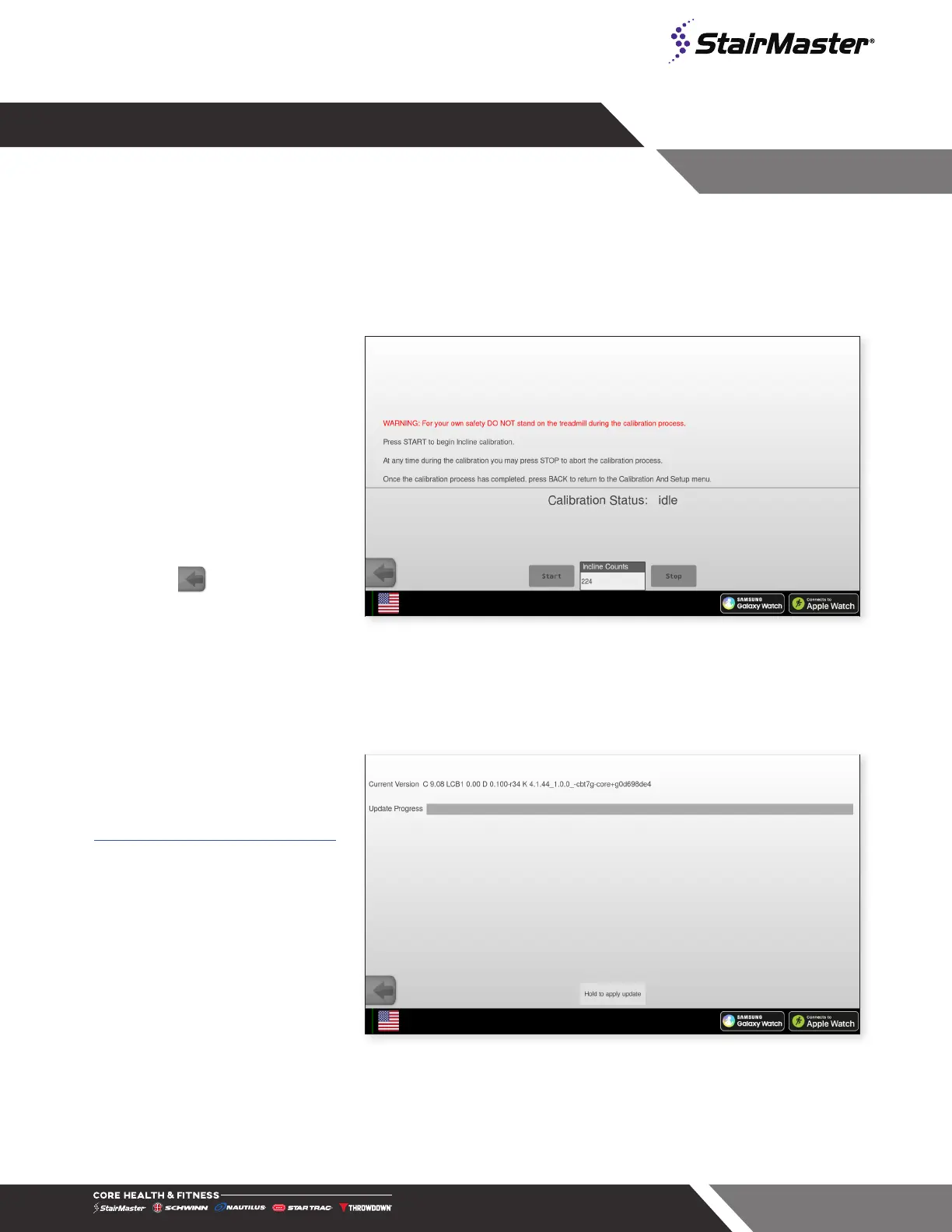
Incline Calibration Procedure
1. Select Incline Calibration on
the Calibration and Setup
screen.
2. Press START to begin the
calibration.
3. After the Speed Calibration is
completed, press EXIT; The
Calibration And Setup screen
appears.
4. Press to exit and go back
to the Home Screen.
5. The Incline Calibration has
been completed.
Fig. 60
Incline Calibration (Treadmill Only)
Software Updates (GUI SW
Update)
Follow online directions to download
latest software and place in root folder
of a USB stick:
https://support.corehandf.com/Software/
1. Insert USB stick into console
USB port.
2. Select GUI SW Update on the
Calibration and Setup screen.
3. Hold update button on bottom
of screen until update starts
then let go.
4. System will update in 7 steps.
Note: Steps 1 and 6 may
appear to take longer than
other steps.
5. When console screen displays
“Power cycle required to
complete update” turn the unit
power off and on to complete.
Fig. 61
GUI SW Update




 To Next Page