The home screen
Note: Connection from your StarLeaf endpoints to the public telephone network is an
optional extra. For more information, contact your StarLeaf representative.
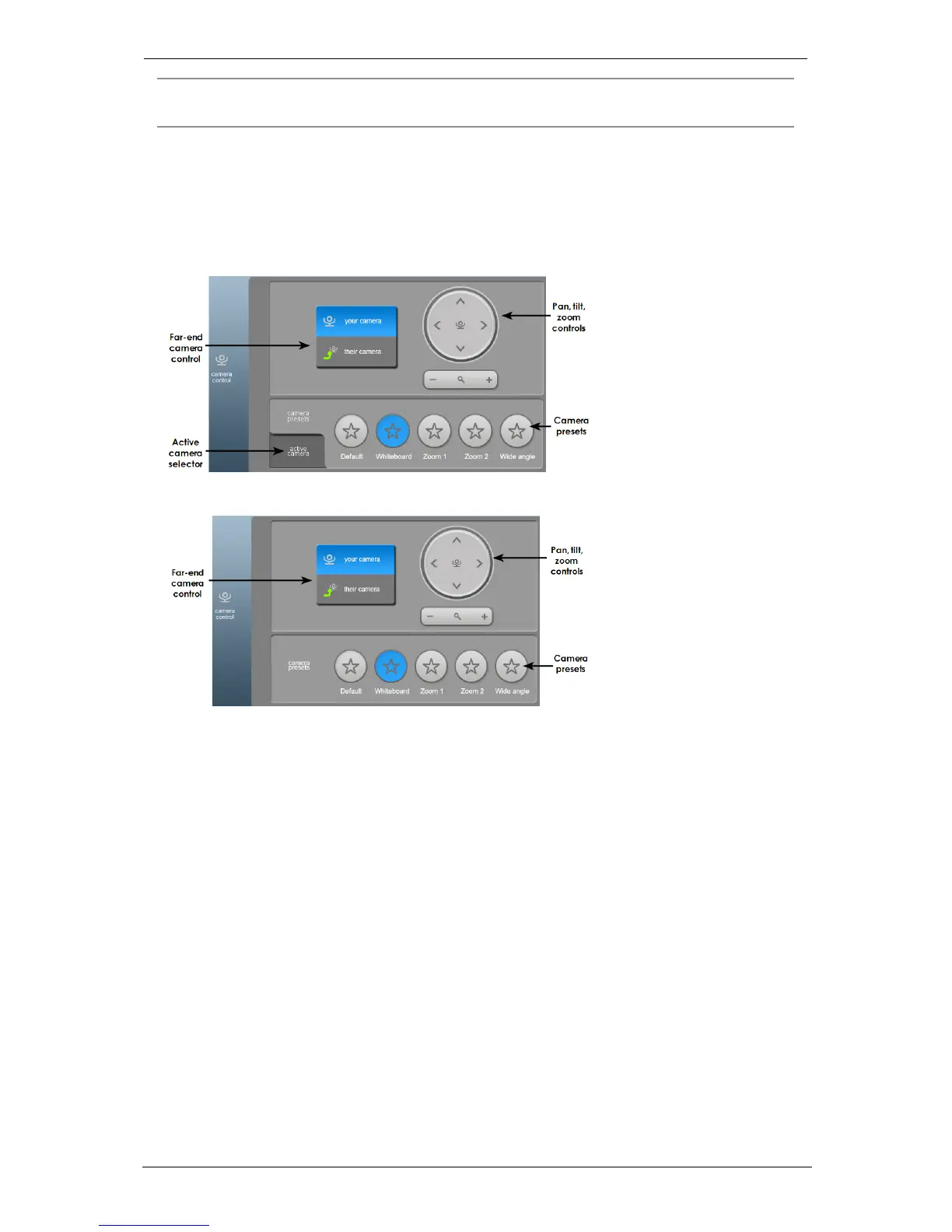
Camera control for the PTZ camera
The Camera Control tab on the home screen provides you with controls for the PTZ
camera. (You will not see these controls if you are using a GT Mini with a USB camera.)
Camera control on the Group Telepresence 3351:
Camera control on the GT Mini 3330:
The near-end camera control allows you to pan, tilt, and zoom your camera. This control is
available both in a call and before you make a call. If the far end is using a PTZ camera,
you might be able to control it yourself using the far-end camera (their camera) control.
Camera presets are pre-defined camera positions. For example, a pre-defined position
that points the camera at the whiteboard, or that changes the camera to a wide-angled
view. Select the position you require from the touchscreen controller.
If you have more than one camera attached to the Group Telepresence 3351, the active
camera selector allows you to select which camera you want to use.
Group Telepresence, 27 September 2017 Page 7 of 38



 To Next Page