6 Fault rectification
F
aults are indicated by event messages as described below. The dis-
play flashes red. The list of event messages below contains informa-
tion on troubleshooting and fault correction.
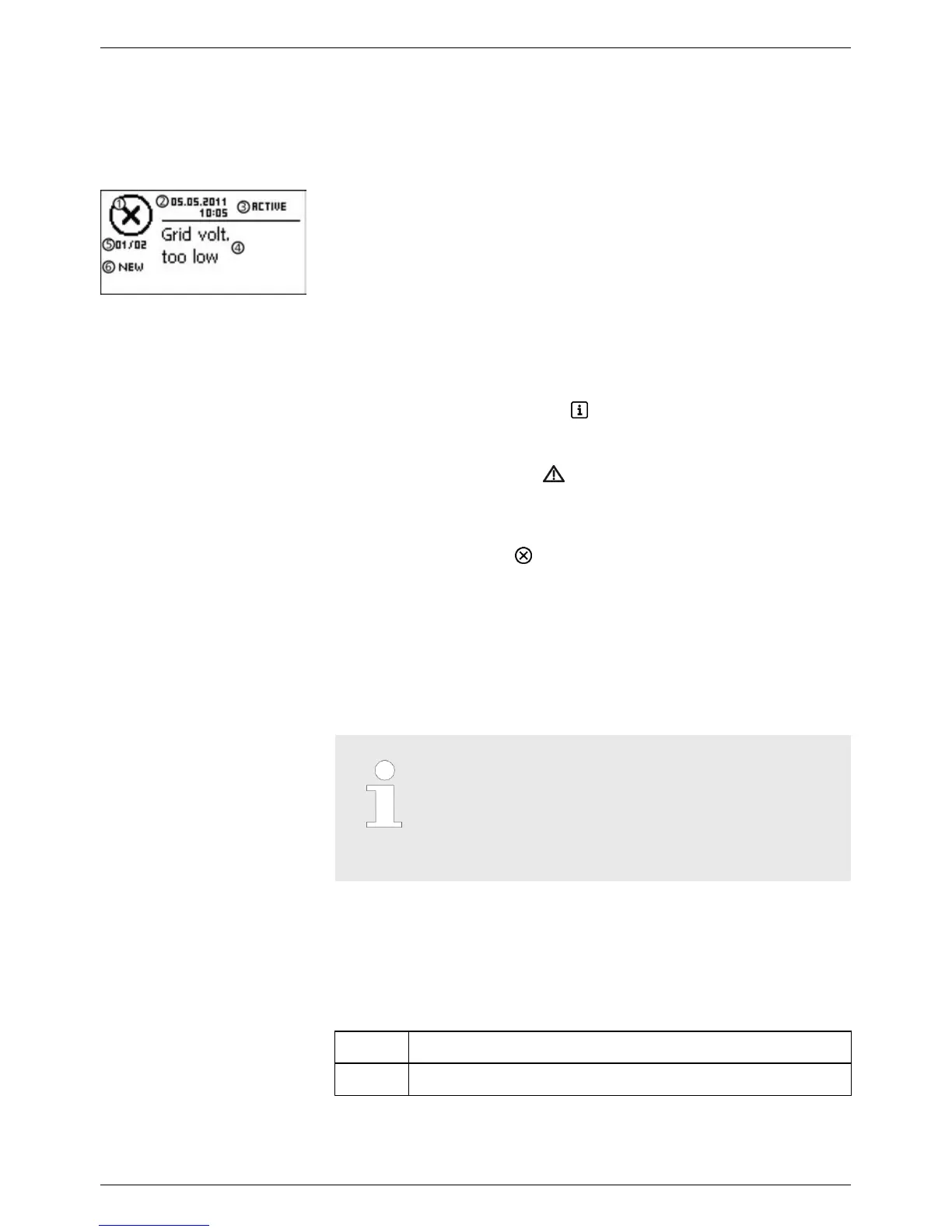
Event messages contain the following information:
①
Symbol for the type of event message
②
Date/time when the event occurred
③
ACTIVE = cause of the event message is still present or Date/
time at which the cause of the event message was corrected.
④
Cause of the event message
⑤
Counter: No. of the displayed event messages / T
otal number of
event messages; max number of all event messages = 60
⑥
NEW is displayed until the event message has been manually
confirmed via the ESC or rs button.
Event message types
n T
ype Information (symbol
)
The inverter has detected an error that does not affect the feed-
in process. The user does not need to intervene.
n T
ype Warning (symbol
)
The inverter has detected an error that may result in reduced
yields. It is highly recommended that you correct the cause of
the error
.
n Type Error (symbol
)
The inverter has detected a serious error
. The inverter will not
feed into the grid while this error is present. Please contact your
installer. More information is provided in the table below.
Display behaviour
New event messages are displayed immediately
. The messages disap-
pear after they have been confirmed or their causes have been cor-
rected.
Note
When an event message is confirmed, the user
thereby simply confirms that he/she has seen the
message. This does not correct the error that
caused the event message to be shown!
If messages exist whose cause has been corrected but have not been
confirmed then *
is shown in the status display. If an already con-
firmed error recurs then it is displayed again.
Confirming event messages
✔
An event message with the comment NEW is displayed.
u Press ESC/r/s. The event message is confirmed.
Structure
Function
Operation
EN
750.661 | Z03 | 2016-09-12
50









 To Next Page