5
Connections
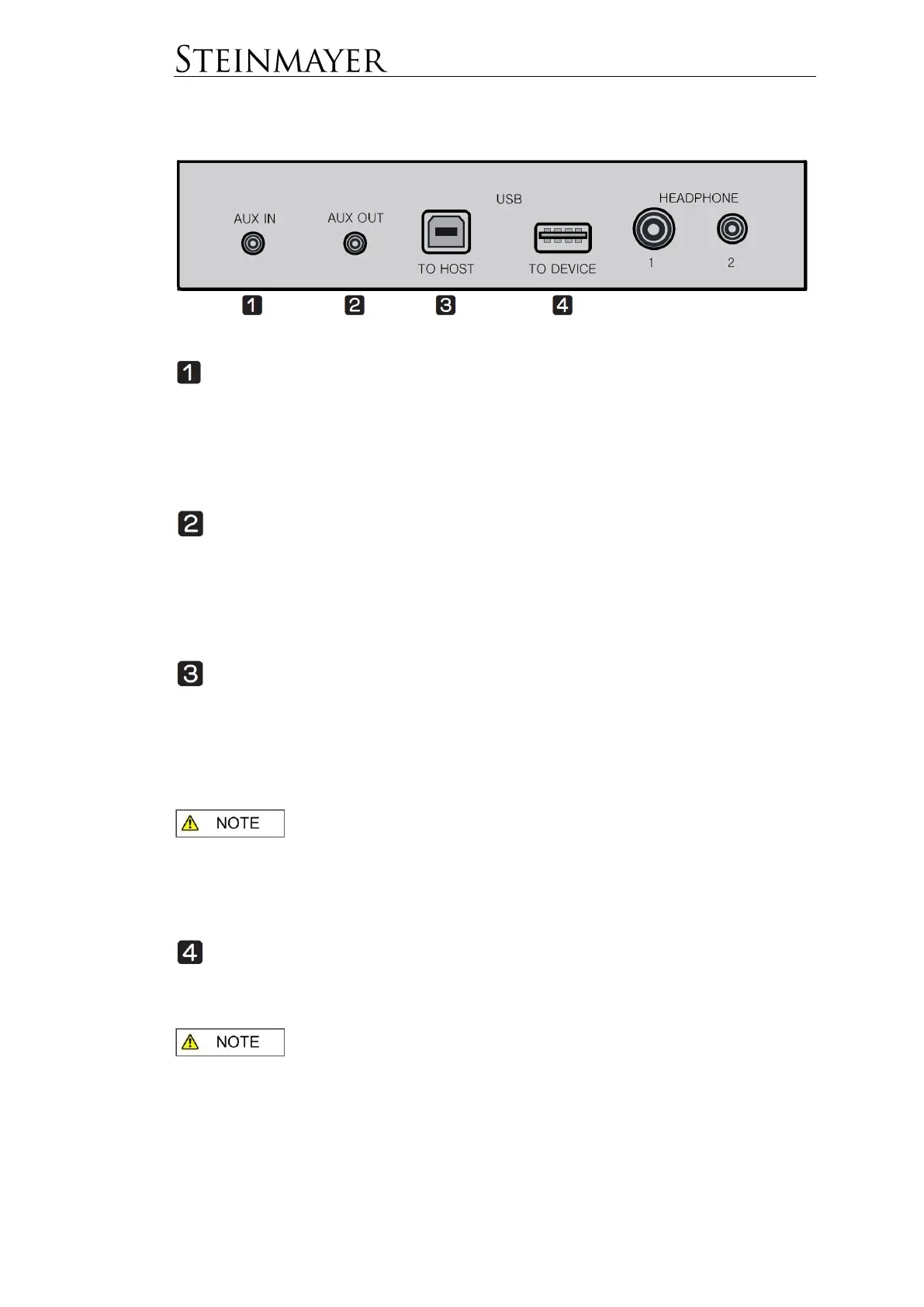
Connection panel at the bottom left of the piano console
Aux In – Stereo 3.5mm
The Aux-In jack can be used to connect external audio devices such as Mp3
players. The incoming music signals through this jack are played through the
loudspeakers of the piano. It is recommended to turn off both devices before making
a cable connection. Initially, to avoid damage, set the volume of both devices to a
low level.
Aux Out – Stereo 3.5mm
The Aux-Out jack can be used to connect external amplifiers or recorders. The
music signals sent out via this jack can be played back via an external amplifier or
recorded by a recording device. It is recommended to turn off both devices before
making a cable connection. Initially, to avoid damage, set the volume / sensitivity of
both devices to a low level.
USB to HOST - (USB – B)
The USB-to-HOST jack connects to the computer to transmit MIDI or audio data.
The connection is made via a USB A to B cable (not included).
To use the piano as a MIDI input device, start MIDI-capable software (not included)
on your computer and select the piano as a MIDI device within the application.
To use the piano as an audio source, select the instrument in the audio settings of
the computer as the audio device.
: The instrument uses USB 2.0. It is recommended not to exceed a
cable length of 1.2m. The instrument supports Windows XP or higher, Mac OS X
and iOS 4.0 and higher. Compatibility with Android Devices may be limited
depending on the manufacturer and version. No further drivers are needed. After
connecting, to avoid malfunction, wait a few seconds before using the instrument.
USB to DEVICE – (USB – A)
An external storage medium in the form of a USB stick can be attached to the USB-
to-device socket. The MP3 and SMF files from the USB stick can be played via the
piano.
The instrument supports USB sticks with FAT32 formatting. Do not
remove the stick during data transfer. After attaching the stick, to avoid
malfunctions, wait a few seconds before using the piano.


 To Next Page