19
To add a second track without hearing the recording of Track 1, go with the cursor to
TRACK 1 and set its status with the or keys on MUTE.
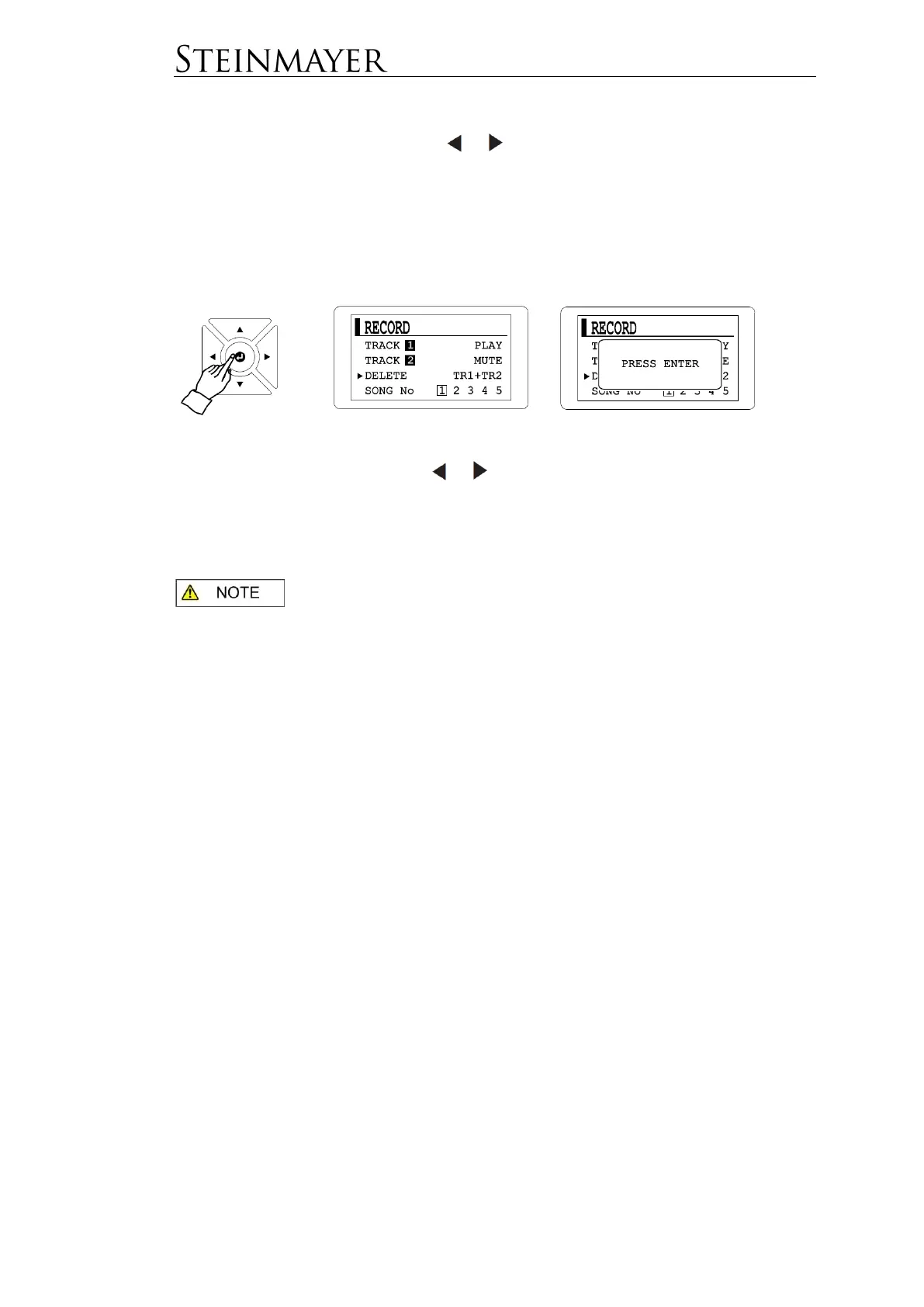
A track occupied by a recording cannot be dubbed. If you would like to replace this
track, delete the current recording via the menu dialog DELETE.
Here you can select with the arrow keys which track should be deleted (TR1, TR2 or
TR1 + TR2).
The piano has 5 memory slots for 2 tracks each. These can be selected in the
SONG No menu dialog using the or keys.
Press the RECORD button again to exit the RECORD menu.
If no key is pressed for a long time during recording, recording will
stop automatically.
The recording capacity per track is 4500 notes. If this number is exceeded, the
recording stops automatically.
If you want to use the metronome while recording, start the metronome before
recording. The metronome will not be recorded.
The piano has an internal memory. The recorded tracks are not lost when switching
off the piano.
Recording with Piano Assist
The piano can also record your playing with Piano Assist. Just start the Piano Assist
function before recording. The recording can only be done on Track 1 in READY
REC status. Track 2 cannot save Piano Assist data. When changing to Track 2 or
already assigned Track 1, the Piano Assist function will be switched off
automatically.


 To Next Page