11
Split
Here, the keyboard divides into two areas with different timbres. First, select the
desired main voice for the right keyboard half.
Now press the DUAL button three times. The cursor on the display points to SP and
the button lights in red.
Now select the desired second tone (split voice) for the left keyboard half using the
or keys.
By moving the cursor up and down, you can switch between the selection of the
main and split voices.
The volume levels of both voices can be adjusted individually. See function menu.
Press the DUAL button again to deactivate the mode.
Layer+Split
Layer and split function can be combined.
First, select the desired main voice for the right keyboard half.
Now press the DUAL button twice. The display shows the respective voice for LY
and SP and the button lights in pink.
By moving the cursor up and down, you can switch between the selection of the
main, layer and split voice. Now select the desired tone using the or keys.
The volume levels of the different voices can be adjusted individually. See function
menu.
Press the DUAL button twice to deactivate the mode.
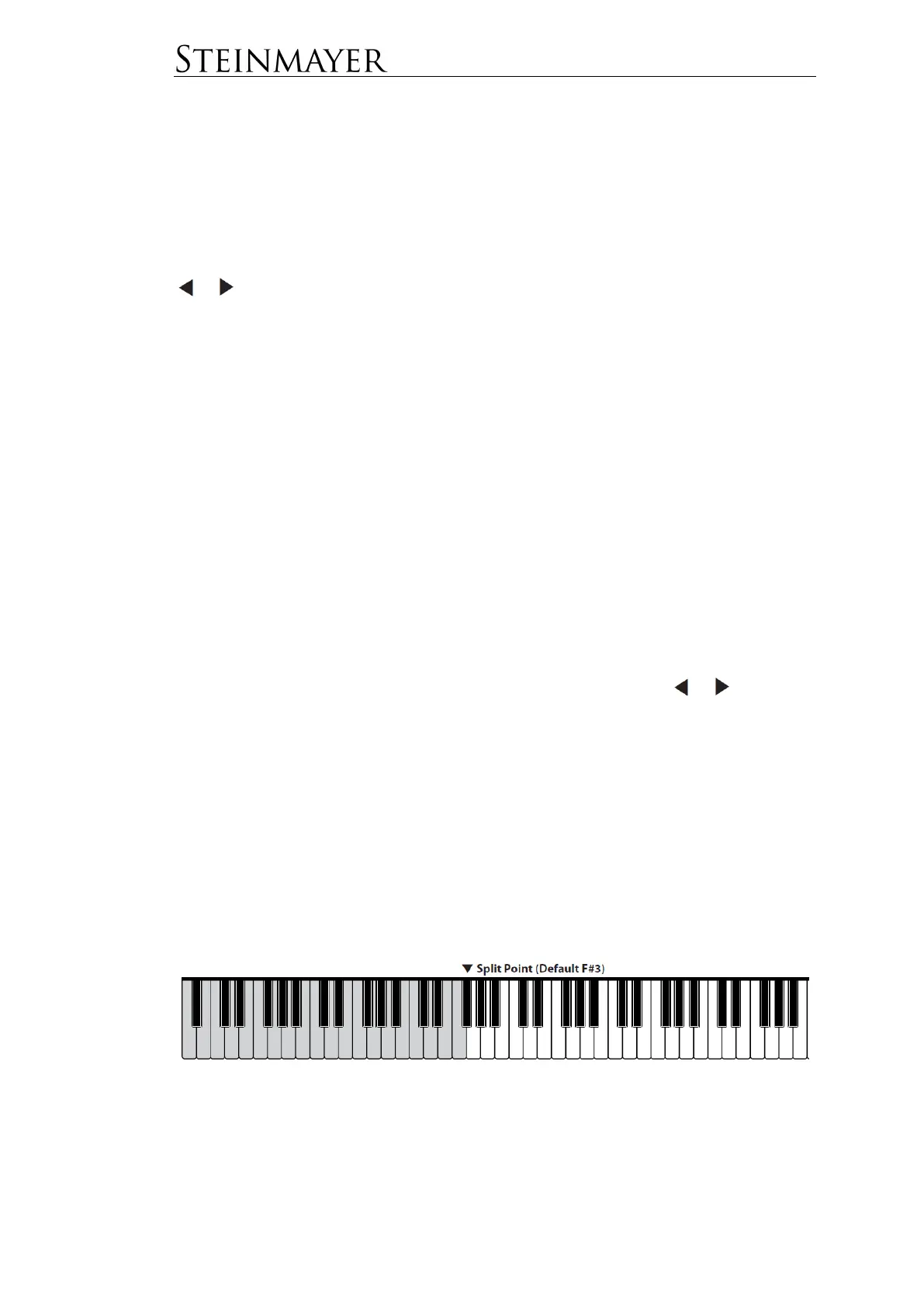
Move the split point
The split point defines the boundary between the left and right half of the keyboard.
The split point can be chosen individually. See function menu. The default value for
the split point is F # 3 (the third Fis from the left).


 To Next Page