21
USB-Player
The piano can play music data from a USB stick (not included in the scope of
delivery). The supported file formats are SMF and MP3.
The instrument only supports USB flash drives with FAT32 format.
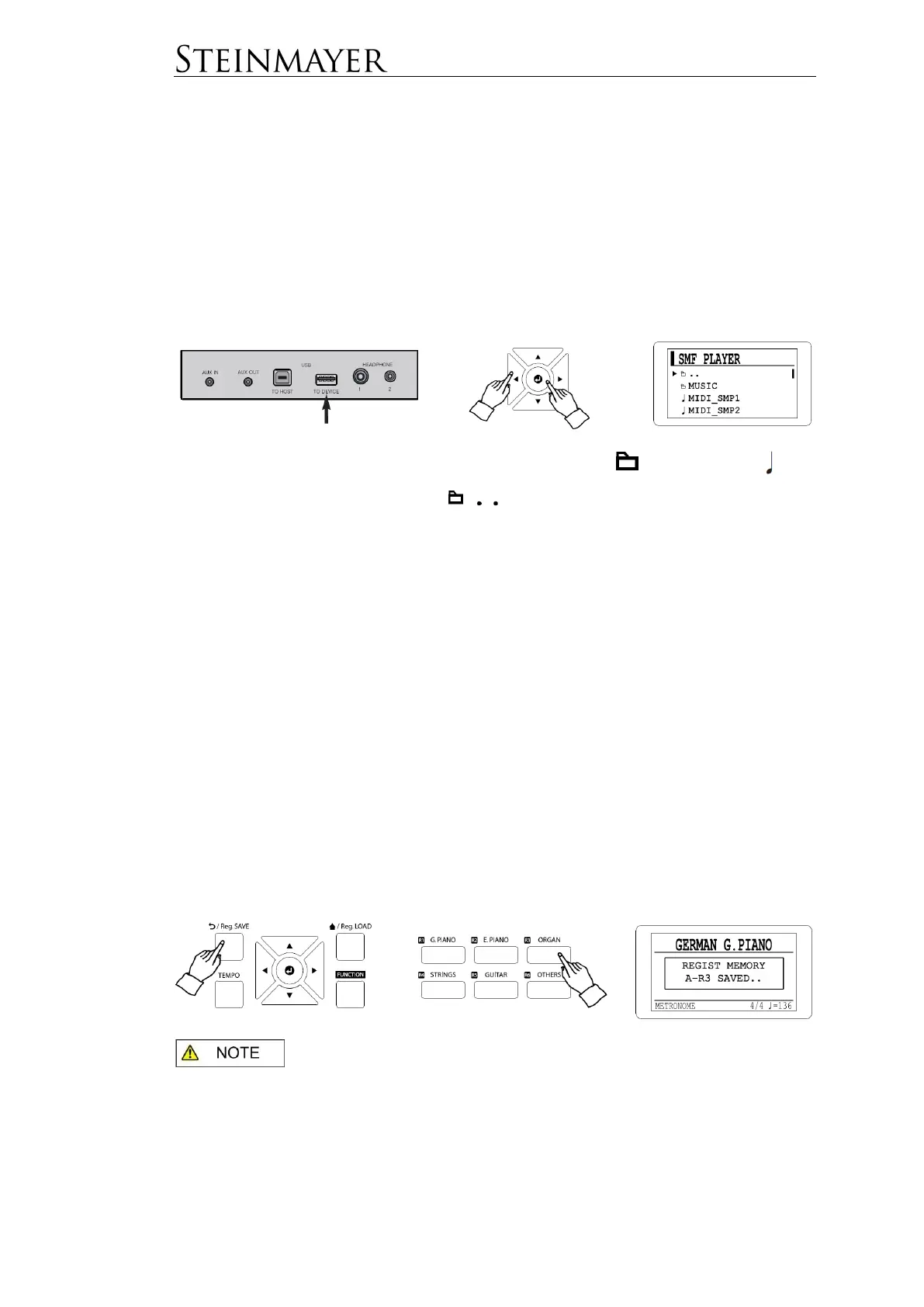
Press the MUSIC button and navigate the curser to SMF (if you want to play
standard MIDI files from the stick), MP3 (if there is MP3 data on the stick) or VP (if
you want to play Advanced MIDI Files).
Navigate with the cursor to the desired file. Where stands for a folder and for
the respective music file. Selecting takes you to the higher-level folder.
Start the selected track using the START / STOP button.
In the operating menu, different parameters are available for modification. Navigate
with the cursor to the desired parameter and confirm with Enter. This allows you to
change the volume (VOLUME) of a song. In the PLAY menu dialog, you can select
whether all songs should be played one after the other, only one song once or one
song repeatedly.
Registration Memory
Saving a Registration
The instrument has five registration memory banks, each with six registration
memories (R1-R6). These allow you quick access to preferred settings.
To save the current status of your piano's settings, press and hold the Reg.SAVE
button and one of the six registration buttons (R1-R6).
: If memory data already exists on the selected registration memory
location, this data will be overwritten.


 To Next Page