20
Music Databank
The instrument contains various music data which can be used for practicing or
simply for listening.
You can also play music from a USB stick (not included in scope of delivery) on the
piano. The supported file formats are SMF and MP3.
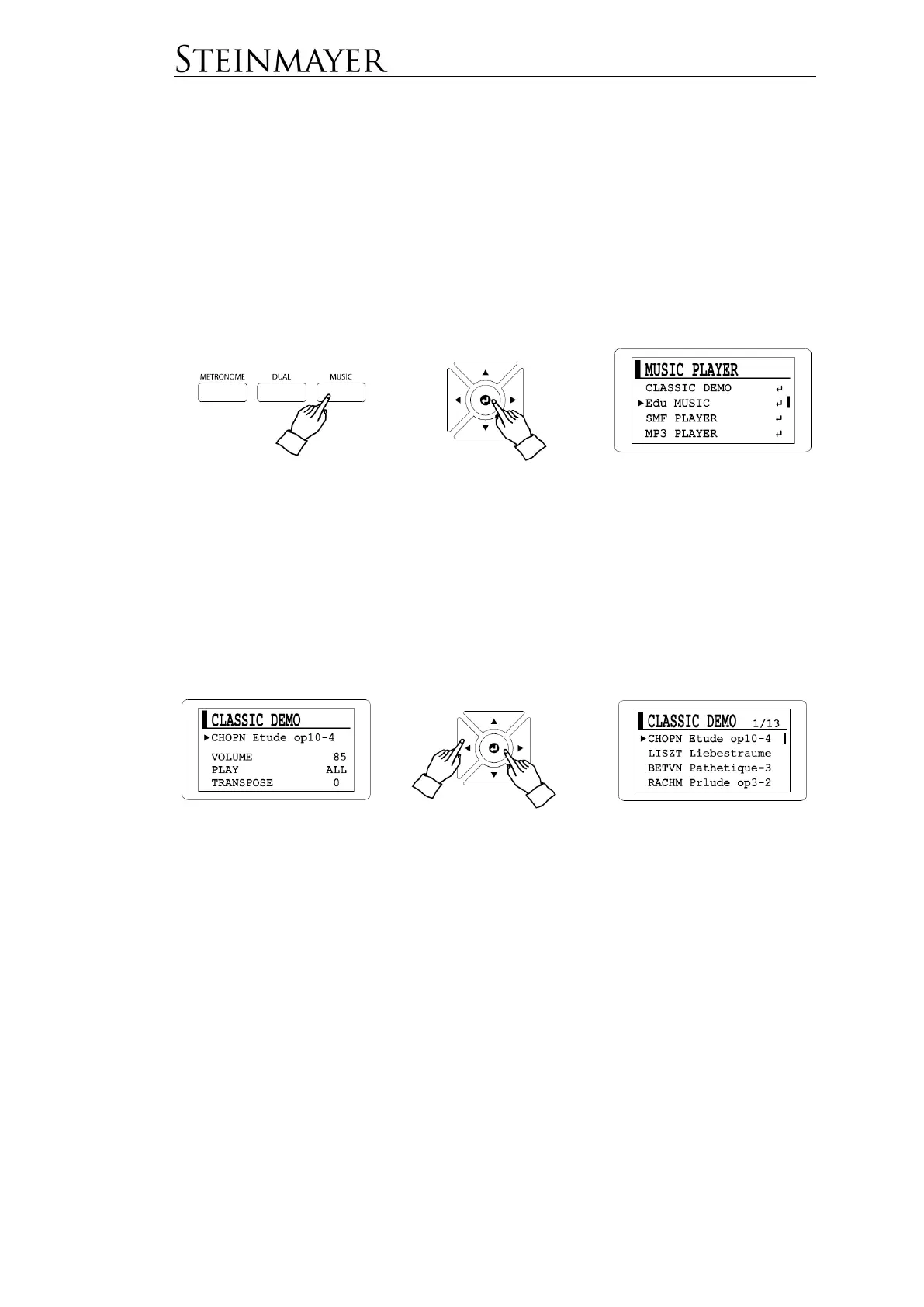
Press the MUSIC button to go to the corresponding selection menu.
Navigate with the cursor to the desired menu item and confirm with Enter.
Classic Demo includes 50 classic demo songs.
Edu MUSIC includes an etude collection of some famous composers.
By confirming with the Enter button you will get to the respective operating menu.
Press Enter again to go to the selection in the list.
Press the START / STOP button to play the desired track.
In the operating menu, different parameters are available for modification. Navigate
with the cursor to the desired parameter. This allows you to change the volume
(VOLUME) and pitch (TRANSPOSE) of a song. In the PLAY menu dialog, you can
select whether all songs should be played one after the other, only one song once or
one song repeatedly. For Edu Music rehearsals, the speed and part (left, right or left
and right hands) can also be selected for playback.


 To Next Page