Page 10 | Stellar
®
Heavy-Duty Telescopic Crane Owner’s Manual
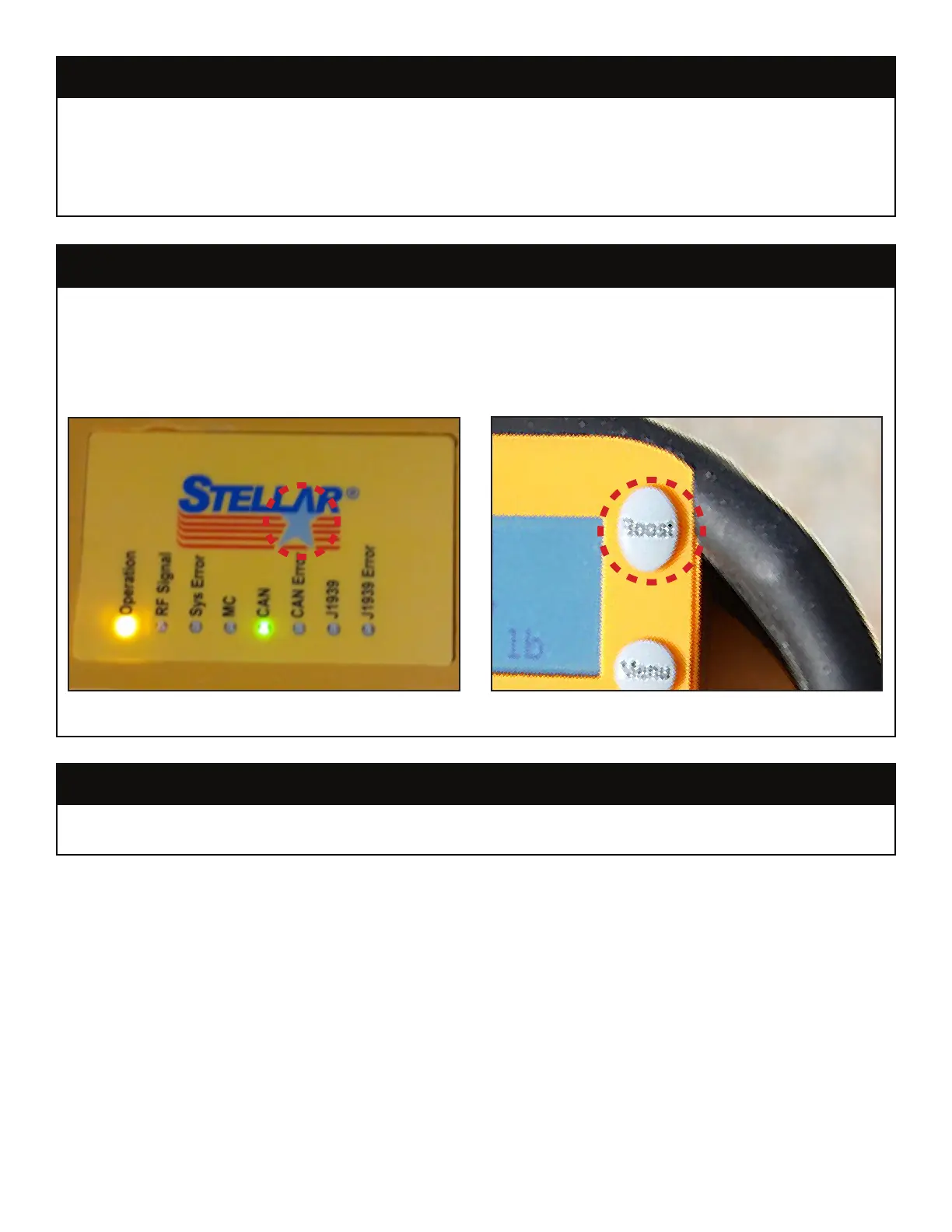
With both the transmitter and receiver powered up, press and hold the star logo button
(A) on the receiver, and then simultaneously press and hold the “boost” button (B) on the
transmitter for a two seconds. You may hear a relay click inside the receiver and the “RF
Signal” indicator will start flashing. Press the “boost” button on the transmitter one more
time to close the main contact relay and complete the pair/learn procedure.
If the radio transmitter and receiver become disconnected from one another, push the
Boost/Re-Link Button for two seconds to re-link the two devices.
If a device intended to monitor the capacity of the crane operates incorrectly, the crane
will put itself into safe mode. Safe mode will allow the operator to work with the crane at
a reduced speed until the current lift is complete and the crane is properly stowed. The
crane should not be used again until the malfunctioning safety device is repaired. The
crane will also communicate to the operator if an overload safety device fault is detected.
Re-Link Radio and Receiver
Safe Mode
Radio Transmitter/Receiver Pair Procedure
A
B
First, press and hold the star logo button (A) on the receiver, and then simultaneously press and hold the “boost” button (B) on the
transmitter for a two seconds.




 To Next Page