Stellar® EC Series Crane Owner’s Manual
Manual Operation
!,# * &(, (',*(%&%!-',$('+!(%%(.,# + +, )+,(() *, ,# *' &'-%%/
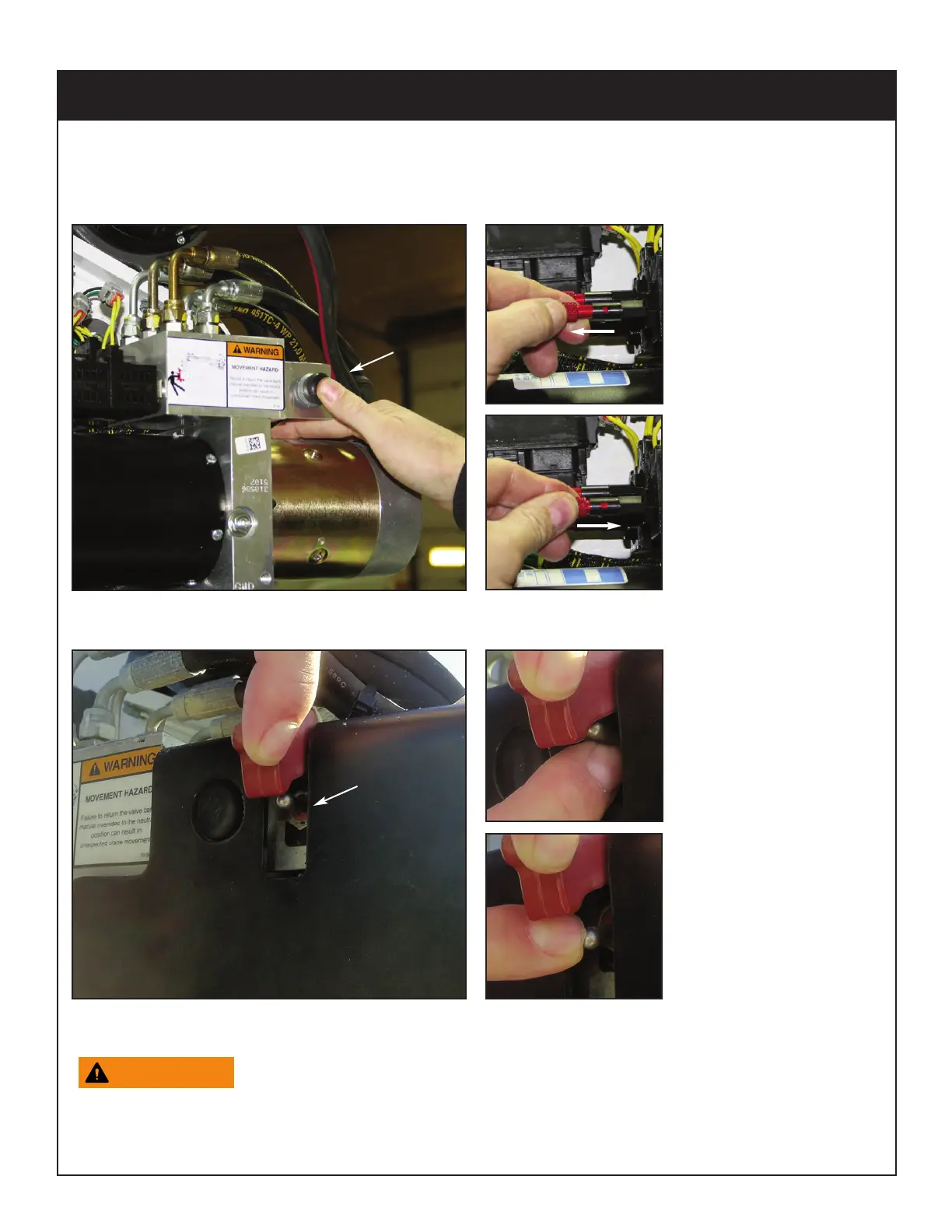
1. Operate Solenoids/Winch Switch. Press and hold the manual override switch and then push
or pull to operate the desired function, as shown below:
To manually operate the winch, toggle the winch switch up and down as shown:
2. Return the valve bank manual overrides to the neutral position.
Failure to return the valve bank manual overrides to the neutral
position can result in unexpected crane movement.
3. Have unit serviced immediately to restore remote control functionality.
Manual Override Pull
Function
While pushing down the
manual override switch
(shown above), the
knurled sleeve is pulled all
the way out to manually
override the pull solenoid
function.
Manual Override Push
Function
While pushing down the
manual override switch
(shown above), the
knurled sleeve should be
pushed all the way in to
override the push solenoid
function.
Push
Pull
Manual Override
Switch: Push and hold
to run manually.
Manual Winch Up
Push the manual winch
switch up to raise the
cable and hook.
Manual Winch Down:
Push the manual winch
switch down to lower the
cable and hook.
Manual Override
Winch Switch




 To Previous Page