18
Band Limit Settings
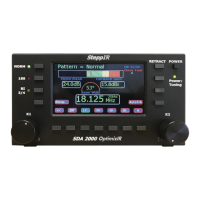
To adjust upper and lower frequency limit of a Band, first use K1 knob to select desired
band. Next press ether of the Lower limit buttons or Upper limit buttons. Then use K2
knob to adjust limit frequency. Repeat for the other band limit. Then press Select to
save. The display will blink. If band is changed or exit is pressed without pressing Select
first, changes will not be saved. Band Limit is used to set frequency limits used in
Autotrack Mode and other band sensitive options. It does not affect how element lengths
are calculated or how Create/Modify works.
Transceiver Setup
This feature is used to link a radio, computer or another SteppIR controller to the
OptimizIR. To use the transceiver interface, the rig needs to have computer interfacing
capability. Rigs with these options were manufactured from 1990 and beyond. When
enabled, the transceiver interface on the SteppIR controller will “listen” to the rig through
its computer port, and will automatically re-adjust as the user tunes through the bands.
The user will also need an optional interface cable for the specific rig, which has a 9 pin
female D-sub connector on one end that hooks up to the top “Data In / Radio” port on the
back of the controller. The other end will go to your rigs interface. There is a second 9 pin
D-sub connector below the first D-sub called “Data Out”. This D-sub connector is used if
the user desires to stack two SteppIR horizontal antennas. It allows the two controllers to
communicate to each other, so when any change in frequency occurs on one controller,
the other will follow. It also allows the user to connect the SteppIR directly to a PC. An
optional “Y” cable is available from SteppIR that allows the user to run a logging program
concurrently with the SteppIR controller. (Not required for ICOM radios).
Use K1 knob to select which item to adjust. Use K2 knob to change the value. Press
Select to save changes. The transceiver Interface menu allows selection of radio brand
and baud rate of the two ports at the rear of controller. The baud rate is the speed in
which information is exchanged between the SteppIR controller and the radio. See
operating manual for the radio to determine the proper baud rate. This setting must be the
same as the setting in your radio, or the interface will not function. Note that ICOM radios
require CI-V transceiver mode enabled. The data input and data output ports can be set
to different baud rates. Adjust the three settings to the desired value and press Select
key. The display will blink indicating settings have been saved. Selecting OFF for radio
type will disable the transceiver interface and AutoTrk button. The data out port is always
active as long as OFF is not selected for a radio type. This port is intended for daisy
chaining controllers and computer control. See Transceiver Interface manual for details.


 To Next Page