27
The frequency coverage range of each of the antennas is broken up into numerous blocks
for each direction (NORM, 180, and BI 3/4). Each covered by a different antenna model.
Using the “Create/Modify” mode, the user can modify and save any of the master
antennas in each of these frequency ranges. The frequency range is identical for the all
three direction modes of the antenna (NORM, 180, and BI 3/4). If you select “NO”, no
changes will be made and your antenna segment will be just as it was before.
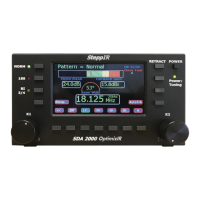
The K1 knob is used to adjust value highlighted in RED. The K2 knob is used to select
what to adjust. This also moves RED highlight. The software will not allow the user to
adjust an element that does not exist. Only elements that are included in the selected
antenna will be highlighted in RED. The buttons across bottom have many functions,
depending on what is selected. The Create/Modify mode enables user to 1) customize
antenna element lengths, 2) change relay settings and 3) control special antenna modes.
All changes made in “Create/Modify” mode will immediately update the antenna.
However, none of the changes are saved unless SAVE button is pressed. This allows
experiments to be conducted without concerns about misconfiguring antenna.
The following items can be adjusted:
Select Pattern: The K2 knob scrolls through a list of all patterns for the selected
band, up to 16.
Adjust Element: Highlight element to adjust with K2 knob and change length with
K1 knob. Press K1 knob to change step increment from 0.1, 1 or 10 units.
Adjust Frequency: The K2 knob will adjust through segment range only. It stops
at the segment boundary. Pressing the K2 knob will change the step-size 10 kHz,
100 kHz, 1 MHz.
Select Segment: The K1 knob will change current segment. Frequency will be
set to bottom frequency of the segment. This is useful on bands with more than one
segment like 6 m, 10 m and 80 m (and other antennas with loading coils).
Band Correction: The K1 knob will scale element lengths (ranging from 0.0% to
9.9%) for current band. This is useful for correcting for interference, or correcting for
fiberglass loading when trying a new antenna model or tuning the 80 meter dipole.
Multi-Element Adjust: This allows the user to select more than one element to
adjust at a time. Use buttons to select elements to be adjusted and adjust K1 knob
to change the setting. This can also be used to scale the 80 meter dipole.
Reset Pattern to Default: This will reset current pattern (Direction) to default
values. This does not reset saved values to Default. Save must be performed
separately to make it permanent.


 To Next Page