28
The Clear, Copy, Save and Exit buttons are active for 1) Select Pattern, 2) Adjust
Element, 3) Adjust Frequency, 4) Select Segment and 5) Band Correction settings.
Clear: Press this to remove currently selected pattern from this band.
This will not clear Normal or 180.
Copy: This will make a new pattern copied from currently selected pattern.
It will allow the user to select a name for the new pattern from list of names
associated with current direction, Norm, 180 or BI 3/4.
Save: Will save current pattern to EE-prom memory and will be used for
tuning antenna in normal mode.
Exit: Will check for modified patterns and ask is user wants to save changes
for each modified pattern. It will then restore saved values and exit
Create/Modify mode.
Any correction factors made using Global Correction Factor options will also be added
to element length. Dipoles like on DB36 and DB42 use the End 2 elements to tune dipole,
reflector and last director. There are three ways to tune the wire dipole namely, 1)
adjusting the band correction, 2) multi-element adjusts or 3) individually adjust the
elements. The 80 meter dipole has a segment every 100 kHz. To trim the dipole across
entire band, segments need to be corrected individually. The vertical coil has more than
one segment for a given band, they each must be tuned separately.
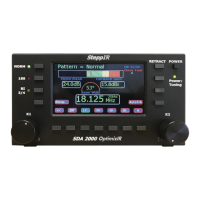
LCD Display Setup
The K2 knob scrolls through the changeable items. The K1 knob is used to change
value. The Select button will save new value. Care should be taken when changing
colors. It is possible to change settings too much and cause a black display. Color adjust
will show how it will look before pressing Select button. Be careful with background,
some colors cannot be changed.
LCD Brightness: Range is 0 to 32 with 0 being brightest and 32 being dimmest
Background Color: Range is 0 to 80 cycling through a rainbow of colors
Foreground Color: Range is 0 to 80 cycling through a rainbow of colors
Text Color: Range is 0 to 80 cycling through a rainbow of colors
Button Text Color: Range is 0 to 80 cycling through a rainbow of colors
Button Panel Color: Range is 0 to 80 cycling through a rainbow of colors
Button Top Color: Range is 0 to 80 cycling through a rainbow of colors
Button Bottom Color: Range is 0 to 80 cycling through a rainbow of colors
Bottom Select Color: Range is 0 to 80 cycling through a rainbow of colors
Custom Color 80: Allows setting of custom colors
LCD Default: Adjust the K1 knob to display Yes, then press Select.


 To Next Page