6
to retract the antenna, it is there as a feature in case it is needed. There is no problem at
all with leaving the antenna extended, even when not in use.
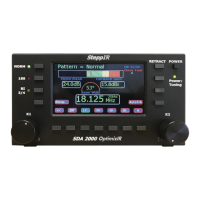
The SDA 2000 OptimizIR controller hosts a number of new features – color screen, large
display and simplified user interface are what you will first notice when turning on the
controller.
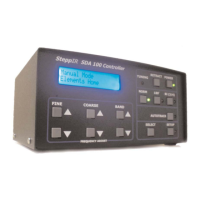
With the SDA 100 controller and the Original Controller, the user has always had the ability
to create, modify and change the antenna. But the process was not simple, and it was
buried inside the setup mode of the antenna software, only to be used by the more
motivated SteppIR owner. With the OptimizIR, we have brought that technology to the
“front” of the interface, and embraced the technology of creating and modifying antennas.
New antennas you will see on the OptimizIR are: maximum forward gain, maximum front
to rear, and wide beamwidth antennas. Visually you can see what type of antenna is
being utilized with the full color bar indicator that is always visible on the controller. Also
new to the OptimizIR – every antenna (including DB32 and MonstIR) is included in the
firmware, so you can operate multiple antennas (one at a time, you will still need to switch
control cable) without having to modify the controller.
In addition, the user can create their own antennas using EZ-NEC or the many other
antenna modeling progams, and then upload those models into the OptimizIR, using the
included mini-SD card. There are some sites that are creating their own antenna models
for SteppIR owners, such as Dan Maguire’s Auto-EZ. You can check out Dan’s software
(available for $79) at www.AC6LA.com. Dan worked very closely with us in the computer
modeling of the OptimizIR antennas.
The OptimizIR is the first of a series of new controllers that will make the SteppIR
antennas “smart”, and give the user the ability to fully employ the advantages of a
remotely tunable antenna!
73
John Mertel
President/CEO


 To Next Page