1. SETUP AND MOVING
2
2
5
5
7
7
1
9
8
11
15
11
8
6
14
14
SETUP AND MOVING
3
DEADPOOL PRO MANUAL 500-55K1-01
MARVEL.COM
© MARVEL
1.1 FIRST-TIME
SETUP INSTRUCTIONS
CAUTION: AT LEAST TWO (2)
PEOPLE ARE REQUIRED TO
MOVE AND MANEUVER THE
GAME. USE PROPER MOVING
EQUIPMENT AND EXTREME
CARE WHILE HANDLING. STERN
PINBALL MACHINES WEIGH
OVER 250LBS BOXED.
TOOLS REQUIRED
• 5/8” Socket Wrench
• Utility Knife
• Snips
• An Assistant
Your brand new Stern Pinball Machine is
carefully packed for safety and security.
For your safety, exercise caution and use
the correct tools and sufcient help when
setting up your new game.
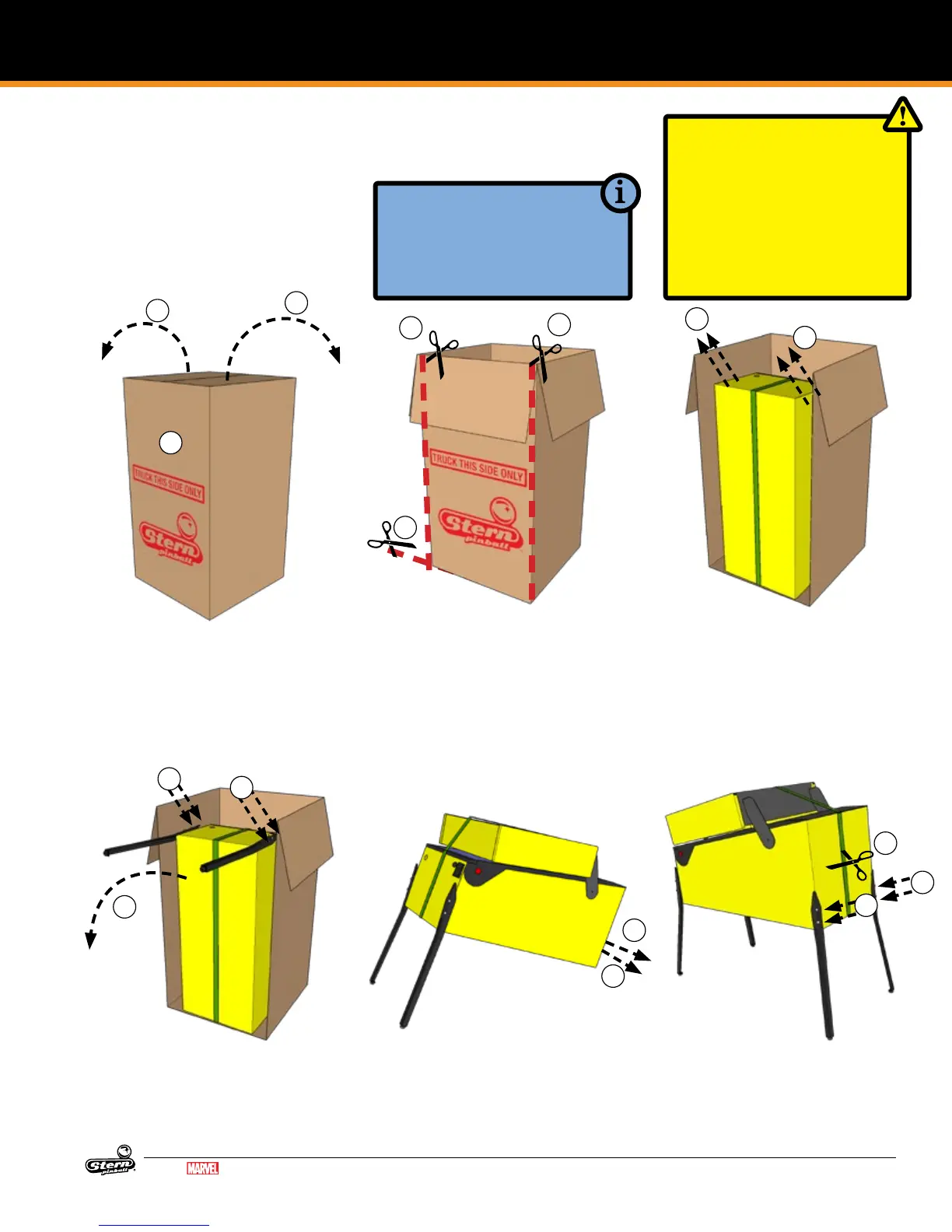
1. Locate the side labeled “TRUCK
THIS SIDE ONLY”. The bottom of
the game faces this side.
2. Open the top box aps by pulling
hard in an upward motion on each
ap. If the aps are taped, cut the
tape rst, taking care to avoid the
box staples.
3. Remove the four (4) foam pieces
and two (2) narrow box tubes
which contain the four (4) identical
legs with levelers.
4. DO NOT CUT STRAPPING YET.
Keep backbox secured in the
down position.
5. With the utility knife, carefully cut
down the left and right corners of
the box.
6. Let the face fall forward and
remove the entire side by carefully
cutting the bottom.
7. With the game still in its folded po-
sition, use a ⅝” wrench to loosen
and remove the 2 leg bolts on each
side of the front cabinet. Ensure
the leg levelers are screwed all the
way into the legs.
8. Install front legs using the bolts
removed from the cabinet. Secure
tightly.
9. Have someone help you carefully
set the game down on the front
legs.
10. Set aside the open box.
11. With a ⅝” socket wrench, loosen
and remove the 2 leg bolts on
each side of the rear cabinet, 4
total.
12. Using supports or two people,
prop the rear of the cabinet up.
13. Ensure the rear leg levelers are
screwed all the way into the legs.
14. Install rear legs using the 4 bolts
removed from step 11.












 To Next Page