4 Operation
Operation of the display operating
unit
NOTE
The daily operating hours are reset in the
same manner.
8
9
0
6
7
4
3
5
7312_003-058_en_V4
12
34
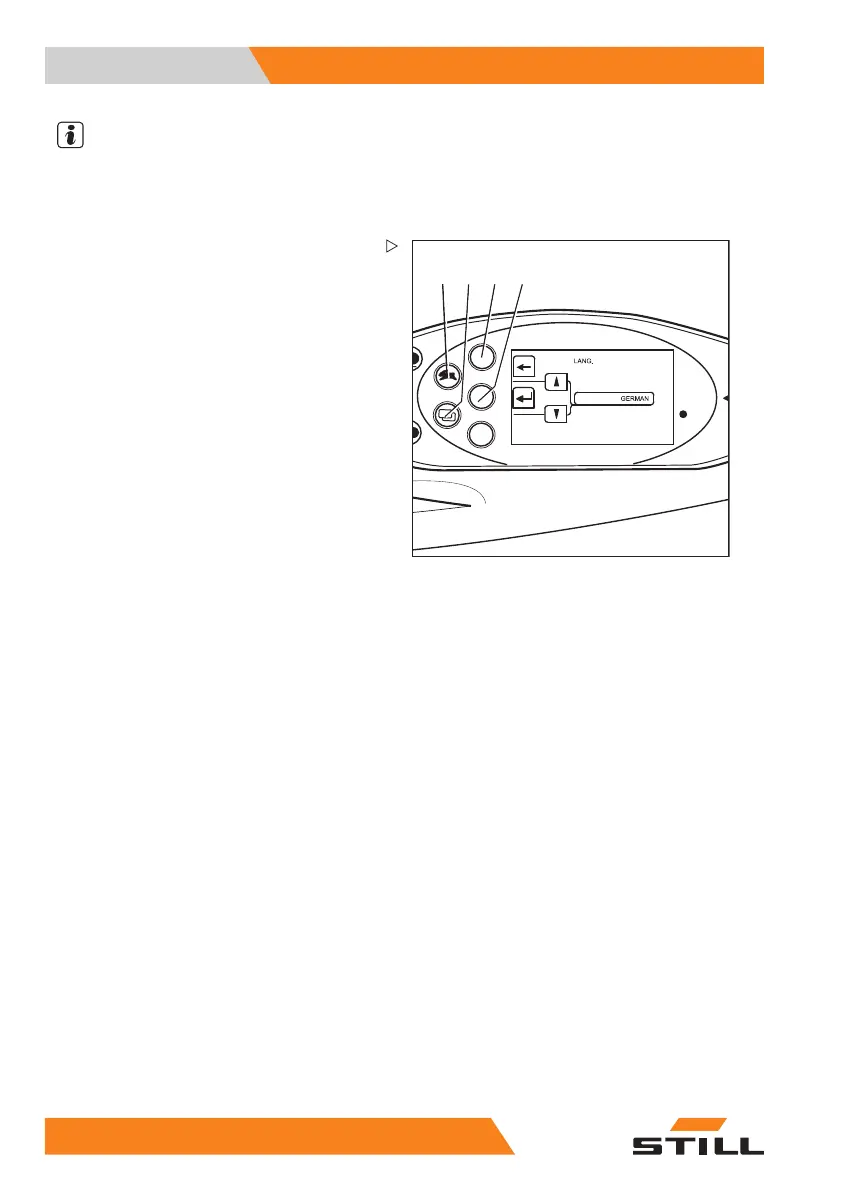
Setting the language
The displays can be shown in additional
languages:
– Switch to the "CONFIGURATION"
menu; see ⇒ Chapter "Adjusting the dis-
plays", P. 4-106.
– Press drive program button (1) or menu
selection button (2) until the
LANGUAGE
option appears. Confirm your selection by
pressing Return key(4).
The "LANGUAGE" menu appears.
– Press drive program button (1) or menu
change button (2) until the desired language
appears in the display.
– Confirm your selection by pressing the
Return key (4).
– Use arrow key (3) to exit the menu and
return to the next higher level.
Soft key button for operating various
equipment variants
There are two soft key columns available on
the display operating unit. With these soft
key columns, you can switch the additional
functions on and off, e.g. a rotating beacon.
The second soft key column is only available
if the truck has more than three additional
functions.
112
174749 EN - 03/2017



 To Next Page