Stonex R60 – User Manual 24
R60 Manager – Service menu
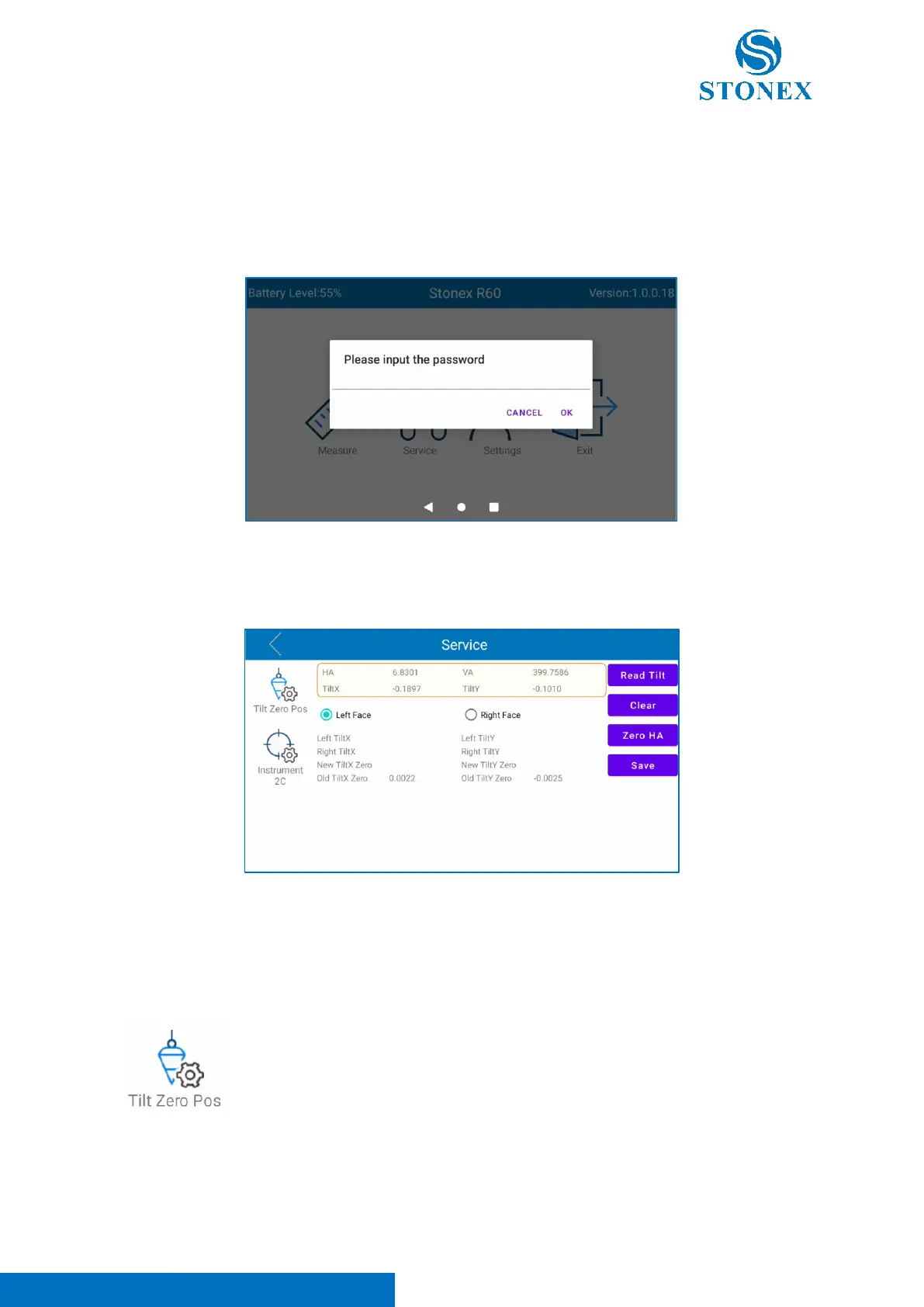
This menu is dedicated to total station calibration and service operations. It’s possible to access to it
with a password:
12345678
Before calibrating the instrument, see chapter 5 Calibration for more information and details about
instrument calibration. After inserting the password, the following screen appears.
Two different calibrations can be performed in service menu: “Tilt Zero Pos” and “Instrument 2C”.
Choose “Tilt Zero Pos” to enter in tilt offset (zero position) page correction. In this
menu it’s possible to calibrate the tilt sensor. Follow the procedure below to calibrate
it:
- Aim at the crosshair of collimator at telescope in “Left Face” (Face 1 -> face with
the display and the plate bubble) and click on “Read Tilt”.
- Select “Right Face”, rotate the instrument 180°/200 gon and aim at the crosshair
of collimator at telescope in “Right Face” (Face 2 -> face with instrument serial
number) and click on “Read Tilt”.
- Click “Save”



 To Next Page