2.3.1. Blink Codes – Damaged Hardware
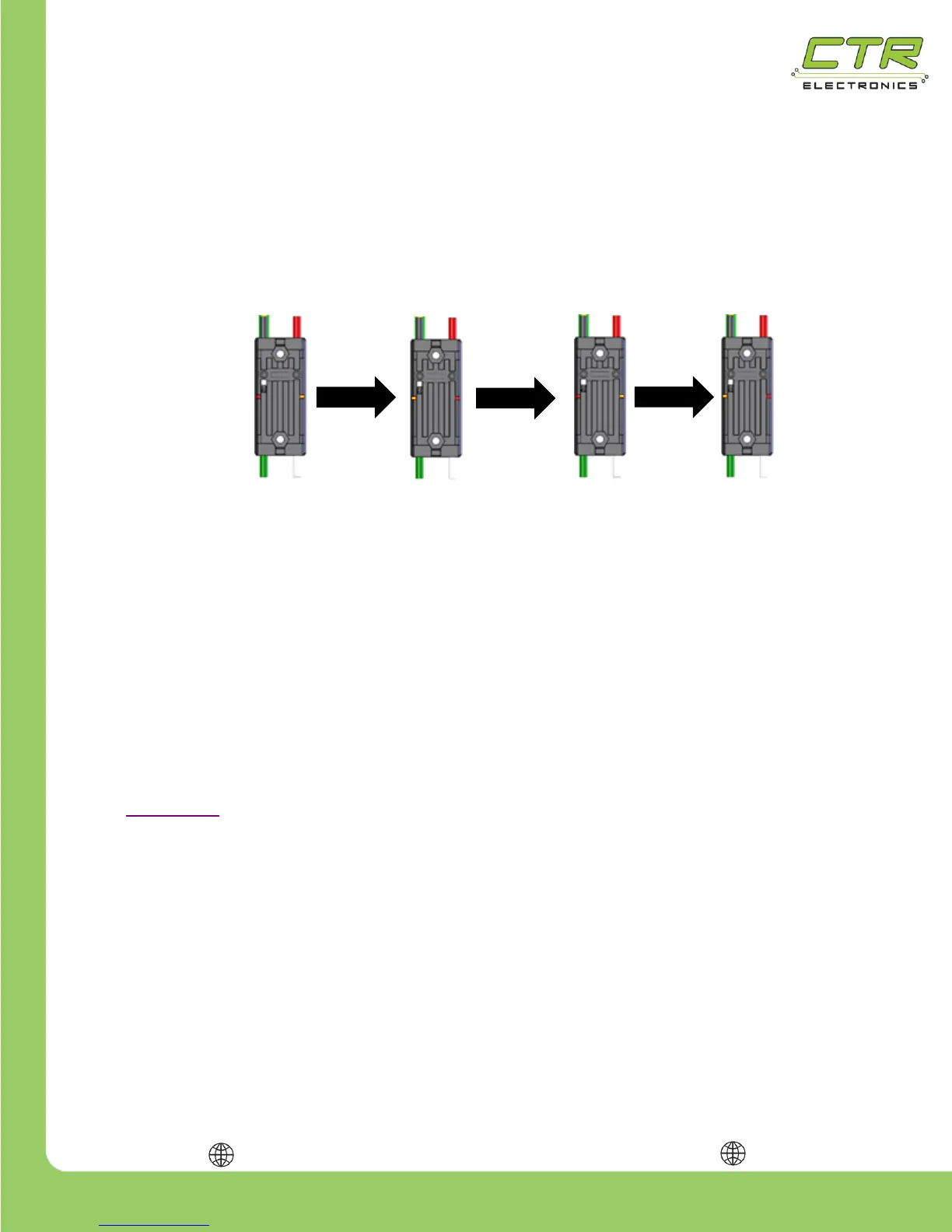
The Talon SRX can detect certain types of hardware damage. When damage is detected the Talon
will blink in a periodic fashion as mentioned in the table above.
This is also illustrated below…
This failure mode typically occurs after reverse powering the input power leads (red and black) or by
providing battery voltage through the motor leads (green/white leads). Both will cause
permanent damage and must be prevented.
Note that the LEDs never turn off when indicating this failure mode. Each LED is always red or
orange at any moment. The orange/red LED pattern will continue to blink this pattern with no
intermittent change in LED activity.
If this is being witnessed, ensure that the LED pattern isn’t simply an intermittent red LED blink
superimposed on to the typical orange LED pattern. This is typically observed when there is an
intermittent wiring issue or when two or more Talons with common device IDs are present on the
CAN bus. Both can be checked by connecting the Talon directly to the robot controller following the
steps in Section 1.3. Do not connect any other CAN devices and avoid complex wire harness
strategies.
Erratic red and orange blink patterns are typically caused by intermittent cable issues, or not properly
configuring the device IDs of the Talon SRX. Such LED patterns should not be misconstrued as the
damaged LED code mentioned above.
This is also supplemental content covered in the Talon SRX Software Reference Manual under
Section 16 – Troubleshooting Tips and Common Questions.


 To Next Page