217-8080
Talon SRX - User’s Guide
crosstheroadelectronics.com vexpro.com
Copyright 2017, Cross The Road Electronics, VEX Robotics Inc.
Updated: 2017-02-03
1.3.2. Wiring the Talon SRX for use with CAN bus
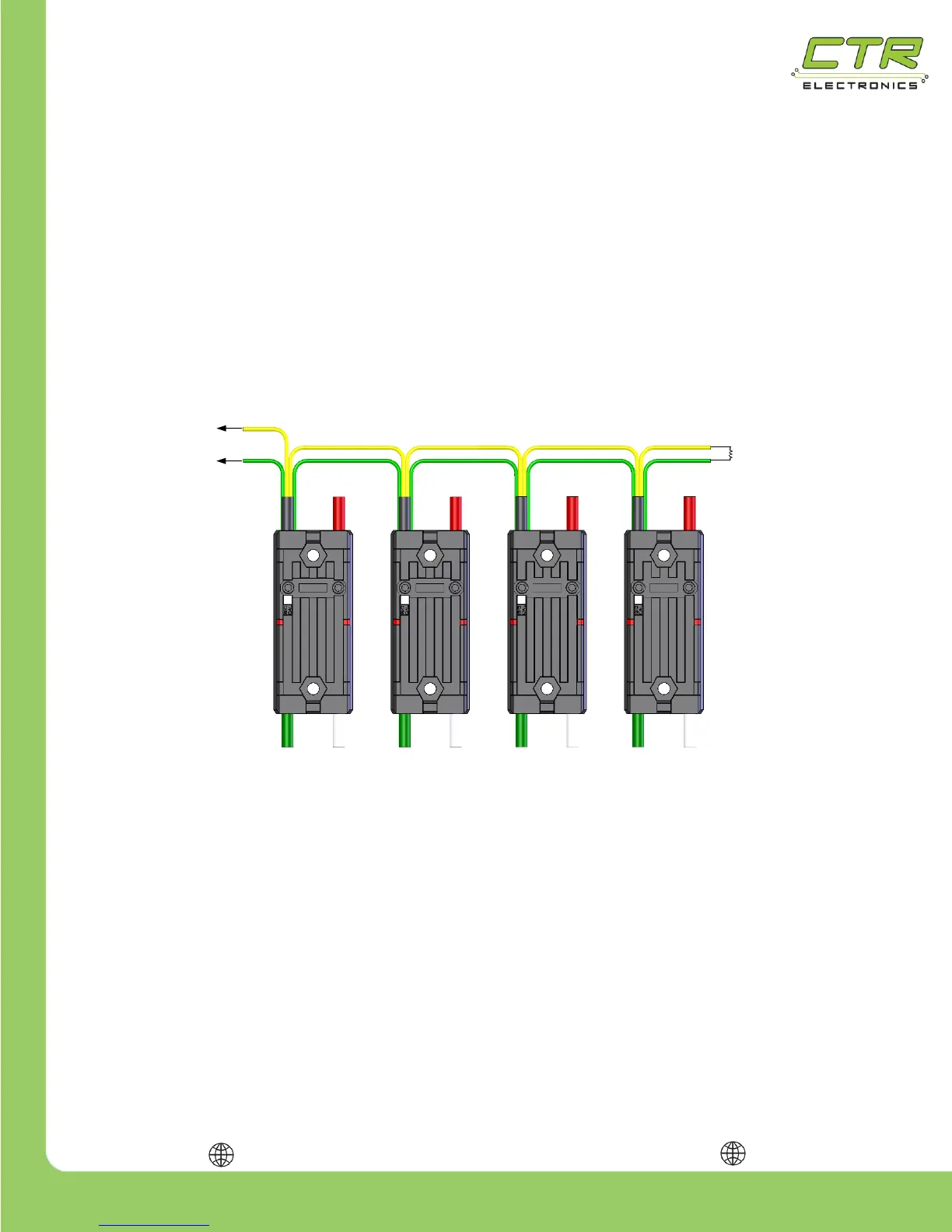
To wire CAN bus, connect a yellow signal wire to the CAN terminal marked “H” on the NI roboRIO
and connect a green signal wire to the CAN terminal marked “L” on the NI roboRIO.
To connect additional Talon SRXs, use tightly crimped connectors to connect the signal wires green-
to-green & yellow-to-yellow as shown below. For the best connection, it is highly recommended that
each connector is crimped and soldered. The yellow and green wires should also be wrapped in a
twisted pair fashion (not illustrated) to maximize tolerance to electrical noise.
Note: Signal wires of the same color are electrically identical – it does not matter which wire is used
as long as the color is correct.
After all of the Talon SRXs have been wired, there will be 2 remaining signal wires – connect these
two wires using a 120 Ω resistor or to the CAN interface on the Power Distribution Panel (PDP) to
properly terminate the cable end.


 To Next Page