1
2
3
4
5
7
6
* Standard values! Actual value on package depends
on strap and package.
A)
1 2 3 4 5 6 7
400* 600* 750* 850* 1100* 1300* 2000 N*
B)
1 2 3 4 5 6 7
400* 450* 600* 750* 1000* 1100* 1200 N*
6.4 SETTING STRAP WIDTH
The tool can be used with two different strap
widths (12–13 mm (
1
/
2
“) or 15–16 mm (
5
/
8
“).
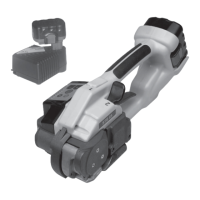
a) Change strap width from 12–13 mm to 15–16 mm
– Remove battery from tool.
– Release sunk screw (18/2) and remove strap stop
13 mm (18/1).
– Lift the rocker lever towards the handle, release
sunk screw (18/4) and remove strap guide 13 mm
(18/3).
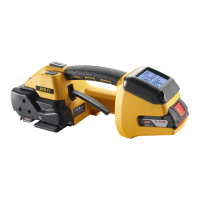
– Release sunk screw (19/3) and cylinder screw (19/1)
and remove cover (19/4).
– Release cylinder screw (19/5) turn strap stop (19/2)
180° and remount it.
– Unscrew threaded bolt eight turns with screwdriver
(19/6).
– Pull down strap guide (19/7) and turn it 180° until
16 mm indicator appears.
– Tighten threaded bolt with screwdriver (19/6) and
mount cover (19/4).
– Secure screws (19/1) and (19/3) with Loctite 222.
b) Change strap width from 15–16 mm to 12–13 mm
– Sequence as described under point a).
– Mount 13 mm strap stop (18/1) and secure sunk
screw (18/2) with Loctite 222.
– Mount 13 mm strap guide (18/3) and secure sunk
screw (18/4) with Loctite 222.
– Turn strap stop (19/2).
– Turn strap guide (19/7) until “13“ indicator appears.
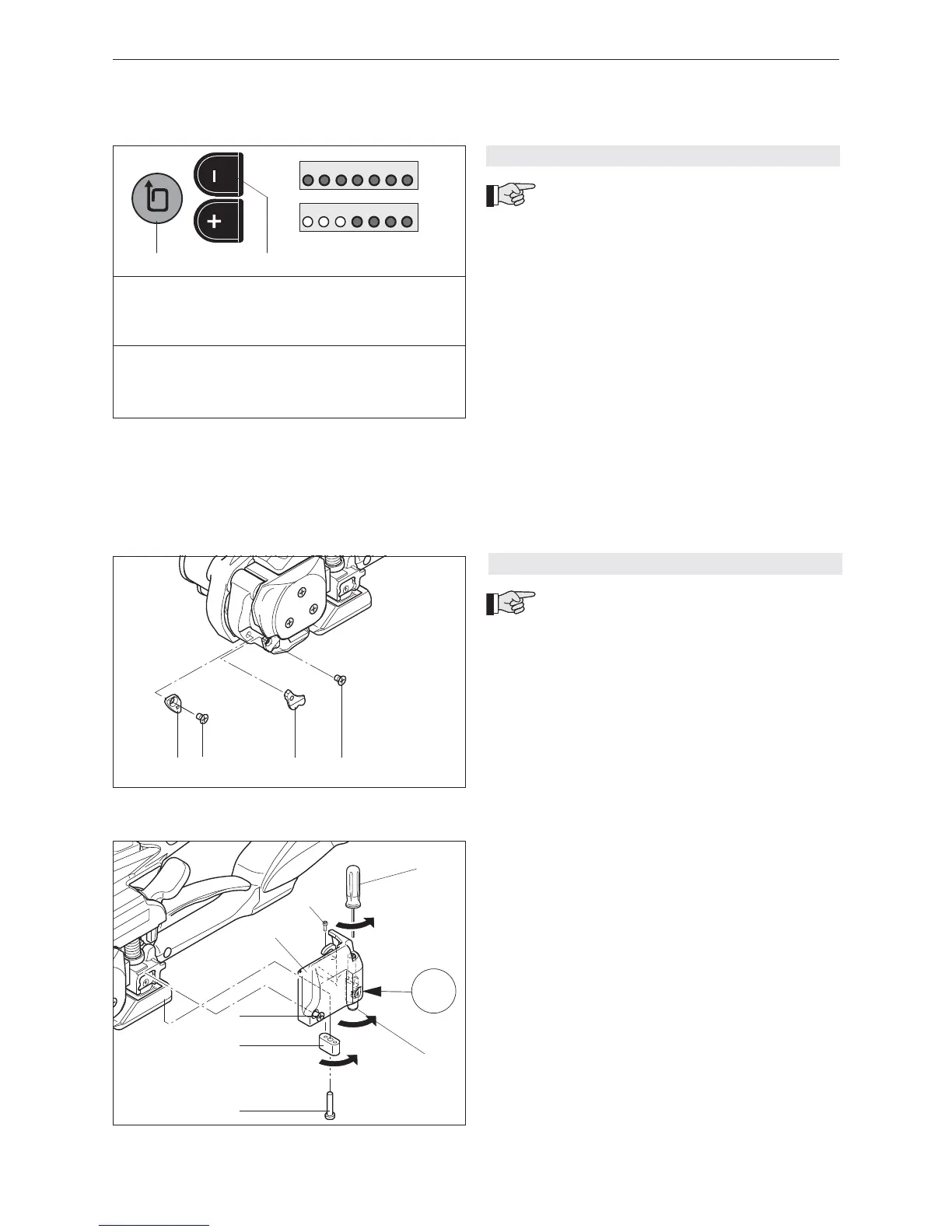
6.3.4 SETTING STRAP TENSION RANGE
The following two strap tension ranges can
be set on the tool:
A = 400–2000 N (standard, PET straps)
B = 400–1200 N (Soft tension*, PP straps)
* Soft tension: tension wheel starts slowly. Prevents
excessive dirt on PP straps.
Check strap tension range
– Depress and hold down “–“ push button (17/2), and
depress strap tension push button (17/1) for one
second.
– If the LEDs 1–7 are fl ashing = A (400–2000 N)
– If the LEDs 1–4 are fl ashing = B (400–1200 N)
Change strap tension range
– Depress and hold down “–“ push button (17/2), and
depress strap tension push button (17/1) for one
second.
– Depress “–“ or “+“ push button briefl y so strap
tension range changes (wait two seconds until new
setting is saved).


 To Next Page