Objet500 User Guide 6 Operating and Maintaining the Objet500 3DPrinter
DOC-07027 Rev.E 6-14
Thereareadditionalsettingsthatyoucanselectforspecialpurposes(see
"AdvancedSettings").Ifnecessary,clickAdvanced Settingsbefore
clickingNext.
❒ Economy.Thiscyclecanbeusedwhenreplacingalight-coloredModel
materialwithadarkermaterial(suchasTangoBlack™orVeroBlack™)
oriftheexactcoloroftheprintedmodelsisunimportant.Usethis
cyclewhenreplacingcleaningfluidwithanyModelmaterial.
Thewizardflushesthesystemwiththeminimumamountofmaterial
neededtoensurethatmodelshavethemechanicalpropertiesofthe
newmaterial.
❒ Full.Usethiscyclewhentheprintedmodelsmusthavetheexact color
ofthenewmaterial.
Thewizardthoroughlyflushesofthefeedtubesandprintheads
neededforprinting,basedonyourselectionsinthepreviousscreens.
9. ClickNexttobeginthematerialreplacementprocessintheprinter.
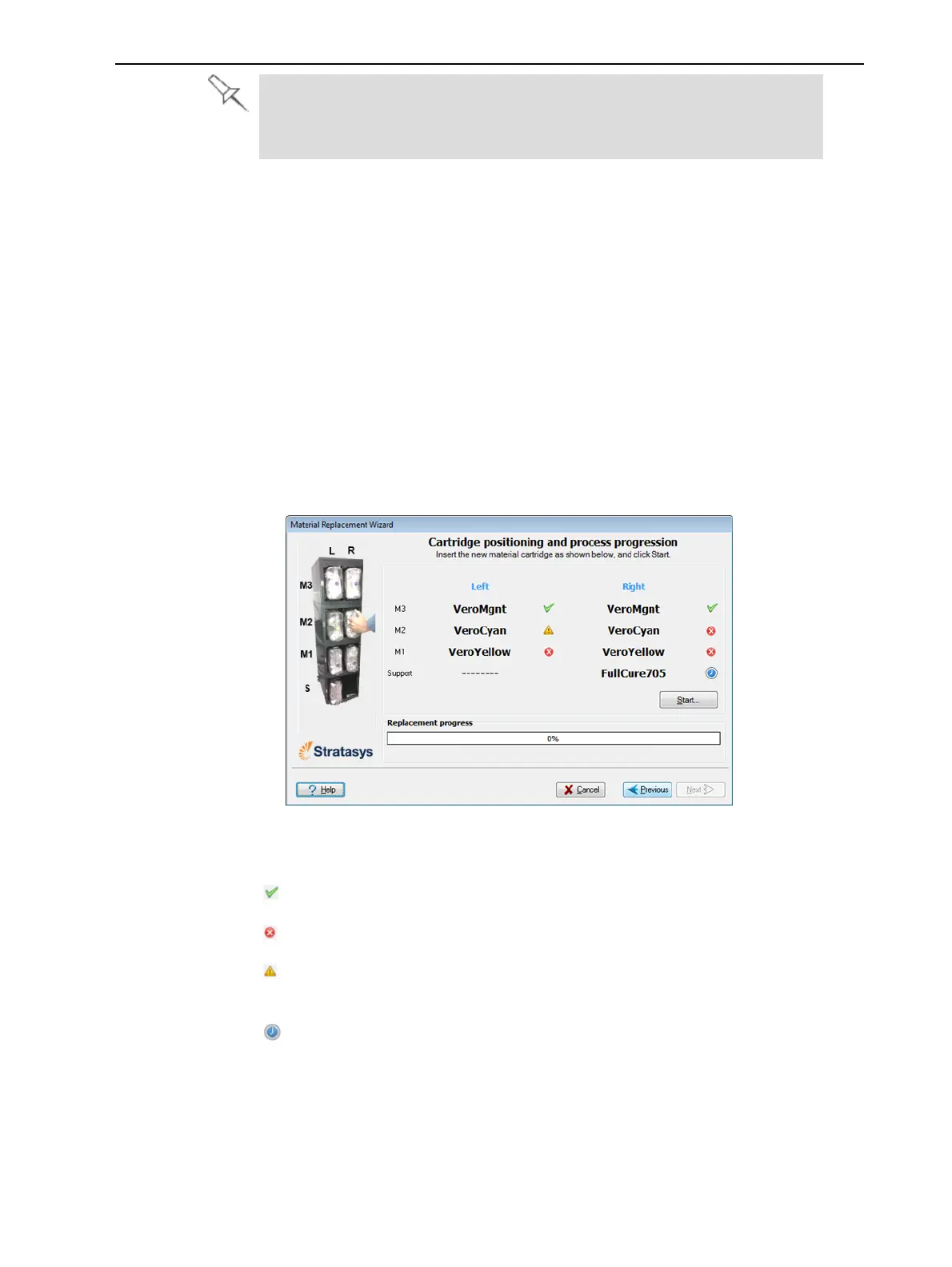
TheCartridge positioningscreenappears,showingyouthenewlocation
ofallcartridgesinthematerialcabinet.
Figure6-10Cartridgesplacement
Symbols:
Thecorrectcartridgeisinthisslot.
Nocartridge(ortheincorrectcartridge)isinthisslot.
Thecartridgeinthisslothasinsufficientweighttocompletethematerial
replacementprocess.
Theexpirationdateofthecartridgeinthisslothaspassed.
10.Replacematerialcartridgesasnecessary,accordingtotheinstructionsin
thewizardscreen.
11.ClickStart.
12.Readthewarningmessage,andclickOK.



 To Next Page