35
You can use the colour buttons to manually
start the motor and move the dish to the west
or east by a fixed number of steps:
• To move west 8 steps, press the red
button;
• To move east 8 steps, press the green
button;
• To move west 1 step, press the yellow
button;
• To move east 1 step, press the blue
button.
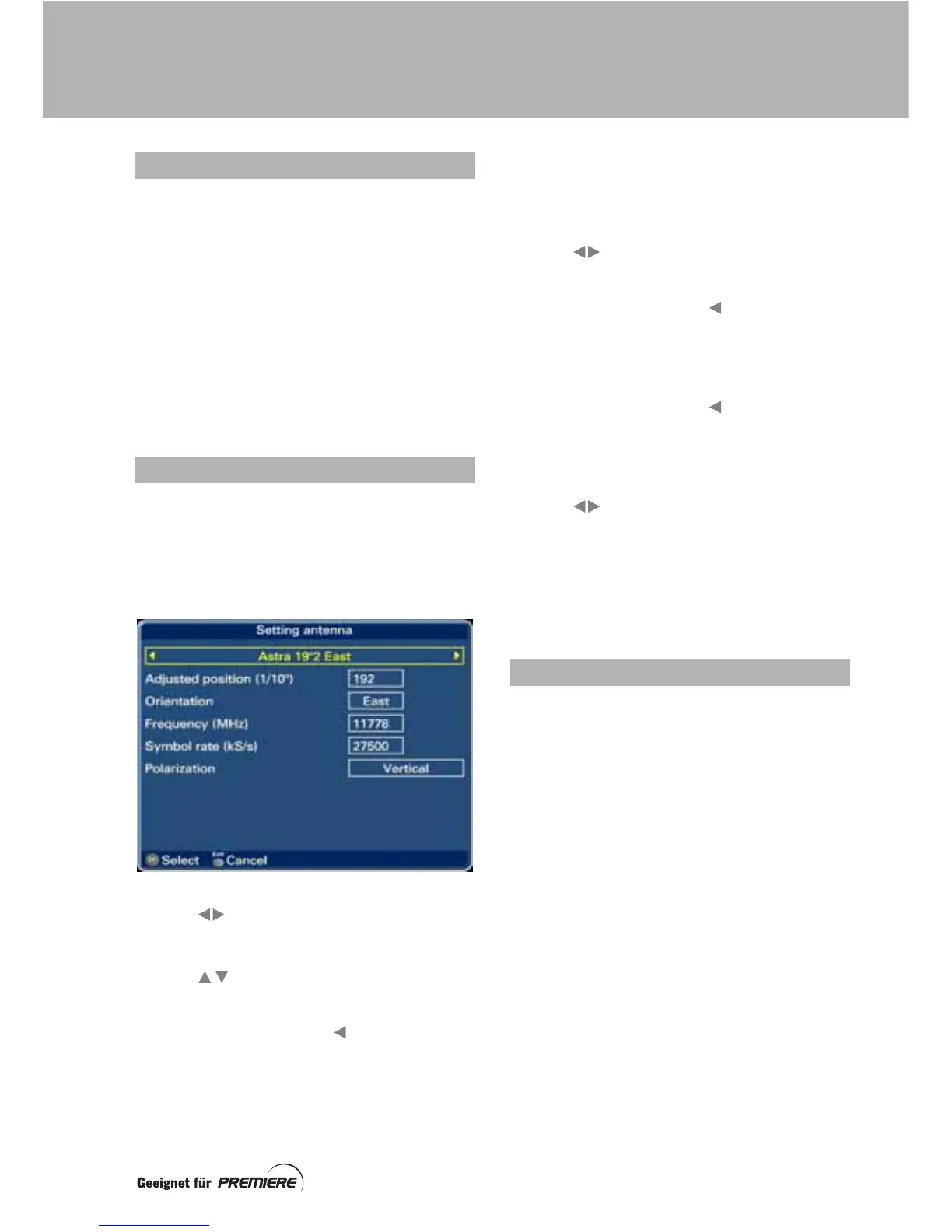
To view the Position screen, press the Opt
button.
You use this screen to choose which satellite
is currently selected, and view or change
various associated settings.
Use the buttons to choose the satellite
you want. This is displayed in the box at the
top of the screen.
Use the buttons to highlight a setting:
Adjusted position (1/10º)
To delete digits, press the button.
Use the number buttons to enter the angular
position you want, e.g. 192 = 19º2.
Note that if you adjust the position setting, it
will override the preset position shown for the
satellite on the Reception screen.
Orientation
Use the buttons to choose West or East.
Frequency (MHz)
To delete digits, press the button.
Use the number buttons to enter the frequency
you want, e.g. 11778.
Symbol rate (kS/s)
To delete digits, press the button.
Use the number buttons to enter the symbol
rate you want, e.g. 27500.
Polarization
Use the buttons to choose Vertical or
Horizontal.
To save any changed settings, and redisplay
the Setting antenna screen, press OK.
To redisplay the Setting antenna screen,
without saving changes, press Exit.
To view the Store screen, press the OK button
when the motor is not running.
You use this screen to store the current motor
position for the satellite currently shown on the
Setting antenna screen.
• To store the current motor position for
the currently selected satellite, press
the green button.
• To re-calculate and store all motor
positions, based on how much (if any)
the adjusted satellite positions vary
from the preset satellite positions, press
the red button. This will also store the
current motor position for the currently
selected satellite.
• To redisplay the Setting antenna
screen, without storing any positions,
press Exit.
ADJUSTING MANUALLY
USING THE ‘POSITION’ SCREEN
STORING MOTOR POSITIONS
SETTING UP A MOTORISED DISH



 To Next Page