Recording Function
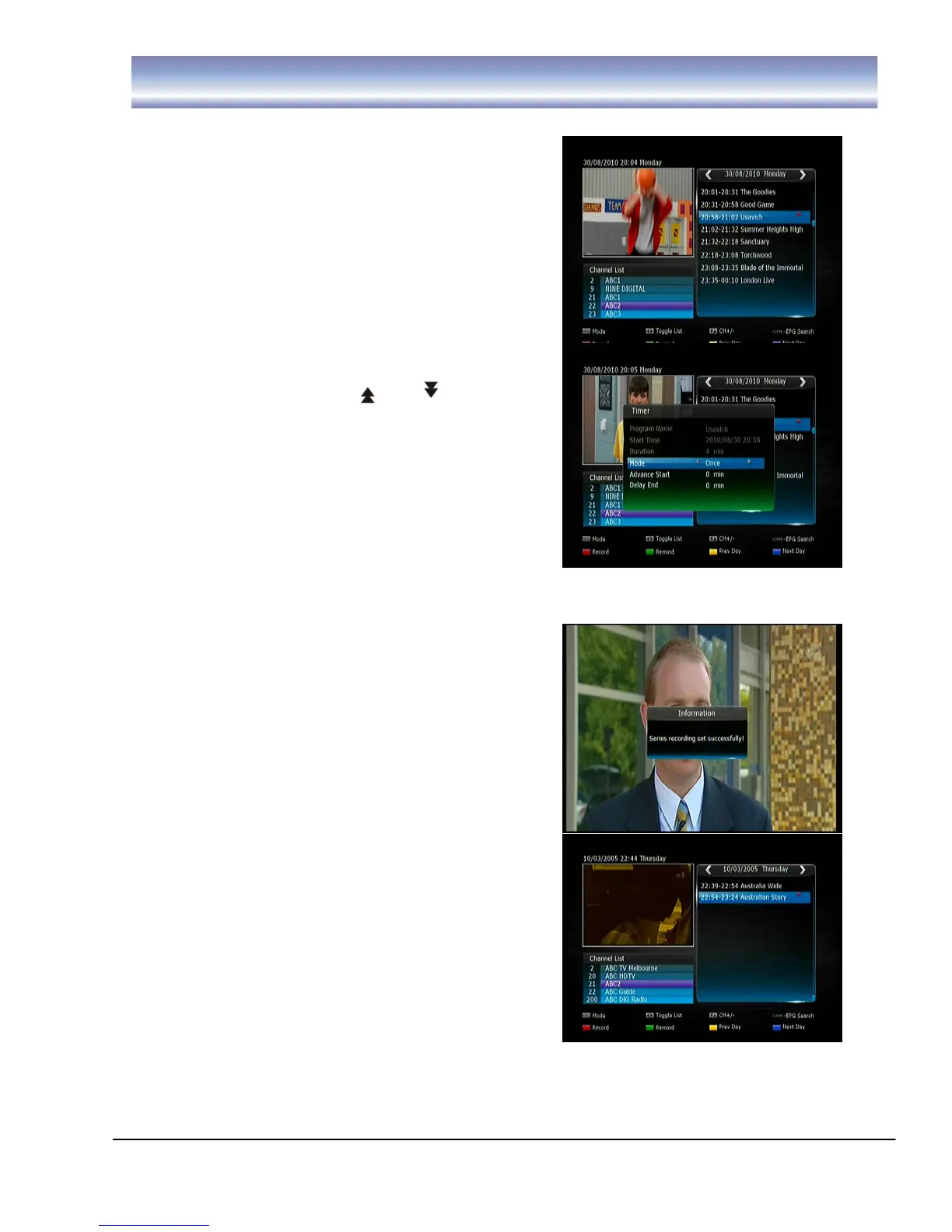
EPG RECORDING
1. Display the EPG by pressing
[EPG] in Live TV
Mode.
2. Press [▲][▼] to select desired
channel and press the [OK]
button.
3. Press [▶] right arrow button to
access program list
4. Press [▲][▼] to highlight the
program you wish to record.
5. Press [ ][ ] to scroll
between pages.
6. Press [RED] button to record the
program.
Press [RED] button once, a “red square”
icon will be displayed next to the program
Press [RED] button twice, to edit the
Recording settings (such as:
Mode/Advance Start/Delay and End
times).
Press [RED] button a third time, to cancel the set recording
SERIES RECORDING
Series recording allows you to record every
episode in the series of the program you have
selected with a single button press:
While viewing the program you wish to
record the whole series, press [S. REC]
button on the remote, the message “Series
recording set successfully” will be displayed
on the screen.
You can also set a series recording via the
EPG. Select the program you wish to record
the whole series, press [S. REC] button of
the remote, the message “Series recording
set successfully” will be displayed on the
screen.
To cancel a set series recording press the Timer button on the remote control.
Select the set series timer using the [▲][▼] buttons. Press the GREEN button to
delete this timer



 To Next Page