4
Front Panel and Rear Panel
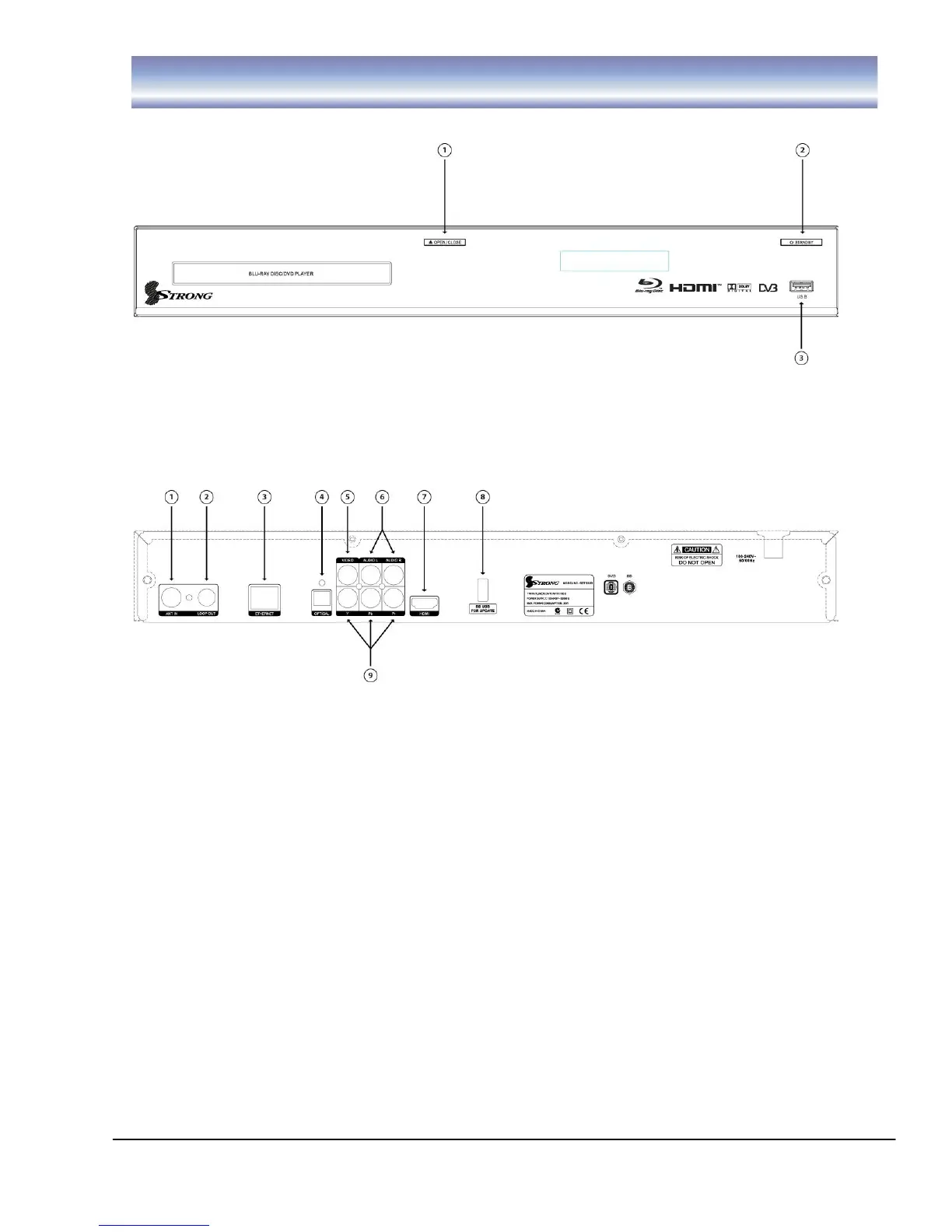
Front Panel
1. OPEN/CLOSE:. Open/ close the door of DVD tray
2. STANDBY button: To turn ON/OFF the Standby Mode.
3. USB Slot: Connect for software upgrades.
Rear Panel
1. ANT IN: Ant In is where you connect the Antenna..
2. LOOP OUT: Loop Out RF signal to second tuner.
3. ETHERNET: Connect to network.
4. OPTICAL: Digital audio output.
5. VIDEO: VIDEO output to connect to your TV.
6. Audio(L/R) Outputs: Output left/right audio signal to TV or amplifier.
7. HDMI: HDMI to connect to your TV in high definition.
8. BD USB for Update: Connect for software upgrades in Bluray mode.
9. Y/Pb/Pr: Output Y/Pb/Pr video signal to TV (support high definition output).



 To Next Page