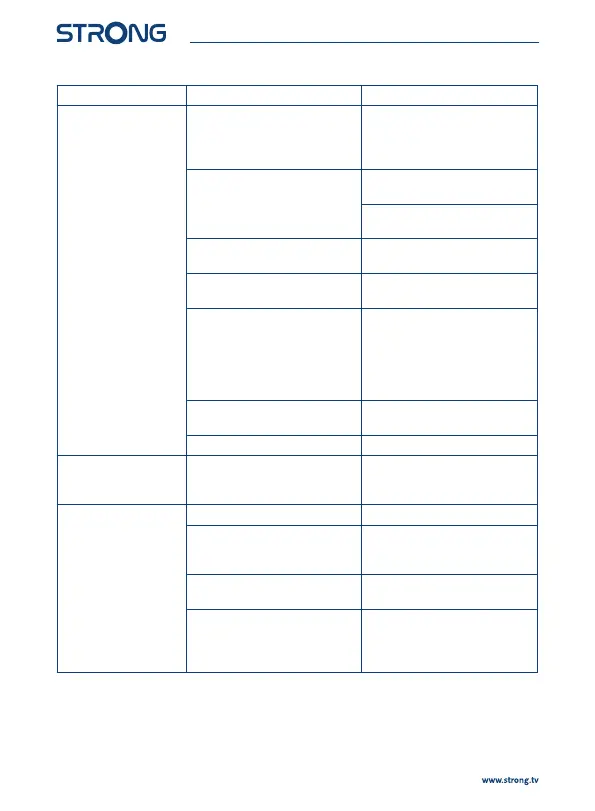
Problem Possible cause What to do
No sound on TV or
amplier.
The volume of the TV is set too
low.
The volume of the receiver is set
too low.
Increase the volume of the TV
with its remote control.
Increase the volume of the
receiver with its remote control.
The correct input is not selected
on your TV or amplier, or the unit
is set to a higher resolution than
supported by the TV.
Switch to the correct TV/amplier
input.
Select lower resolution on the
receiver.
The TV, digital receiver or amplier
is not switched on.
Switch the TV/digital receiver/
amplier on.
The TV or digital receiver is not
connected to the mains.
Check the mains lead.
Bad cable connection. Make sure that any existing
digital or analogue A/V cable
connections between the used
equipment (TV, digital receiver
or A/V amplier) are properly
connected.
Audio is muted. Press the ! button on your
remote control.
The TV power is o. Turn the TV on.
No access to scrambled
services.
The channel is scrambled.
Your receiver doesn't support
scrambled channels.
Select an alternative channel.
No response to the
remote control.
The receiver is o. Plug in and turn on the receiver.
The remote control is not aimed
correctly.
Aim the remote control at the IR
sensor on the front panel of the
receiver.
The IR sensor on the front panel of
the receiver is obstructed.
Avoid or remove obstructions.
The batteries of the remote
control are not inserted, wrongly
inserted or exhausted.
Check whether the batteries are
inserted correctly or exhausted. If
exhausted, replace the batteries in
the remote control.
18



 To Next Page