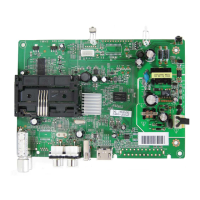
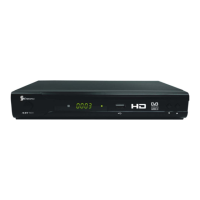
The STRONG SRT5431 is a DVB-T FTA High Definition Digital Terrestrial Receiver designed to provide users with access to all digital terrestrial TV and radio signals broadcast in both Standard Definition and High Definition. It is a high-performance HDTV Terrestrial receiver that fully complies with DVB-T FTA receiver requirement specifications.
Function Description:
The primary function of the SRT5431 is to receive and decode digital terrestrial television and radio broadcasts. It supports a wide range of video and audio formats, including MPEG-4 H.264/AVC High Definition Digital TV, MPEG-2 High Definition and Standard Definition Output, and MPEG-1 Layer I & II. The receiver is equipped with VHF & UHF input and loop-out capabilities, allowing for flexible antenna connections. It boasts a channel capacity of 400, enabling users to store a large number of TV and radio channels.
A key feature of the SRT5431 is its On-Screen Electronic Program Guide (EPG), which provides a seven-day schedule of programs for all tuned channels. This allows users to plan their viewing and recording activities in advance. The receiver also supports Picture in Graphics (PIG), auto and manual channel search, and parental control for channels, offering a comprehensive viewing experience.
The SRT5431 is designed for easy installation with a plug-and-play setup and an intuitive Menu System. It supports various video resolutions, including 576i, 576P, 720P, and 1080i, and aspect ratios of 4:3 and 16:9, ensuring compatibility with a wide range of televisions. Channel editing functions such as Favorites, Move, Lock, and Delete are available, allowing users to customize their channel list.
For connectivity, the receiver includes an HDMI High Definition Multimedia Interface (HDMI 1.2) for high-quality digital video output. It also features a USB 2.0 port, which serves multiple purposes: software upgrades, DVR functionality, and a media player. Users can record digital television FTA programs to a USB Flash Drive or an external USB portable hard disk and play them back via the USB2.0 compatible port.
Usage Features:
The SRT5431 offers a variety of usage features designed to enhance the user experience:
- Remote Control: The device comes with a comprehensive remote control that provides access to all functions. Keys include MUTE, POWER, numeric buttons (0-9), MEDIA, GOTO, V.MODE, RECALL, TV/RADIO, VOL+/VOL-, CH+/CH-, RED, GREEN, YELLOW, BLUE, MENU, EXIT, INFO., EPG, UP/DOWN, LEFT/RIGHT, REC, OK, PREV/NEXT, FAV, STOP, PLAY/PAUSE, DVR, F.R./F.F, SUBTITLE, LANG, Page UP/Page Down, TIMESHIFT, ZOOM, and SCAN.
- Installation Guide: Upon first use or after a factory reset, an installation guide appears on the TV screen, prompting users to select their preferred language and country, and to initiate an automatic channel search.
- Main Menu: The main menu provides access to all major functions, including Program Settings, Picture Settings, Channel Search settings, Time settings, Option, System settings, and USB Settings. A default password ("000000") is required to modify advanced options.
- Program Settings: This section allows users to edit programs (lock, skip, favorite, move, delete), access the EPG, and sort channels by LCN, Service name, Service ID, or ONID.
- Picture Settings: Users can adjust the aspect ratio (4:3 or 16:9) to optimize the display quality on their TV.
- Channel Search Settings: Both auto and manual search options are available. Auto search automatically scans and saves TV and radio channels, deleting previously saved ones. Manual search allows scanning for new channels without deleting existing ones.
- Time Settings: This feature allows setting time offset (auto or manual for GMT), country region, time zone, and power down (sleep) duration.
- Option Menu: Users can change the OSD language, subtitle language, and audio language preferences.
- System Settings: This includes Parental Guidance (age reference from 4 to 18 years, protected by a default password "000000"), Set Password (to modify the default password), Restore Factory Default (to revert to factory settings, requiring the default password), and Information (to check software version).
- USB Settings (Multimedia Player & DVR): The USB port enables multimedia playback (Music, Photo, Movie) and DVR functionality.
- Multimedia Player: Supports JPEG, BMP, PNG for photos; WMA, MP3, AAC for music; and AVI, MPG, DAT, VOB, MKV, MJPEG for movies.
- DVR Function: Allows instant recording of TV programs, timer recording via EPG, and Timeshift functionality.
- Instant Recording: Pressing the REC key starts recording the currently viewed program.
- EPG Timer Recording: Users can schedule recordings through the EPG, setting parameters like channel, date, start/end time, and repeat mode (Once, Daily, Weekly, Monthly).
- Timeshift: This function allows pausing live TV programs. The paused content is stored on a connected USB device, enabling users to rewind or fast forward through the buffered content.
- Playback: Recorded programs can be played back from the USB device via the FILELIST key, with options to preview, edit, or delete recordings.
- Info Key: Displays an information banner while viewing TV programs.
- LANG Key: Accesses available audio languages and modes (Stereo, Left, Right) for multilingual programs.
- SUB Key: Displays available subtitle languages for programs with subtitle information.
- PREV/NEXT & F.R./F.F. Keys: Used during multimedia playback to navigate between programs or fast forward/rewind.
- ZOOM Key: Allows zooming in/out on pictures and videos, with arrow keys for frame movement.
- SCAN Key: Initiates auto scan for TV and radio channels.
Maintenance Features:
The SRT5431 incorporates several features and guidelines for maintenance and troubleshooting:
- Software Upgrade: The USB port facilitates software upgrades. Users can download update files from the STRONG website, copy them to a FAT32 formatted USB drive, and then update the receiver. It is crucial not to remove the USB drive or power off the receiver during the upgrade process to prevent damage. After an upgrade, restoring to factory default settings is recommended to ensure the update takes effect.
- Battery Installation: The remote control requires UM-4 (AAA) batteries. Users are advised to observe correct polarities during installation.
- Battery Care: Important notes on battery usage include: do not use rechargeable (Ni-Cd) batteries, do not attempt to recharge, short circuit, disassemble, or throw batteries into fire. Avoid dropping or impacting the remote control. Do not mix old and new batteries. Remove batteries if the remote control will not be used for a long time. Keep batteries out of children's reach.
- Power Cord Protection: To prevent malfunctions, electric shock, fire, or personal injury, users should firmly hold the plug when connecting/disconnecting, keep the cord away from heating appliances, avoid placing heavy objects on it, and never attempt to repair or reconstruct the cord. Connections should not be made with the power switched on.
- Ventilation: Ensure ventilation openings are not covered by items like newspapers or curtains. Maintain a minimum distance of 5 cm around the receiver for sufficient ventilation.
- Environmental Considerations: No naked flame sources (e.g., lit candles) should be placed on the apparatus. Attention should be drawn to battery disposal; used batteries should not be thrown in rubbish but returned to the retailer.
- Climate and Liquid Exposure: The apparatus should not be used in tropical climates and should not be exposed to dripping or splashing. No objects filled with liquids, such as vases, should be placed on the apparatus.
- Mains Plug Accessibility: If the mains plug is used as the disconnect device, it should remain readily operable.
- Cable Damage: If the electric cable is damaged, it must be replaced by the manufacturer or a qualified person to avoid danger.
- Hard Disk Formatting: The USB settings include a function to format a portable hard disk. Users are strongly advised to back up all data before formatting, as this action permanently deletes all data on the disk.
- Troubleshooting Guide: The manual includes a troubleshooting table for common problems such as no power, "No signal" message, missing channels, and remote control not working, along with possible causes and solutions. Technical support contact information is provided for further assistance.


 To Next Page
 General