1.19 Leavening
This icon allows the user to select a leavening cycle.
A) Leavening description
The blast chiller allows the automated management of the cycle, with the dough pause-leavening. A lea-
vening cycle has 4 phases, during which it is possible to set up, for different durations, the temperature cell
where the dough will be stored (the model 66350025 is not provided with humidity control).
In particular, it is possible to run the following phases:
1 Blast chilling phase: to “stop” the yeasts in the dough and delay the leavening.
2 Wake phase: to “reawaken” the yeast though the rise of the cell temperature, obtaining a
“preleavenining”.
3 Leavening phase: to complete the leavening process, in order to make the dough ready
to be baked.
4 Maintaining phase: to keep the dough leavened and ready to be baked. This phase doesn’t
have a maximum durability and it ends when the Stop icon is pressed.
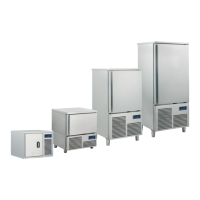
B) Leavening settings
Once you select the leavening cycle, set up (in the following screen) the values within the permitted range.
The default values are those set up by the manufacturer.
With the arrows on the top of the screen it is possible to enter the screen corresponding to the cycle phase
to be modified, and through the icon Edit the user can customize the selected parameter (except for
humidity and ventilation in the model 66350025).
Once the selected parameters are set, start the cycle by pressing the icon Start .
If for a phase the time set is 0, the phase won’t be run.



 To Next Page