1.20 Slow Cooking
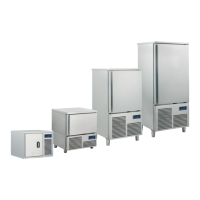
Press this icon to select the slow cooking mode. After selecting “Slow Cooking”, you will see a screen where
it is possible to visualize and change the setpoint and decide whether the cycle will be temperature or time
based; during the cycle, it is not possible to change the setpoints.
In the bottom part of the screen, two areas allow the user to add a blast chilling/deep freezing phase After
cooking blast chilling and a maintaining phase After cooking deep freezing .
If at the end of the slow cooking phase the maintaning phase is activated, this will start at the preset tempe-
rature and it will be everlasting. If blast chilling or deep freezing are activated, they will be run according to
the modalities of these cycles (blast chilling/deep freezing and automatic transition to the maintaining phase).



 To Next Page