Black plate (226,1)
北米Model "A8160BE-B" EDITED: 2010/ 10/ 14
5-42 Audio
audio) menu. If no devices are registered,
“EMPTY” is displayed and the mode
changes to the Bluetooth
®
audio setting
mode.
2. Select the “ CONFIRM” menu. If the
device is connected, “SELECTED” is
displayed and the selecting procedure is
finished. If the device cannot be con-
nected, “FAILED” is displayed and the
selecting procedure was not successful.
! Setting passkey
1. Select the “SET PASSKEY” menu.
After the currently set passkey is dis-
played, a new passkey can be entered.
2. Input the new passkey by operating
the “TUNE/TRACK/CH” dial.
3. Select the “CONFIRM” menu. The new
passkey is displayed, the passkey is
changed and the mode changes to the
Bluetooth
®
audio setting mode.
! Deleting device
1. Select the “DELETE AUDIO” (type C
audio)/“Delete Audio Player” (type D
audio) menu. If no devices are registered,
“EMPTY” is displayed and the mode
changes to the Bluetooth
®
audio setting
mode.
2. Select the “CONFIRM” menu. “DE-
LETED” is displayed and the mode
changes to the Bluetooth
®
audio setting
mode.
& Bluetooth
®
audio operation
NOTE
Depending on the connected device, it
may not activate as per the following
items or not work smoothly.
! How to play back
Press the
button and select the “BT-
A” (type C audio)/“BT Audio” (typ e D
audio) mode.
! To select a track from its beginning
Select a track in the same way that a track
is selected when a CD is played. Refer to
“To select a track from its beginning” F5-
25.
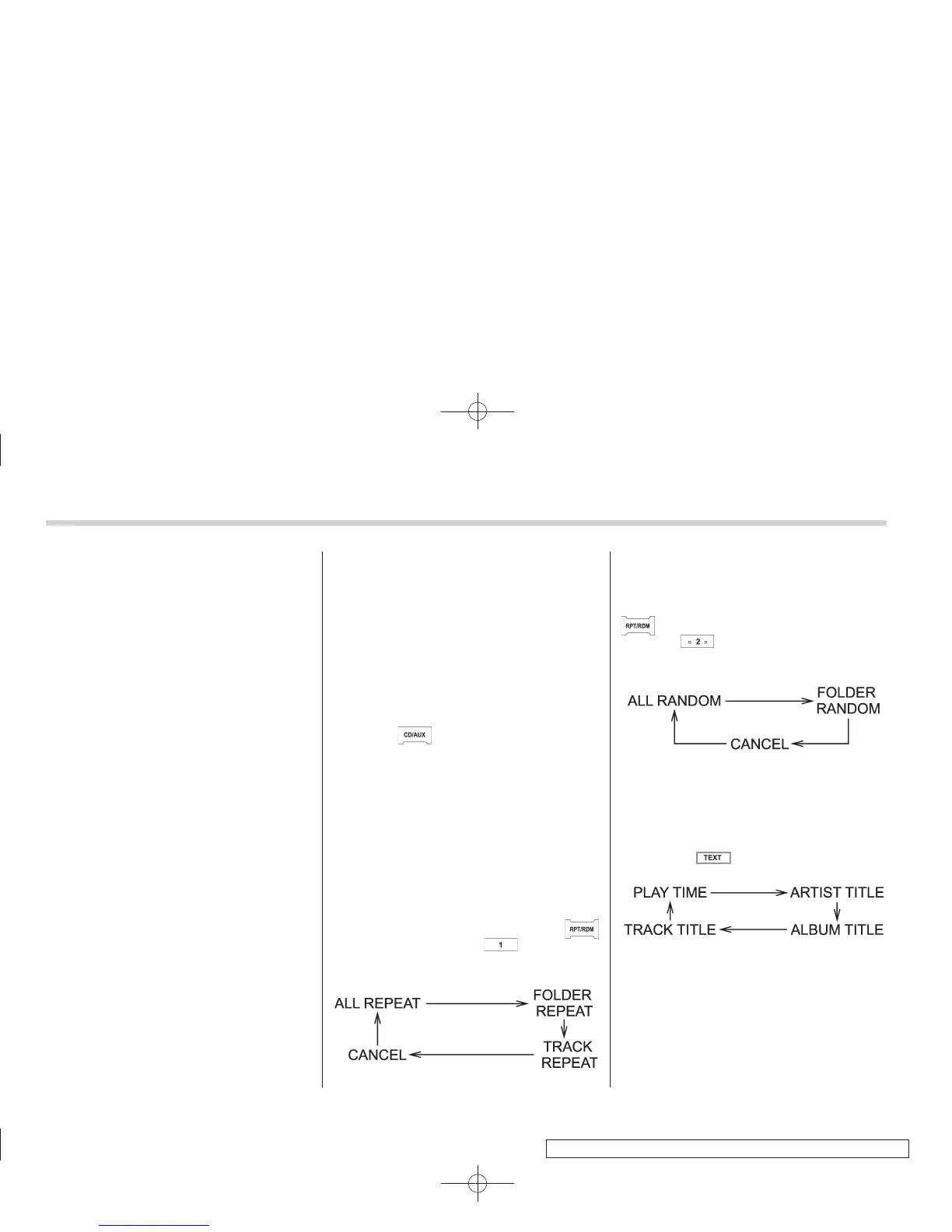
! Repeating
Repeating is operated in the same way a
CD is played. Refer to “Repeating” F5-26.
Each time you briefly press the
button (type C audio)/ button (the
“RPT” button) (type D audio), the mode
changes in the following sequence.
! Random playback
Random playback is operated in the same
way a CD is played. Refer to “Random
playback” F5-26. Each time you press the
button for 0.5 second or longer (type
C audio)/
button (the “RDM” button)
briefly (type D audio), the mode changes
in the following sequence.
! Display selection (type C audio)
Select an item to be displayed using the
same method as when a CD is played.
Refer to “Display selection (type A, B and
C audio)” F5-28. Each time you briefly
press the
button, the indication
changes in the following sequence.
! Folder selection
Select a folder in the same way a folder is
selected when a CD is played. Refer to
“Folder selection” F5-28.















 To Next Page