Black plate (283,1)
北米Model "A8160BE-B" EDITED: 2010/ 10/ 14
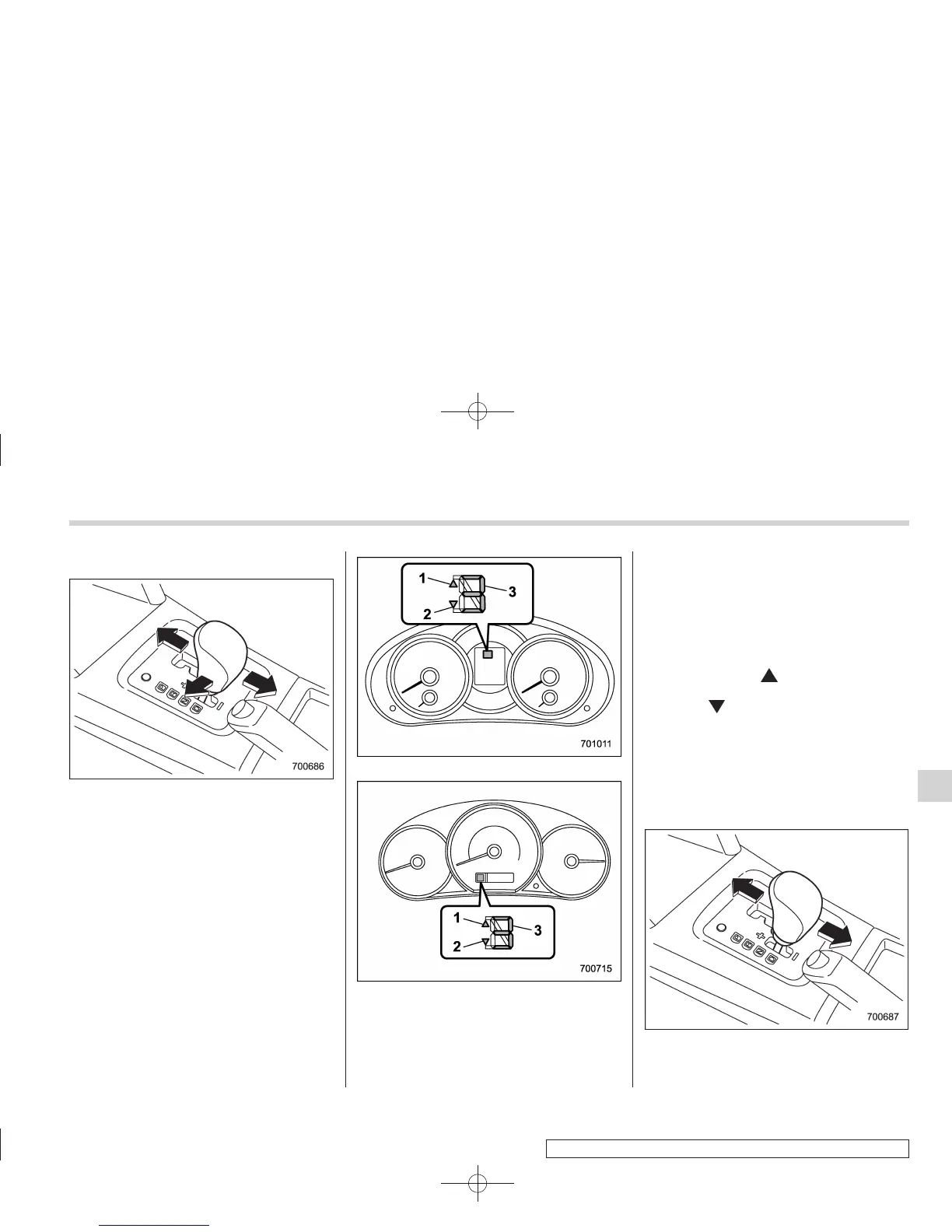
& Selection of manual mode
With the vehicle either moving or station-
ary, move the select lever from the “D”
position to the manual gate then move it to
the “+” end or “−” end of the manual gate
to select manual mode.
Type A
Type B
1) Upshift indicator
2) Downshift indicator
3) Gear position indicator
When manual mode is selected, the gear
pos ition indicator and upshift indicator
and/or downshift indicator on the combi-
nation meter illuminate. The gear position
indicator shows the currently selected
gear in the 1st-to-4th-gear range. The
upshift and downshift indicators show
when a gear shift is possible. When the
upshift indicator “
” is illuminated, up-
shifting is possible. When the downshift
indicator “
” is illuminated, downshifting
is possible. When both indicators are
illuminated, upshifting and downshifting
are both possible. When the vehicle stops
(for example, at traffic signals), the down-
shift indicator turns off.
Gear shifts can be performed by using the
select lever.
Shift to the next-higher gear by briefly
pushing the select lever toward the “+”
Starting and operating 7-19
– CONTINUED –
7















 To Next Page