3-40
Instruments and controls/Multi function display
& Date and time settings
The items in the date and time settings
can be set. To change the items, operate
the “
” or “ ” switch.
NOTE
. The “Date” item must be set to
display the “Birthday”, “Anniversary”
and notifications for vehicle mainte-
nance.
. The “Birthday” and “Anniversary”
items can be entered after the “Date”
item has been set.
. Dates that do not exist in the
Gregorian calendar cannot be set (for
example, April 31).
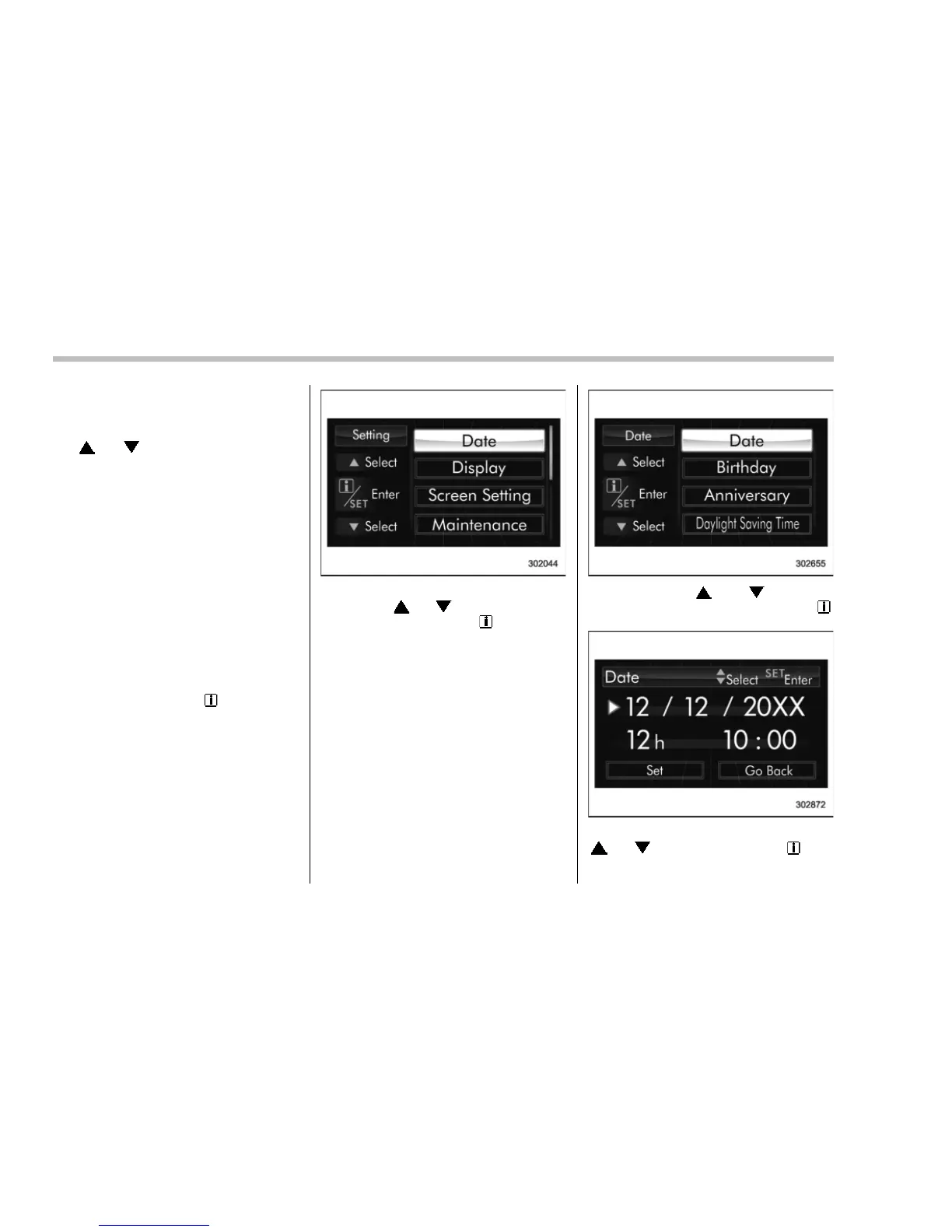
! Preparation for date setting
1. Turn the ignition switch to the “ON”
position.
2. Pull and hold the “
/SET” switch
toward you to show the selection screen.
3. After the selection screen is displayed,
operate the “
” or “ ” switch to show the
“Date” item. Then, pull the “
/SET” switch
toward you.
! Current date and time setting
1. Perform the preparation steps accord-
ing to “Preparation for date setting” F3-
40.
2. Operate the “ ” or “ ” switch to
select the “Date” item. Then pull the “
/
SET” switch toward you.
3. Select the item to set by operating the
“
” or “ ” switch. Then pull the “ /SET”
switch toward you.















 To Next Page