5-28
Audio/USB storage device / iPod
®
operations
fore, iPod
®
operation may be different
depending on the model of the con-
nected iPod
®
.
. When an audiobook or a podcast is
playing, the mode does not change
even if you press the “RDM” button.
To cancel the random playback mode,
press the “RDM” button and select CAN-
CEL. The “RDM” indication will turn off,
and the normal playback mode will re-
sume.
& SCAN (only when connecting
USB storage device) (type A
audio)
“SCAN” button
Scan is operated in the same way as for a
CD. For details, refer to “Scan (type A
audio)” F5-19.
NOTE
When an iPod
®
is connected, you
cannot select the SCAN mode.
& Selecting category (only
when connecting iPod
®
)
When the button is pressed briefly,
the iPod
®
menu will be displayed.
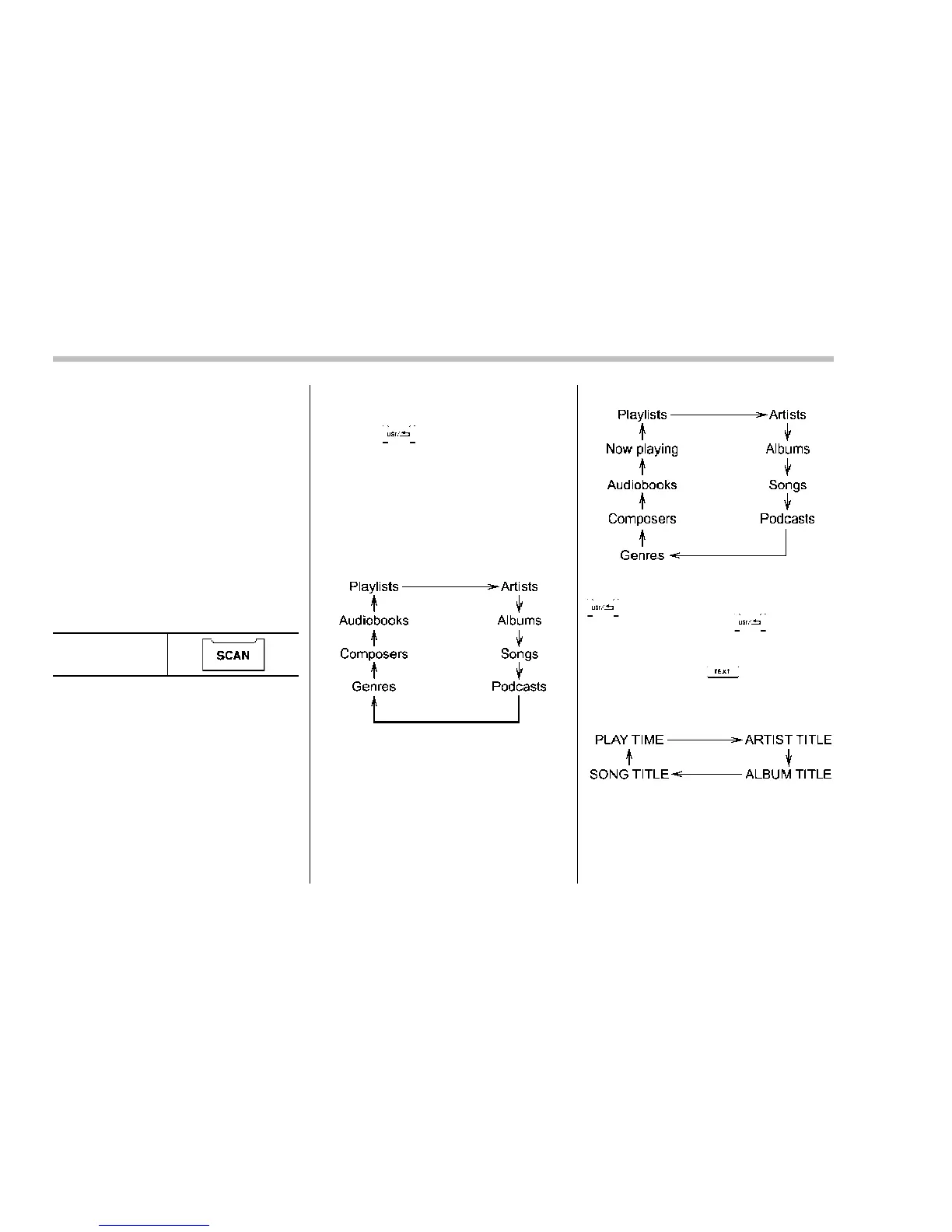
Each time you turn the “TUNE/TRACK/
CH” dial clockwise, the displayed category
will change in the following sequence.
Each time you turn the dial counterclock-
wise, the displayed category will change in
the opposite sequence.
Type A audio:
Type B audio:
To select the category, press the dial. To
close the iPod
®
menu, press and hold the
button. To return to the previous
screen, briefly press the
button.
& Display selection
If you press t he button during
playback, the display will change as
shown in the following sequence.
! Page scroll
Refer to “Page (track/folder title) scroll”
F5-19.















 To Next Page