Page | 34
5.12. Battery Discharge Page
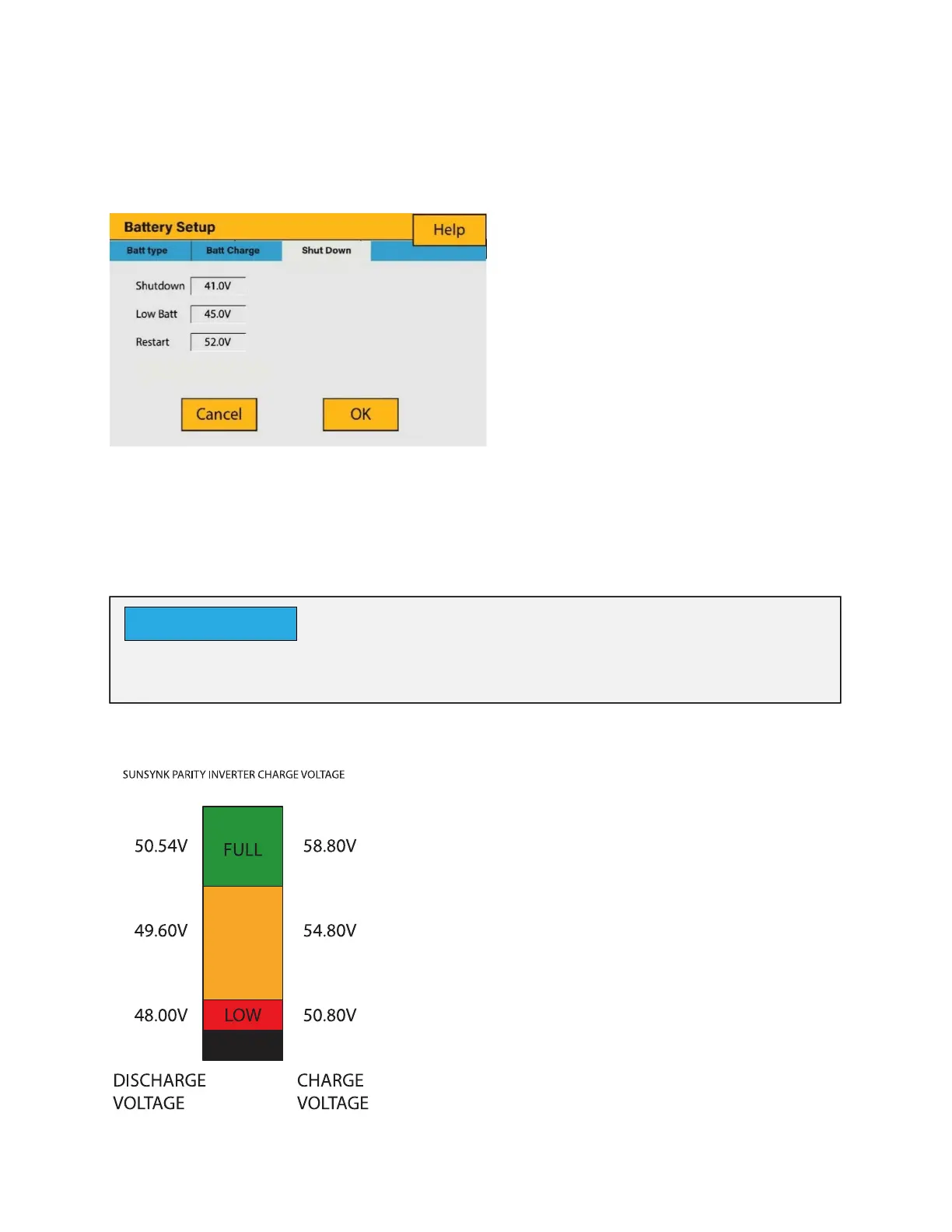
To configure inverter’s shutdown settings, click on the BATTERY icon and then on ‘Shut
Down’.
What you can do from this page:
Adjust battery shut down (voltage or %)
Adjust low battery warning (voltage or %)
Adjust restart (voltage or %)
The voltage displayed on the Sunsynk Parity Inverter will vary depending on whether the
inverter is charging or discharging the batteries.
What this page displays:
Inverter shutdown voltage set as
either a voltage or %.
Inverter low battery warning set
as either a voltage or %.
Restart voltage set as either a
voltage or %.
Activating Shutdown causes the inverter to enter standby-mode. It does not completely
shut down the inverter. Total shutdown occurs at voltages below 19V.
NOTICE
Since the batteries are 48V the figure on the
left is x4:
Fully Charged 50.54V (Discharge Mode)
Fully Charged 58.50V (Charge Mode)
75% Charged 49.60V (Discharge Mode)
75% Charged 54.80V (Charge Mode)
25% Charged 48.00V (Discharge Mode)
25% Charged 50.80V (Charge Mode)
Completely Discharged 47.50V
Setting the cut-off higher is better for the
batteries.







 To Next Page