Page | 36
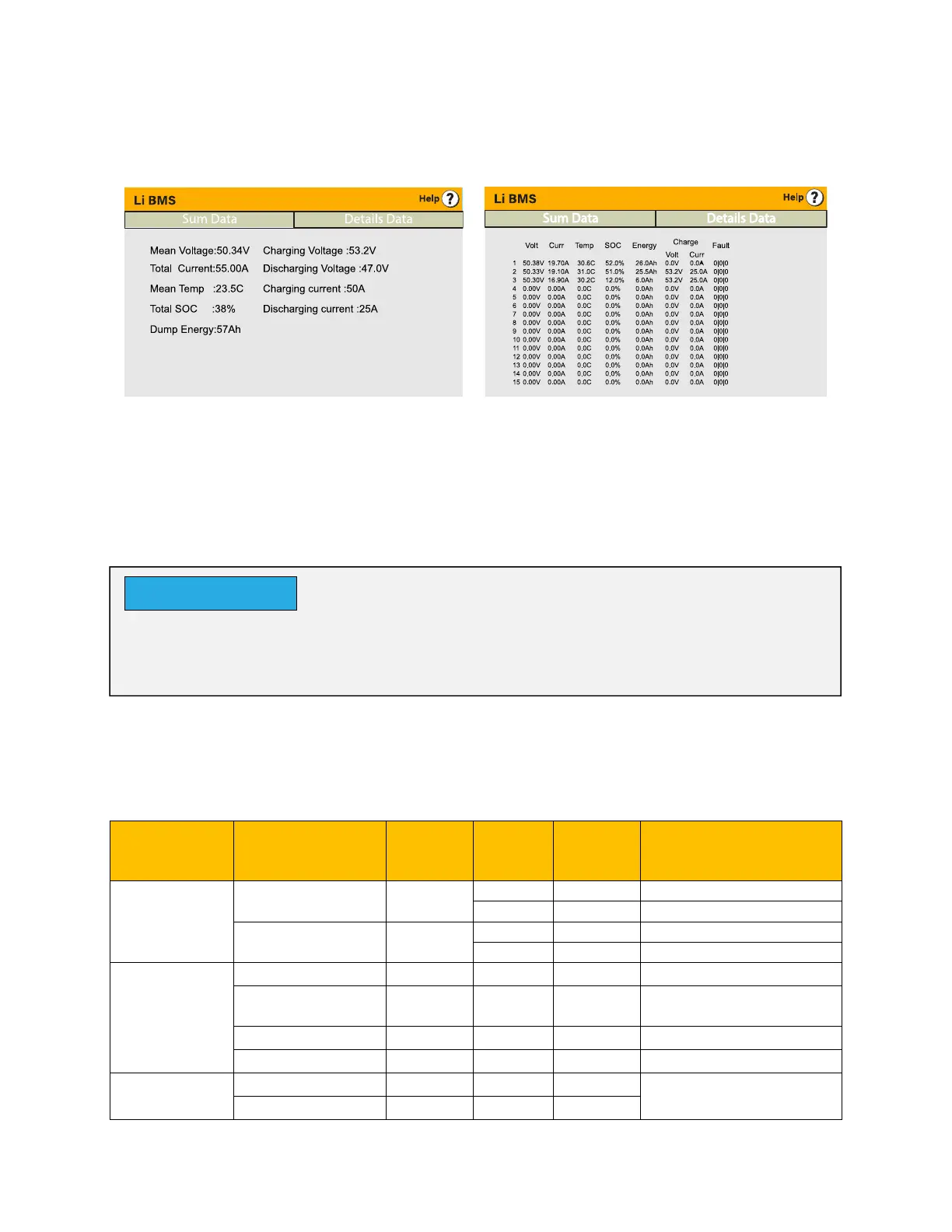
After installing a lithium battery, check on the communications page by clicking on the ‘Li
BMS’ icon to see if the BMS information is visible. If some information is not displayed
correctly (it should look like the diagrams below) then there will be a communication error.
Therefore, if a communication error occurs:
1. Check that your data cable is the correct type.
2. Check that the data cable is plugged into the correct sockets. Usually, RS485 is
employed, but some battery manufacturers use others.
It is important to refer to the manuals that manufacturers produce for their batteries. That
way, the chance of errors occurring during installation are greatly reduced. Below there is
a list of batteries that has been examined, tested, and approved by Sunsynk.
Brand Model
48V
Storage
Inverter
RS485
or CAN
Inverter
Setup
Notes
Pylon or
Equivalent
US2000
CAN 0
RS485 5
US20000-PLUS
CAN 0
RS485 5
DYNESS
B4850
CAN 0
B48100
CAN 0
Short Lione 6&7 at
inverter side
POWERBOX F
CAN 0
POWERBOX 9.6
CAN 0
SolarMD
SS4037
CAN
To be used with V2
Logger
SS4074
CAN
With some types of lithium battery, the BMS cannot be controlled by the Sunsynk
inverter. In this case, treat the battery as a lead-acid type and set the charging and
discharging protocol following the battery manufacturer specification.
NOTICE







 To Next Page