53
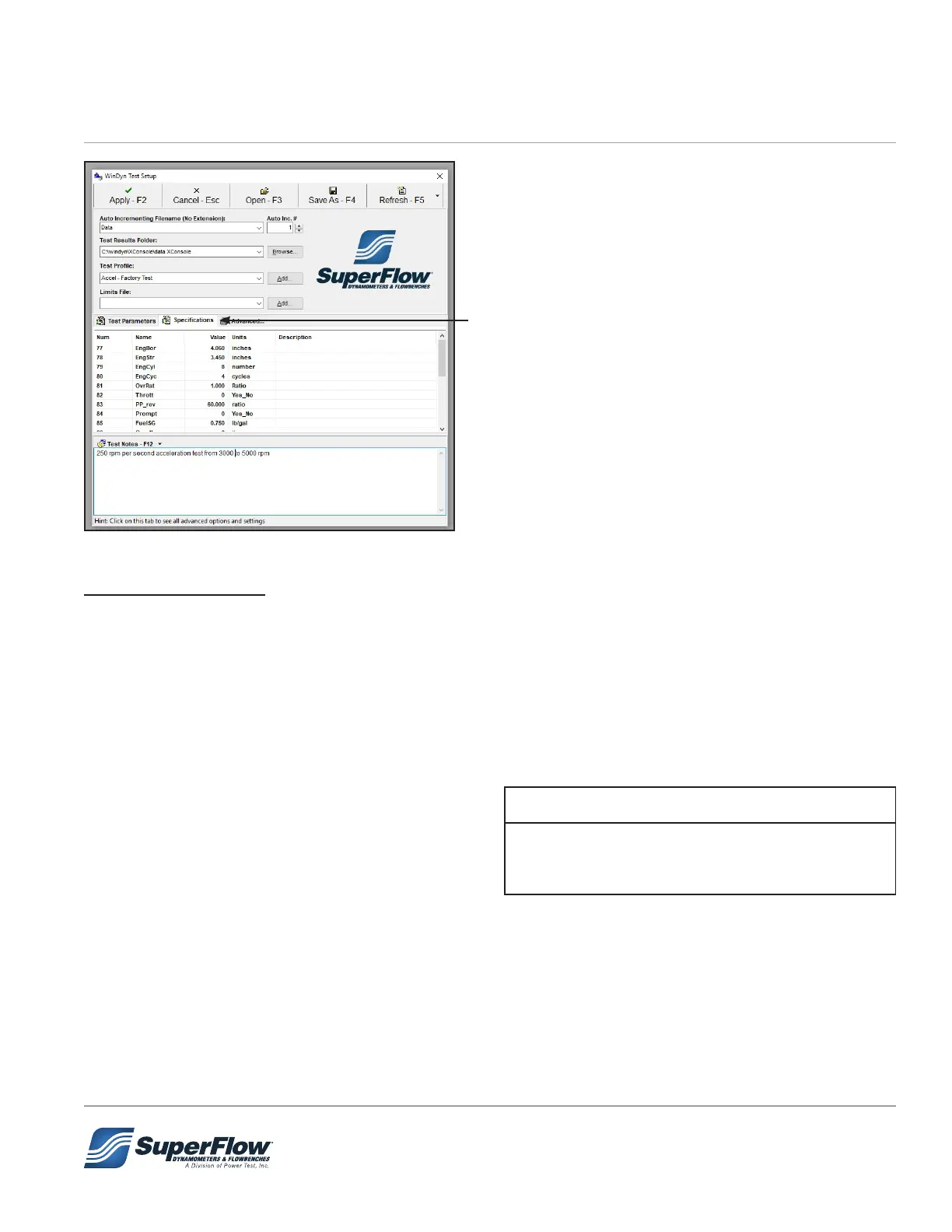
6. Click the Specications tab and enter the engine
specs.
7. Adjust the Valpos setting as necessary.
8. Adjust the fuel specic gravity as necessary.
9. Verify all other specication settings.
Figure 5.15 Test Setup - Specications
ValPos Adjustment
ValPos Adjustment – WinDyn channel 88
The ValPos adjustment allows the user to tune the dyno to the engine being tested. Each integer
represents an inlet valve movement of 20%. Values between integers may be used, i.e., 2.5 or 3.3, etc.
The key is to observe outlet water temps from the absorber. SuperFlow prefers to see temps no higher than
190 deg F. Optimally, use a ValPos and water pressure setting that gives best control and low outlet water
temps.
The ValPos channel will range in value from 1 – 5 (default is 3).
Recommended settings are as follows:
• 1 = Power levels from 0-300 Hp
• 2 = Power levels from 300-700 Hp
• 3 = Power levels from 700-1200 Hp
• 4 = Power levels from 1200-1700 Hp
• 5 = Power levels > 1700Hp
The power level values listed require a water inlet
pressure between 60-90 psi. Outside this range the
values are not valid.
IMPORTANT
5.0 Operation


 To Next Page