65
Calibration Coecients:
A calibration printout with the coecient values can be obtained and kept in a log which is useful for
documentation and tracking any drift trends in the sensors or changes in the channel denitions.
Performing a current value calibration creates a new coecient number for that channel or channels. All
other channel coecients should remain the same. The oset value changes every time the system is
zeroed.
1. From the main WinDyn menu, select Tools>>View Sensor Calibration.
2. Using the Tutorial at the bottom of the window, follow the steps to open the le and print the calibration
values.
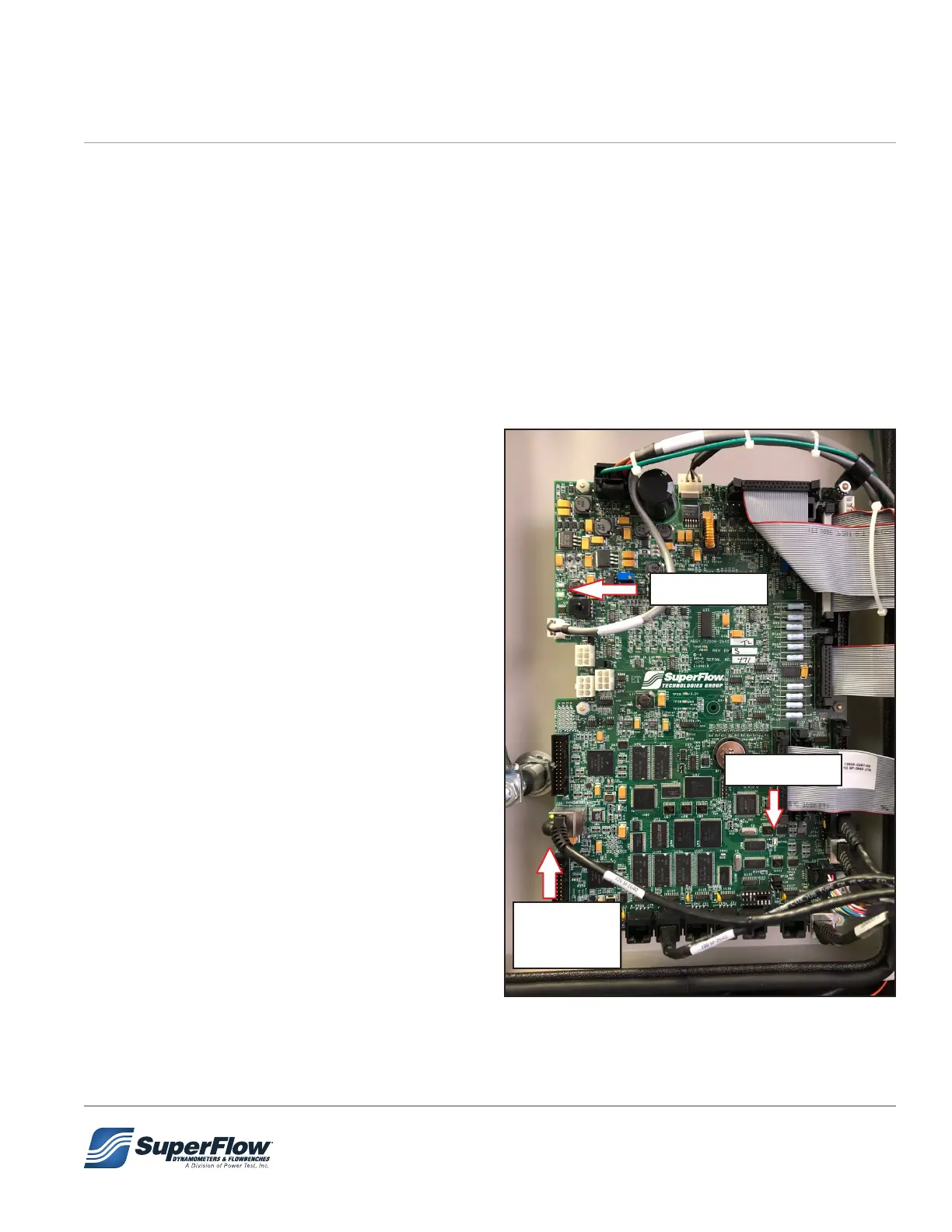
6.4 2640 Circuit Board LEDs
1. Both LEDs should be ON when powered up.
2. Active LED should be blinking when powered
up.
3. Both LEDs should be ON when connected to
the computer network. The top LED will be
ashing when WinDyn or NetDyn are active.
Figure 6.1 2640 Circuit Board LEDs
#1 LEDs
#2 LED
#3 LEDs
6.0 Maintenance


 To Next Page