Chapter 2: Installation
2-19
X7SB4
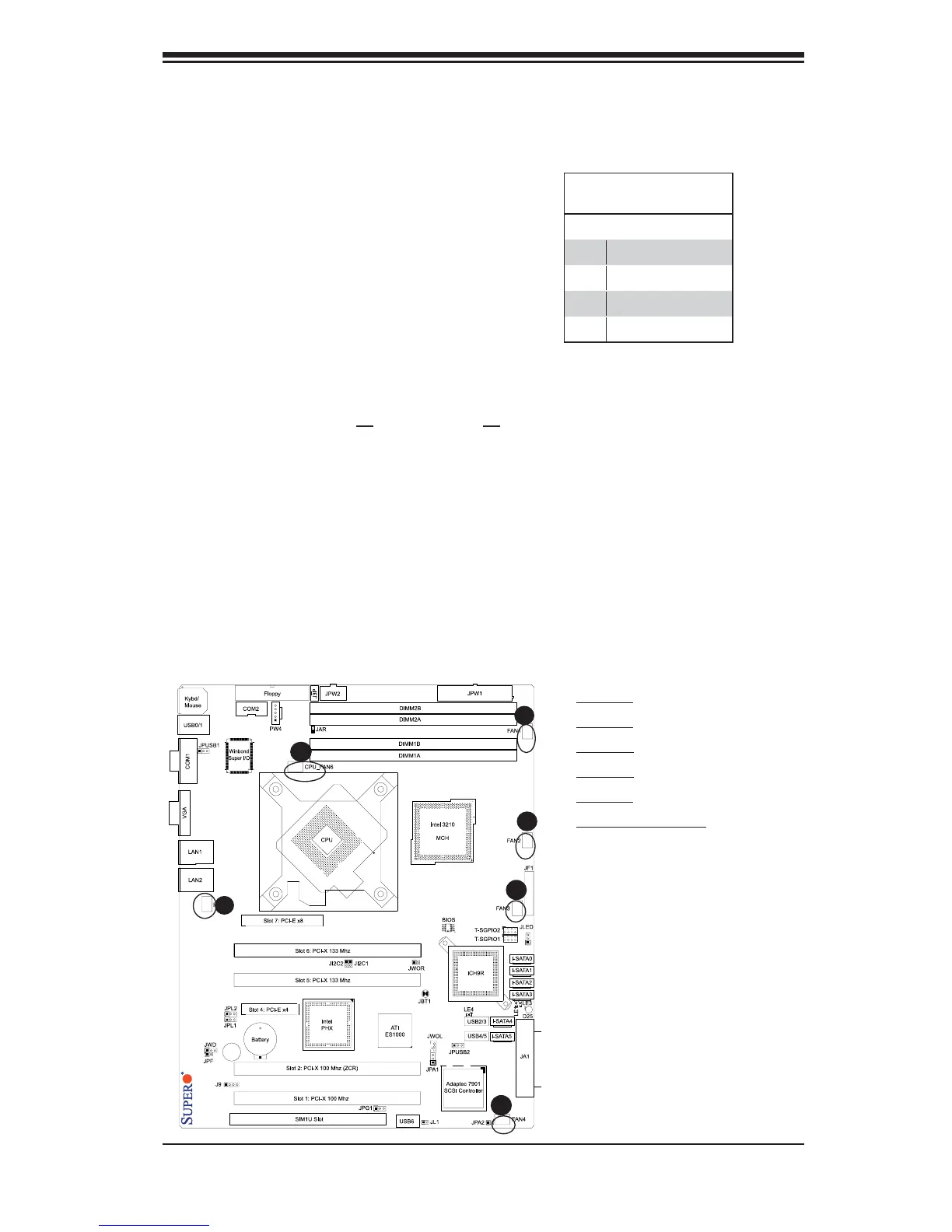
Fan Headers
The X7SB4/X7SBE has fi ve chasis/sys-
tem fan headers (Fan1 to Fan5) and one
CPU Fan (CPU Fan6). All these fans are
4-pin fans. However, Pins 1-3 of the fan
headers are backward compatible with
the traditional 3-pin fans. See the table
on the right for pin defi nitions. The on-
board fan speeds are controlled by Ther-
mal Management via BIOS Hardware
Monitoring in the Advanced Setting
.
Note
s: 1. The Default setting is Dis-
abled. 2. Please use all 3-pin fans or all
4-pin fans on the motherboard. Please
do not use 3-pin fans and 4-pin fans on
the same board.)
D
E
DF
C
B
A
4-pin Fan Header
Pin Defi nitions
Pin# Defi nition
1 Ground
2 +12V
3 Tachometer
4 PWR Modulation
A. Fan 1
B. Fan 2
C. Fan 3
D. Fan 4
E. Fan 5
F. Fan 6 (CPU Fan)



 To Next Page