Chapter 2: Installation
2-21
X7SB4
A
B
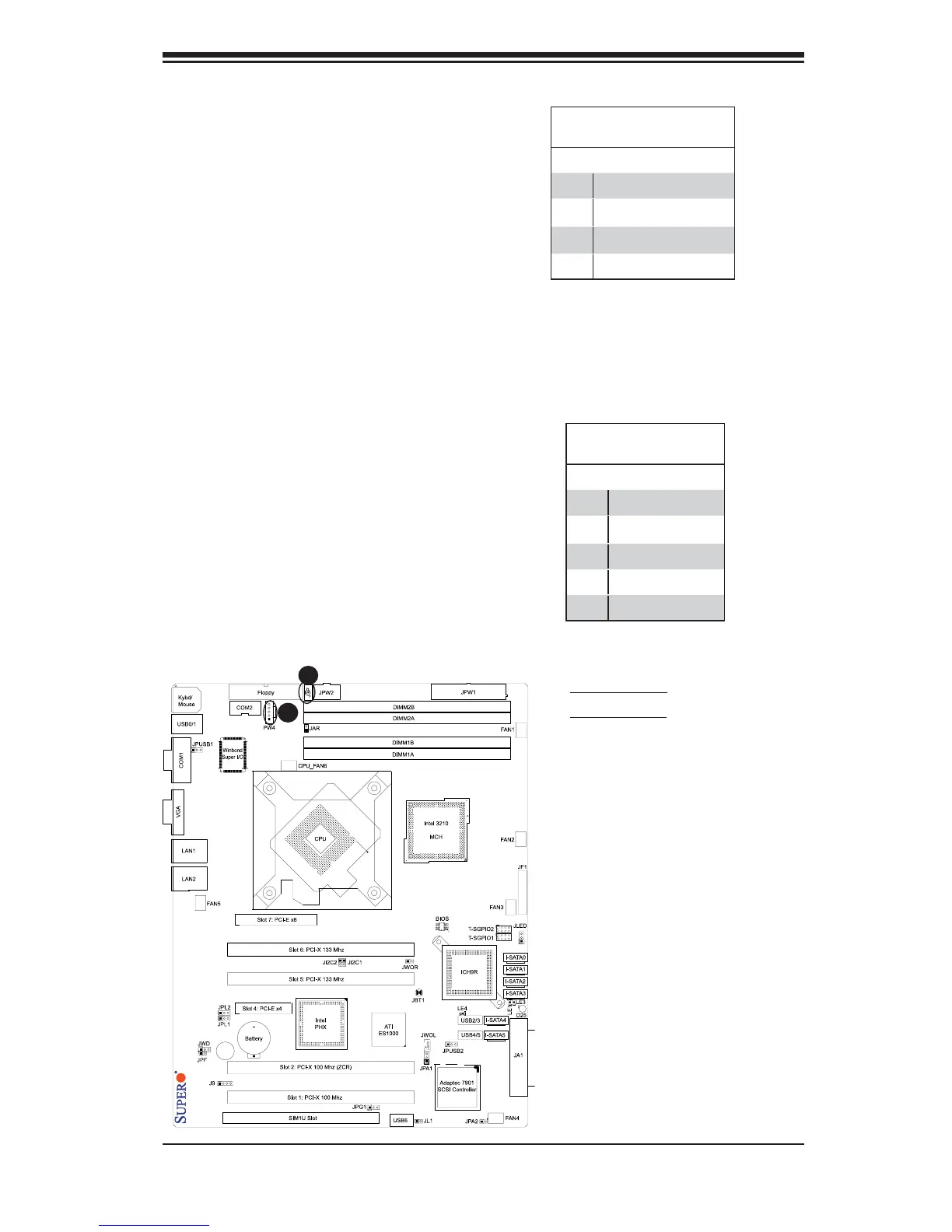
A. Power Fault
B. Power SMB
Power SMB (I
2
C) Connector
Power SMB (I
2
C) Connector (PW4) is
used to monitor Power supply, fan and
system temperature. See the table on
the right for pin defi nitions.
PWR SMB
Pin Defi nitions
Pin# Defi nition
1 Clock
2 Data
3 PWR Fail
4 Ground
5+3.3V
Power Fault (Power Supply
Failure)
Connect a cable from your power supply
to the Power Fail (J3P) header to provide
a warning in the event of a power supply
failure. This warning signal is passed
through the PWR_LED pin to indicate of
a power failure on the chassis. See the
table on the right for pin defi nitions.
Note: This feature is only available when using
Supermicro redundant power supplies.
PWR Supply Fail
Pin Defi nitions
Pin# Defi nition
1 PWR 1: Fail
2 PWR 2: Fail
3 PWR 3: Fail
4 Signal: Alarm Reset



 To Next Page