2-26
X7SB4/X7SBE User's Manual
X7SB4
SCSI Enable/Disable (*X7SB4
Only)
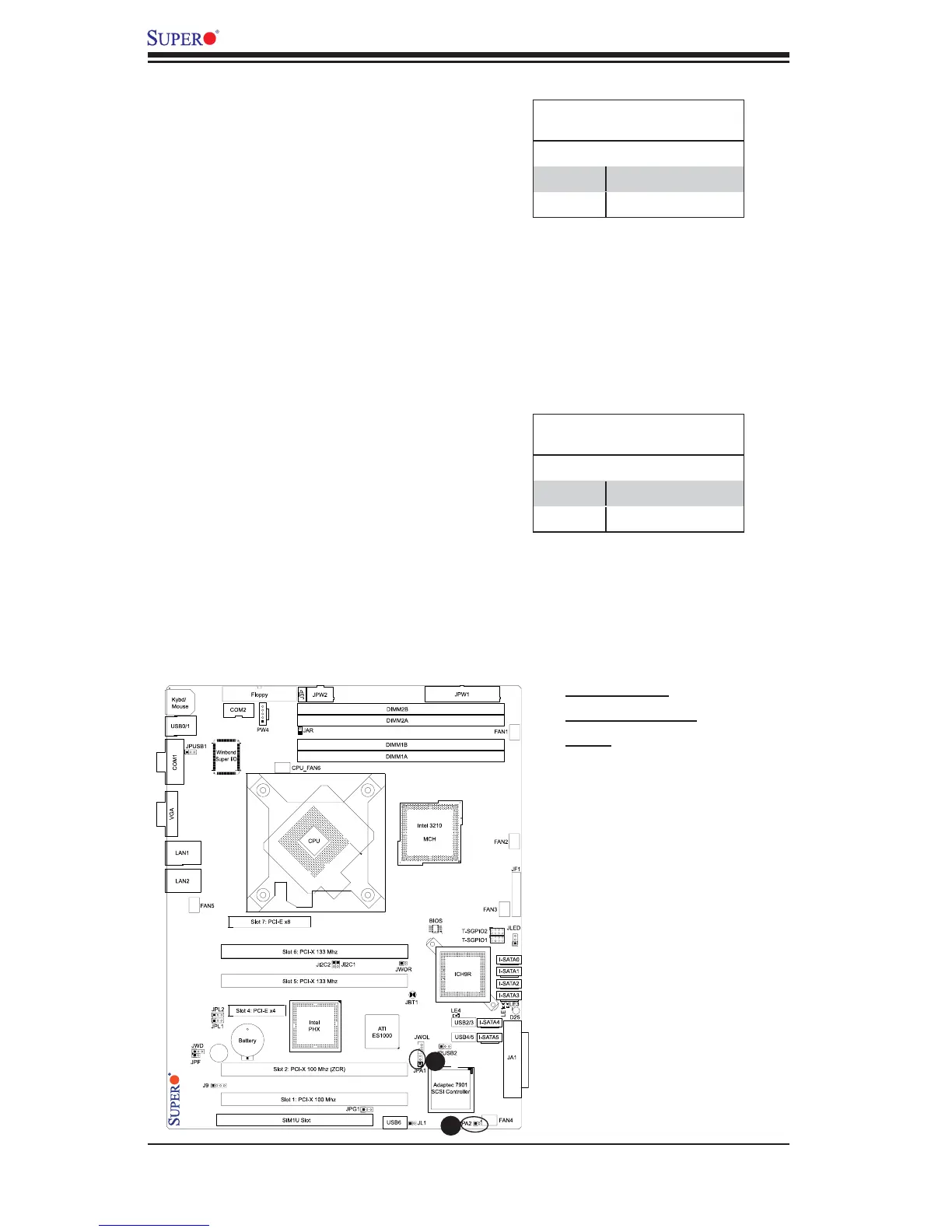
Jumper JPA1 allows you to enable or
disable the SCSI Controller. The default
setting is to close Pins 1-2 to enable the
SCSI connection. See the table on the
right for jumper settings.
SCSI Termination Enable/
Disable (*X7SB4 Only)
Jumpers JPA2 allows you to enable or
disable the termination of the SCSI
connector. The default setting is open
to enable (-to terminate-) the SCSI
channel. (*For SCSI to function prop-
erly, please do not change the default
setting.) See the table on the right for
jumper settings.
(Default: Open: Do not change the default setting!)
B
A
SCSI Enable
Jumper Settings
Pin# Defi nition
Pins 1-2 Enabled (*default)
Pins 2-3 Disabled
A. SCSI Enable
B. SCSI Termination
Enable
SCSI Termination Enable
Jumper Settings
Pin# Defi nition
Open Enabled (*default)
Closed Disabled



 To Next Page