32
i
EN
9. Check the rotational direction
NOTE
A dierent rotational direction has to be selected depending on the type of mounting
(ush or surface). The rotational direction is set ex factory for ush mounting and must
be corrected in the event of surface mounting.
Please check the rotational direction prior to all other congurations as follows:
press briey, the belt should ow into the belt winder.
press briey, the belt should ow out of the belt winder.
If the rotational direction is correct, continue with chapter 10.
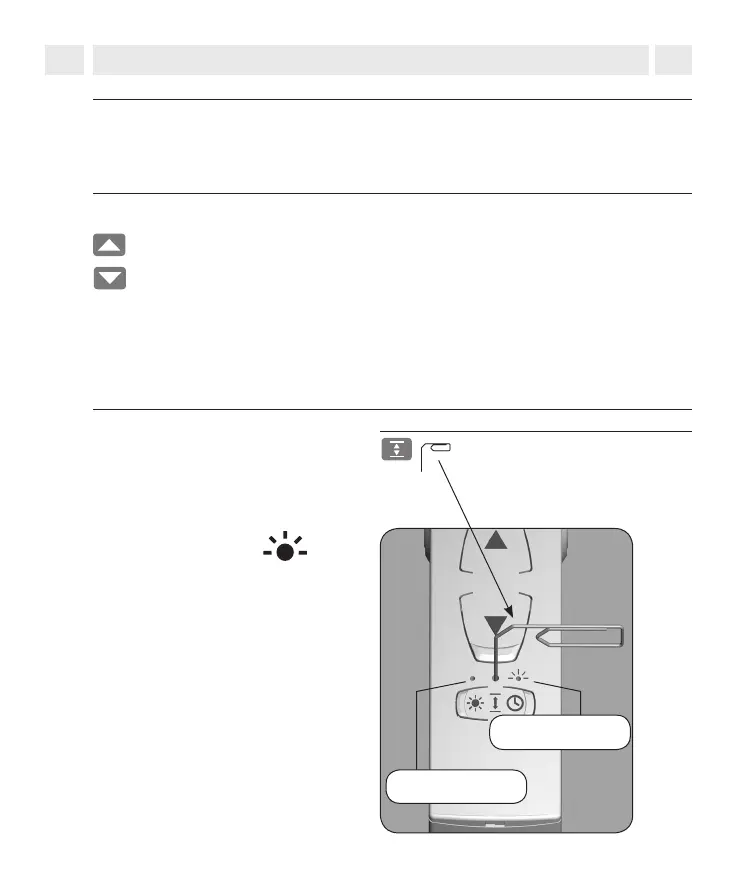
1.
Press the SET button for 10 seconds
using a sharp object (e.g. a paper
clip).
2.
Pay attention to the
indicator lights
Timer status LED
Correcting the direction of rotation
Please note that the SET button is
above the arrow symbol.
Sun status LED
◆ The timer LED ashes = surface
mounting
◆ By pressing again, the direction
of the rotation will change again.
◆ The solar LED ashes = ush
mounting



 To Next Page