33
i
EN
+
+
IMPORTANT
The end points must be congured in order for the roller shutters to stop at the desired
upper and lower positions. It is imperative that both end points are congured, otherwise
malfunctions may occur.
If the belt winder is operated without an end point setting, the drive will continue to run
for as long as one of the two control buttons is actuated.
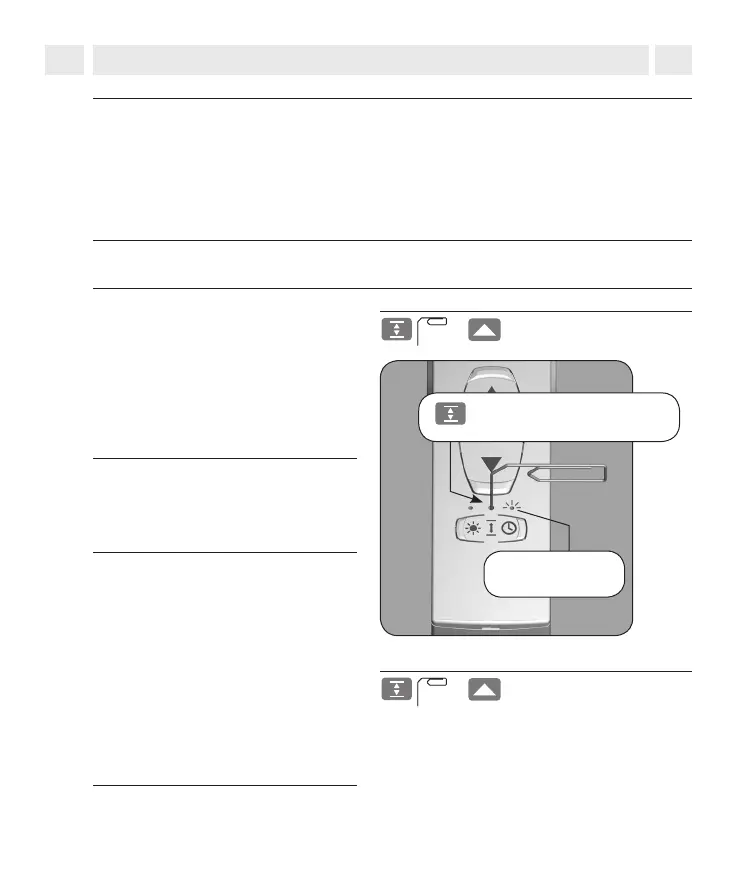
10. Setting the end points
Set the upper end point
1.
Simultaneously press and hold the
buttons.
2.
Release the buttons...,
The SET button is above
the arrow symbol.
Timer status LED
Press the SET button using a sharp
object (e.g. a paper clip).
The roller shutter travels upwards and
the timer LED ashes red.
NOTE
Tighten the belt slightly, until it is
tensioned by the weight of the roller
shutters.
...as soon as the roller shutter reaches
the desired position for the upper end
point. The roller shutter stops and the
upper end point is stored.
IMPORTANT
see next page



 To Next Page