Technician Menu Page 16/33
Programming instructions SYCLOPE ODISEA
®
IV. Technician Menu
The Technician menu provides access to the modification of all the basic settings for the operation of
the treatment, such as:
Sensor calibration
Regulation settings
Technical alarm thresholds
System date
Analogue output scales
Operating timers
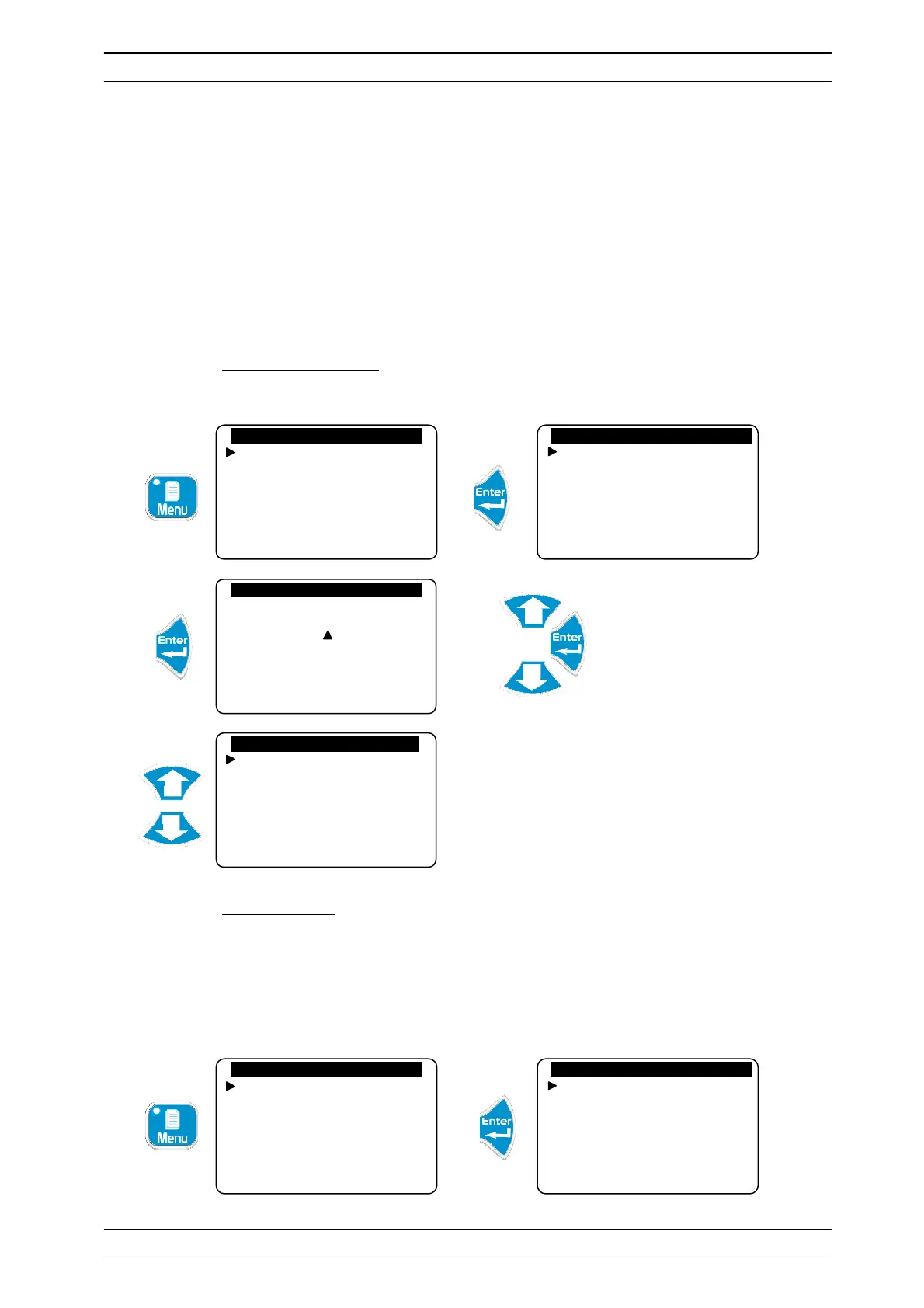
1) Specialist menu access
To access the Specialist level
Enter the code 1234
2) Technician Code
To modify the existing Technician code or cancel the function for locking this level with a code.
a) Modification of the code
Allows the existing code to be changed.
Technician level
Langue/Language/…
Set the time
Displays
Histories
Specialist level
Technician code
System date
Setting(s)
Calibrations
General timers
Analogue outputs
Code d’accès : 0 . . .
Factory Code
Configurations
Initialisations
Version: 3.01
Technician level
Langue/Language/…
Set the time
Displays
Histories
Specialist level
Technician code
System date
Setting(s)
Calibrations
General timers
Analogue outputs


 To Next Page