Specialist menu Page 26/33
Programming instructions SYCLOPE ODISEA
®
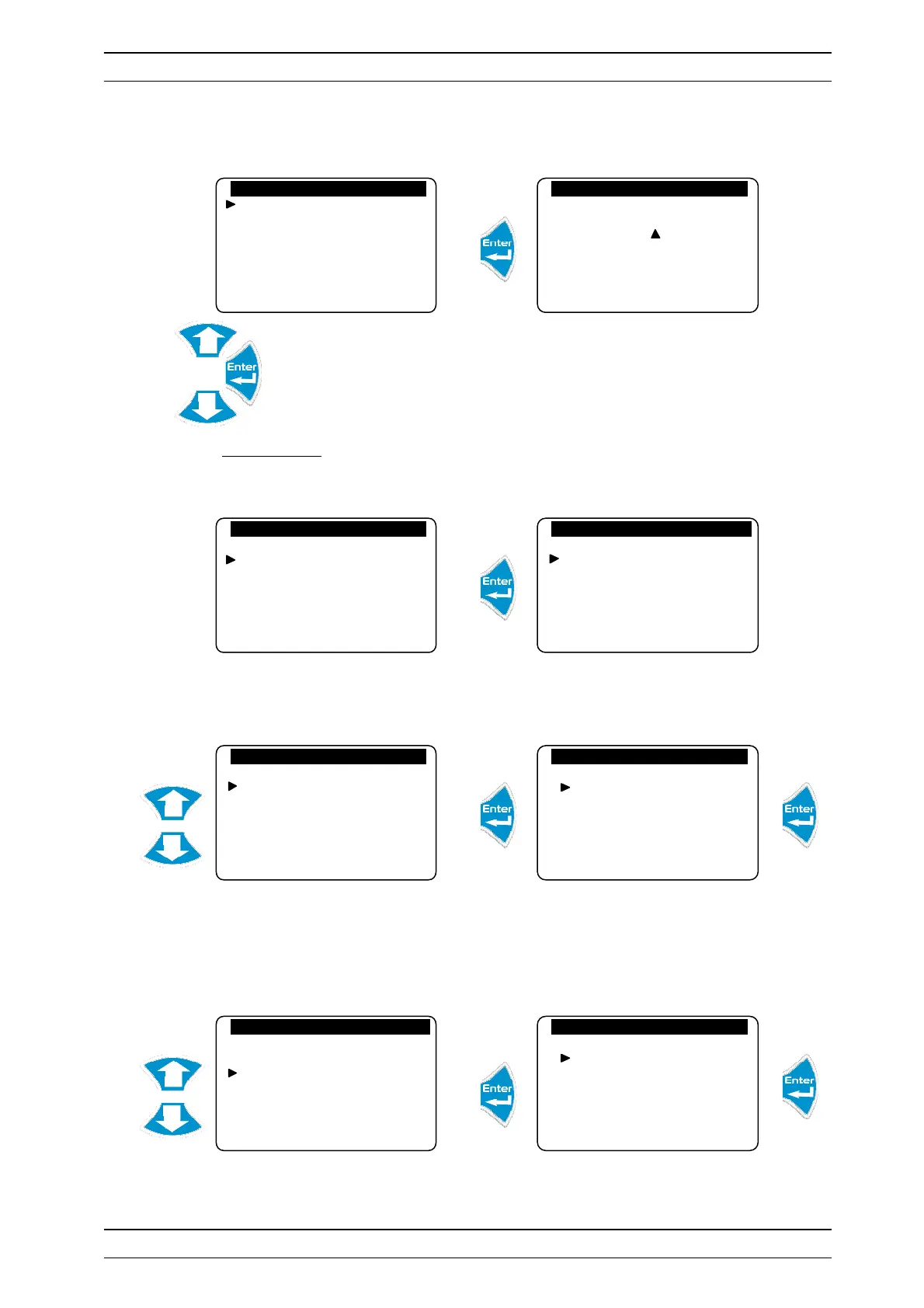
b) Cancellation of the code
Cancels the function to lock this level by a code.
Enter the code 0000 to cancel access control for this level.
2) Configurations
Allows you to change the machine configuration.
a) Timers filtration
Allows you to activate the filter timer function
The function to control the filtering motor is now activated.
b) Flocculant
Allows you to activate the flocculant management function.
Flocculant management is now active.
New code : 0 . . .
Factory Code
Configurations
Initializations
Version: 3.01
Factory Code
Configurations
Initializations
Version: 3.01
Configurations
Filter timers
Flocculant
Meter input
Flow switch
Adjustment operation
Prog. relays
Configurations
Filter timers
Flocculant
Meter input
Flow switch
Adjustment operation
Prog. relays
Filter control
Activation…
Inactivation…
Configurations
Filter timers
Flocculant
Meter input
Flow switch
Adjustment operation
Prog. relays
Floculant control
Activation…
Inactivation…


 To Next Page