Specialist menu Page 30/33
Programming instructions SYCLOPE ODISEA
®
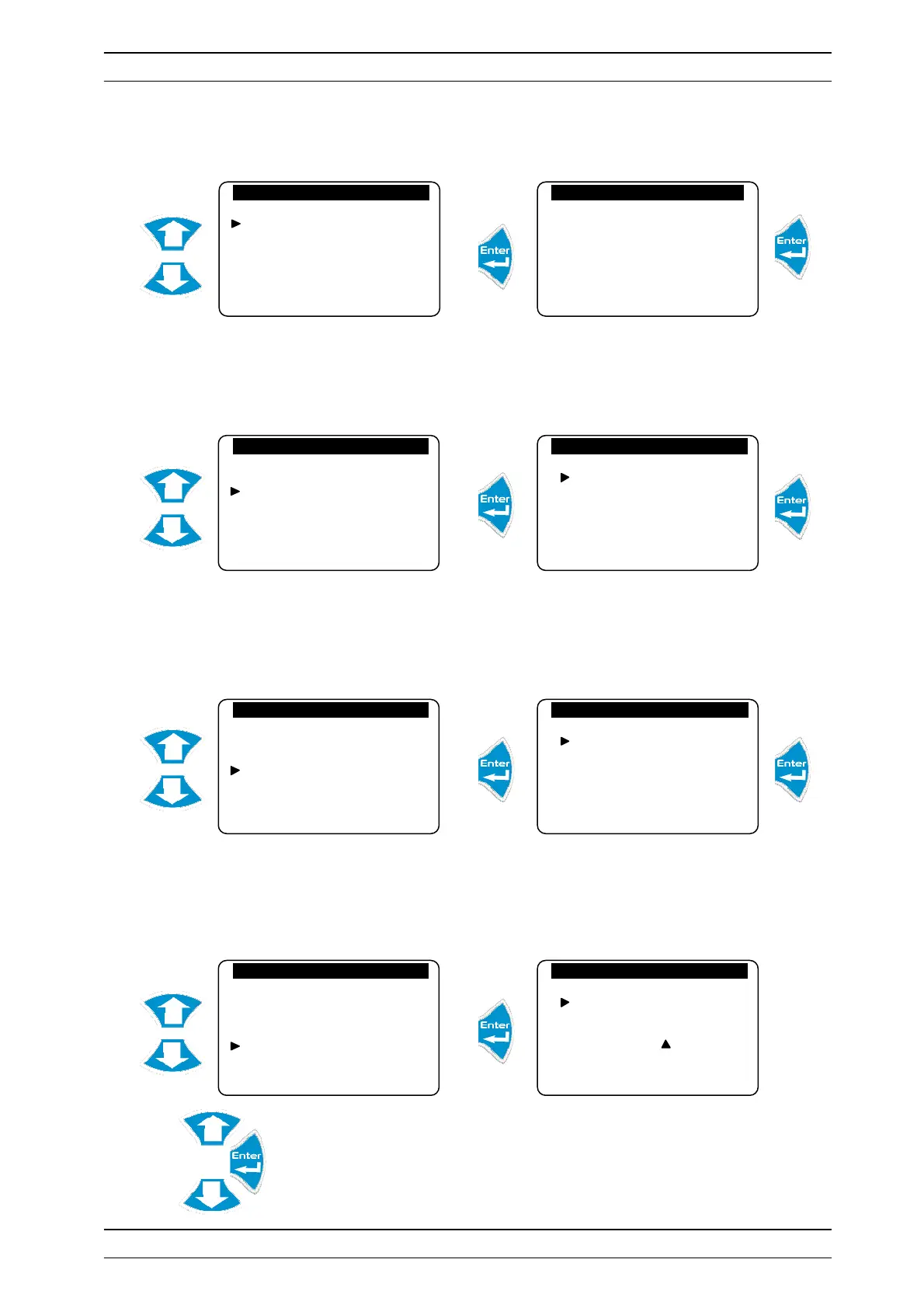
a) Factory reset
Allows you to return the central unit to its basic factory configuration. All settings made by the user will
then be deleted.
The reset has been performed !
b) Modem activation
Allows you to activate modem communication.
Modem communication is now active.
c) Maintenance management activation
Allows you to activate the controller maintenance management.
Maintenance management is now active.
d) Device number
Allows you to identify the device unit in order to establish communication.
Configure the device unit identifier number
Initializations
Factory reset
Modem
Maintenance management
Device number
Reset Memory?
If yes, Enter !
Initializations
Factory reset
Modem
Maintenance management
Device number
Modem
Activation…
Deactivation…
Initializations
Factory reset
Modem
Maintenance management
Device number
Maintenance management
Activation…
Inactivation…
Initializations
Factory reset
Modem
Maintenance management
Device number
Identification
Number: 0 0 0


 To Next Page