16
GO User Guide
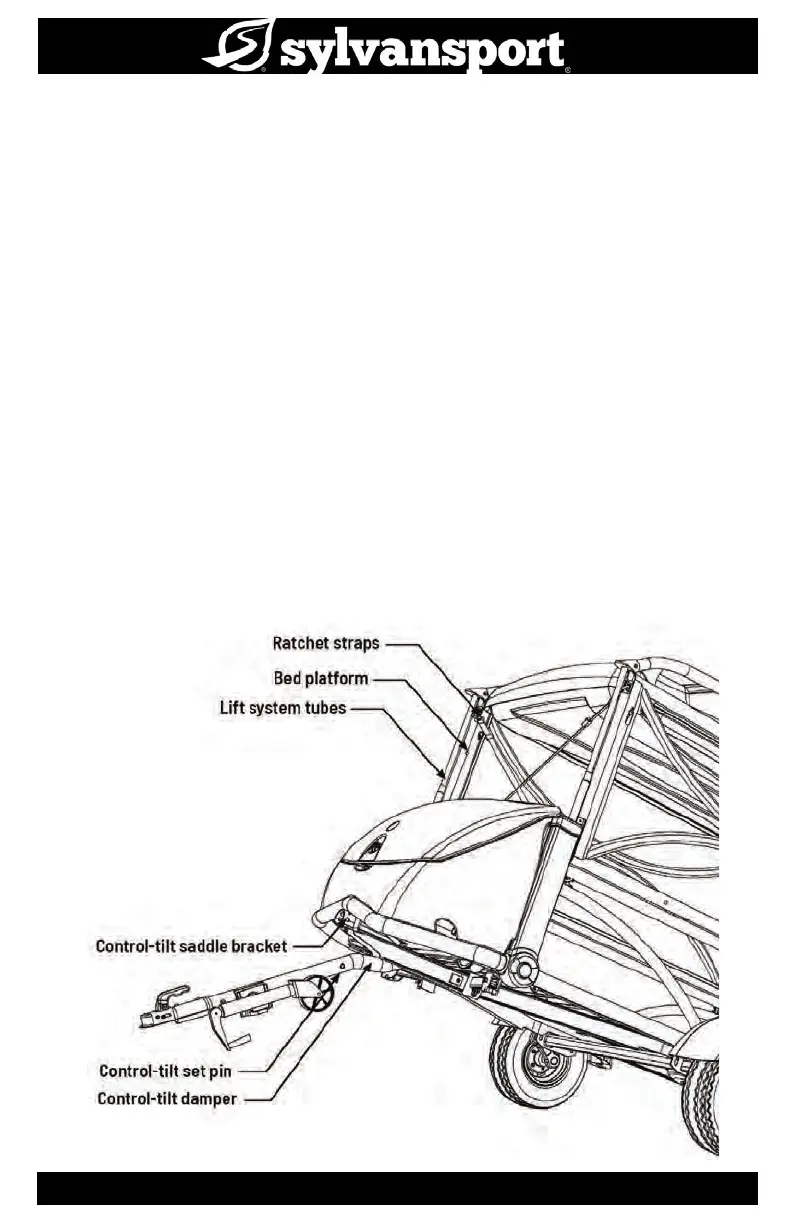
Transport mode - System diagram
Transport mode enables you to transport loads that are too large to safely move in Travel
mode. By raising the two bed platforms to the vertical position, locking the frame down and
securing it with straps, you can safely load up to 810 lbs. of gear on the deck. To load a vehicle
onto the deck:
1. Make sure the GO is properly connected to the tow vehicle.
2. Remove the control-tilt set pin.
3. push down on the rear bumper to tilt the bed for loading.
4. Remove the tailgate, if necessary, to provide room for the vehicle. When nished, the deck
should return to level and the set pin should be replaced. Be certain to check with your state
regulations regarding loads that extend beyond your trailer.
Before moving, make sure:
• Control-tilt set pin is secured
• (4) locator pins are securely engaged
• (8) ring grip pins are secured
• (4) ratchet straps are connected and tightened
• (4) stabilizer jacks are retracted underneath the deck
• Swivel jack is rotated up, into horizontal position


 To Next Page