1
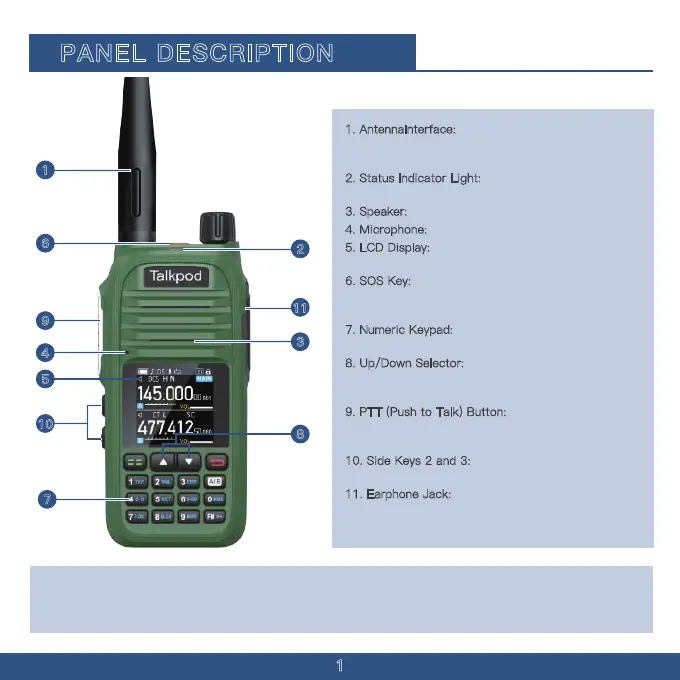
1. AntennaInterface:
SMA antenna interface, used
for installing the provided antenna or other brand
antennas compatible with the SMA interface.
2
. Status Indicator Light: Illuminates red during
transmission and green when a signal is received.
3
. Speaker: Outputs sound.
4. Microphone: Inputs sound.
5. LCD Display: Displays the operational status of
the walkie-talkie.
6
. SOS Key: Press and hold to initiate an SOS
emergency alert; a short press can be customized
for other functions.
7
. Numeric Keypad: Used for entering frequencies
and functions.
8
. Up/Down Selector: Adjusts the displayed
frequency, menu numbers, or menu content upward
or downward.
9
. PTT (Push to Talk) Button: Press the PTT
button to transmit; release it to return to receive
mode
1
0. Side Keys 2 and 3: Functions of these side
keys can be customized through the menu.
1
1. Earphone Jack: Used for connecting an
external earphone; or to connect a programming
cable for programming and software updates via PC.
1
2
3
4
5
6
7
8
9
10
11
CAUTION:DO NOT use the transceiver without the jack cover or the optional equipment attached.
The transceiver meets IP54 requirements for dust-tight and waterproof protection only when the
jack cover or the specifed optional speaker microphone is attached.
PANEL DESCRIPTION


 To Next Page