6
◆
What is TR-71U
/
TR-72U Quick Start
?
The
「
TR-71U
/
TR-72 Quick Start
」
is activated automatically each time you
open Windows. It searches for and detects any USB connected TR-71U
/
72U
unit and upon detection automatically opens the TR-71U
/
72U software
program
(
Settings Display
)
.
●
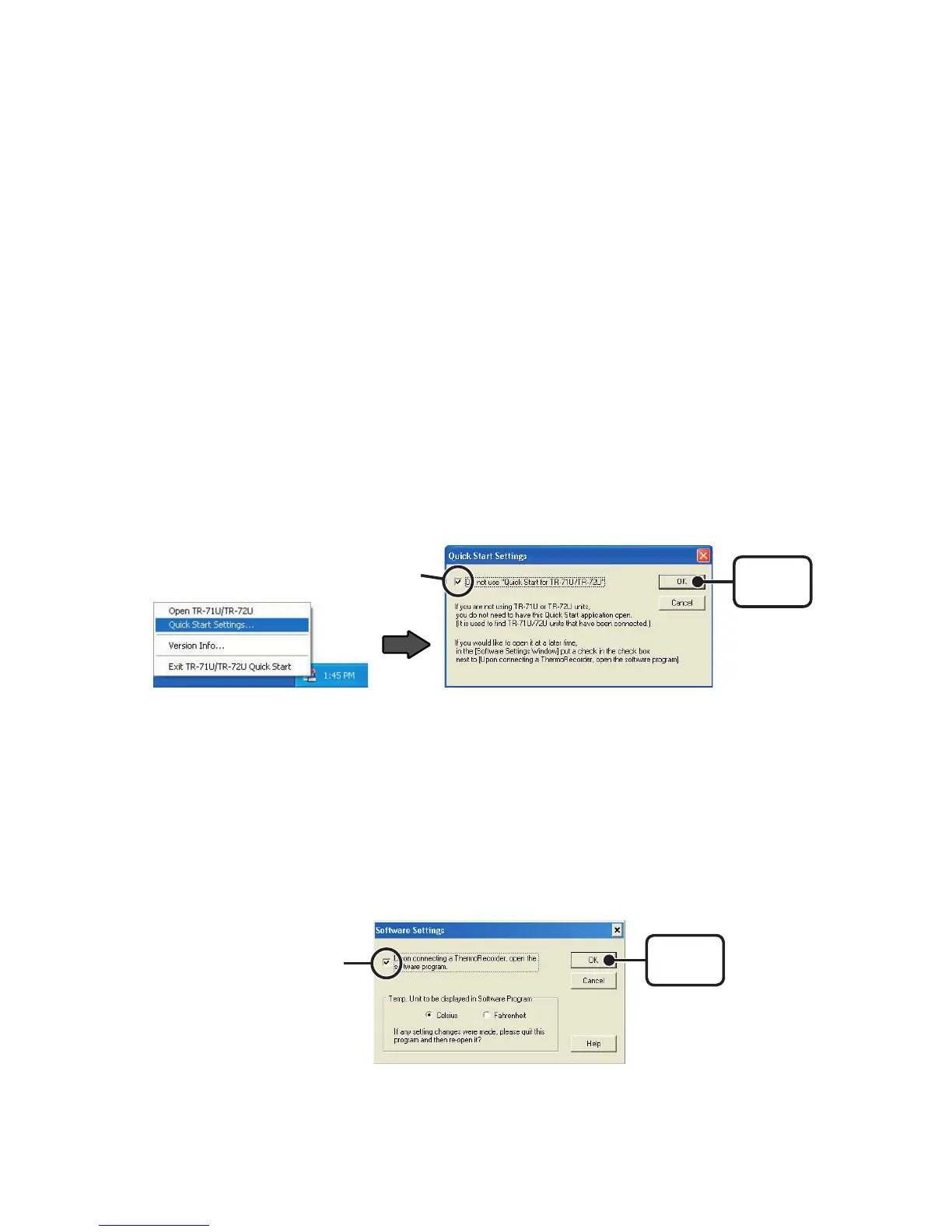
Disabling the auto activation of the TR-71U
/
TR-72 Quick Start
【
From the Taskbar
】
1.Click the Quick Start icon in the task tray and click on [Quick Start
Settings].
2.Place a check next to [Do not use Quick Start for TR-71U/TR-72U]
and click the [OK] button.
Check
[
OK
]
button
【
From the Software
】
1.Click the TR-71U/72U icon in the Main Window. Then, in the Settings
Display, under the [Settings] Menu select [Software Settings].
2.Remove the check from [Upon connecting a Thermo Recorder, open
the software program], and click the [OK] button.
Remove this
check
[
OK
]
button



 To Next Page