IMPORTANT SAFETY PRECAUTIONS
12 TASCAM 202MKV
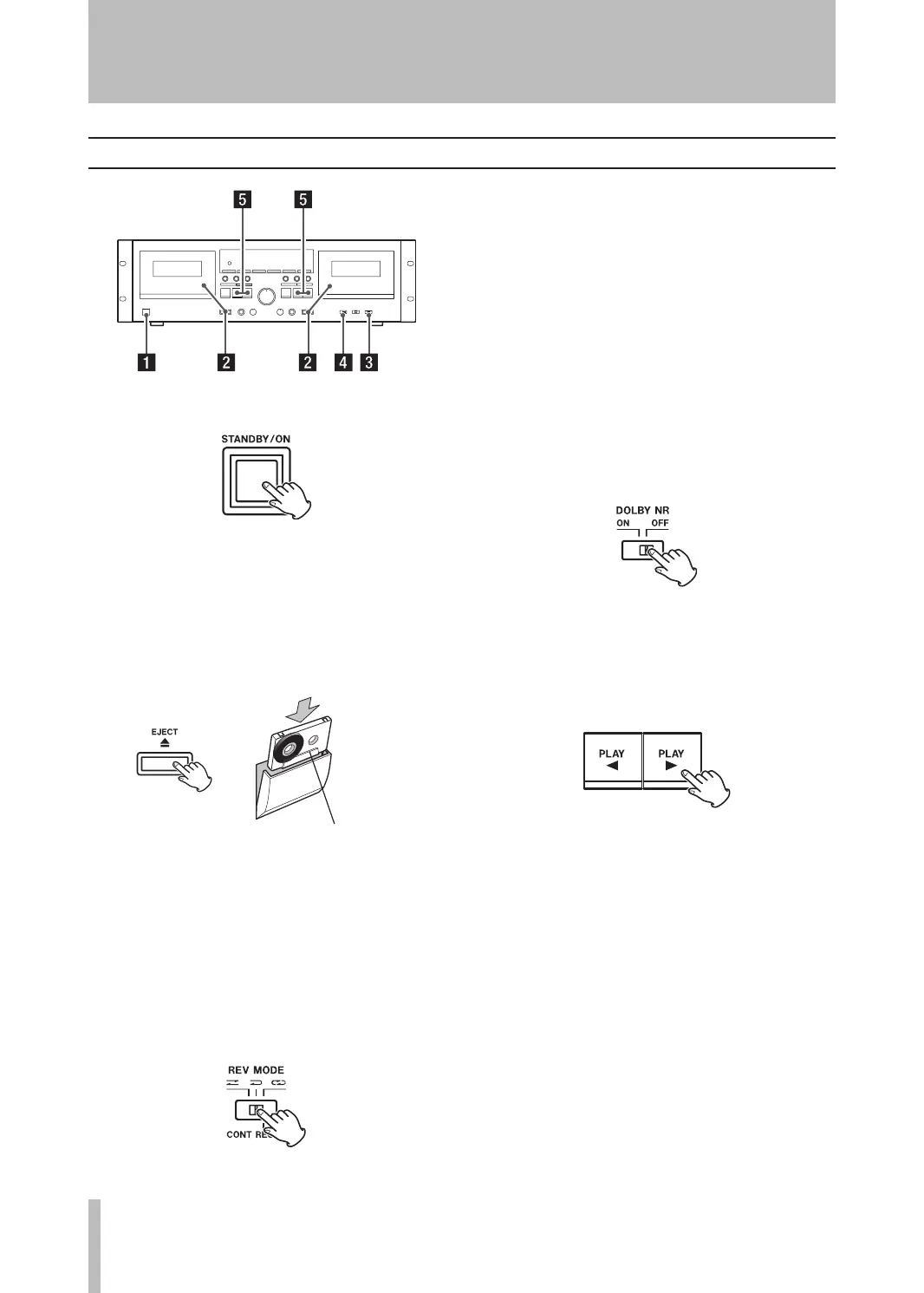
Playback 1 (either TAPE 1 or TAPE 2)
1. Switch on the STANDBY/ON.
2. Load a pre-recorded tape into the TAPE 1 or 2
deck.
Press the EJECT key (ø) to open the cassette
compartment. Insert the cassette tape with its
open edge facing down, the desired side facing
you. Then, close the cassette compartment by
pushing on its front part.
Side “A” facing you
This cassette deck can play back Normal (Type I),
Chrome (Type II) and Metal (Type IV) tapes.
For the sake of simplicity, we refer to the tape side
facing you as Side “A” and to the tape side facing
away as Side “B”. When you insert a cassette with
Sides “A” and “B” reversed, Side “A” should read
Side “B” and Side “B” should read Side “A”.
3. Select a reverse mode setting using the REV
MODE switch.
You have a choice of three settings:
Ä: One way mode
Set the switch to this position to playback
only one side.
Ë: Two way mode
Set the switch to this position to play back
both sides of the tape in one session. When
playback reaches the end of side “A”, the
playback direction is automatically reversed,
and playback continues on side “B”.
ä: Repeat mode
Set the switch to this position. Both sides
of the tape are played back as many as 5
times.
4. Set the DOLBY NR switch.
Set the switch to the ON position when playing
back tapes recorded with Dolby NR.
To play tapes recorded without Dolby NR, set the
switch to the OFF position.
5. Press the PLAY (˙ or ¥) key.
Pressing the ¥ key starts playback from side
“A”.
Pressing the ˙ key starts playback from side
“B”.
3 − Playback


 To Next Page