IMPORTANT SAFETY INSTRUCTIONS
TASCAM 202MKV 23
4 − Recording
Be careful not to press the PLAY
•
(˙ or ¥) key
whose arrow points in the same direction as the
indicator. Doing so will start playback.
You do not need to adjust the recording level or
•
set the Dolby NR system, as both depend on the
pre-recorded source tape.
4
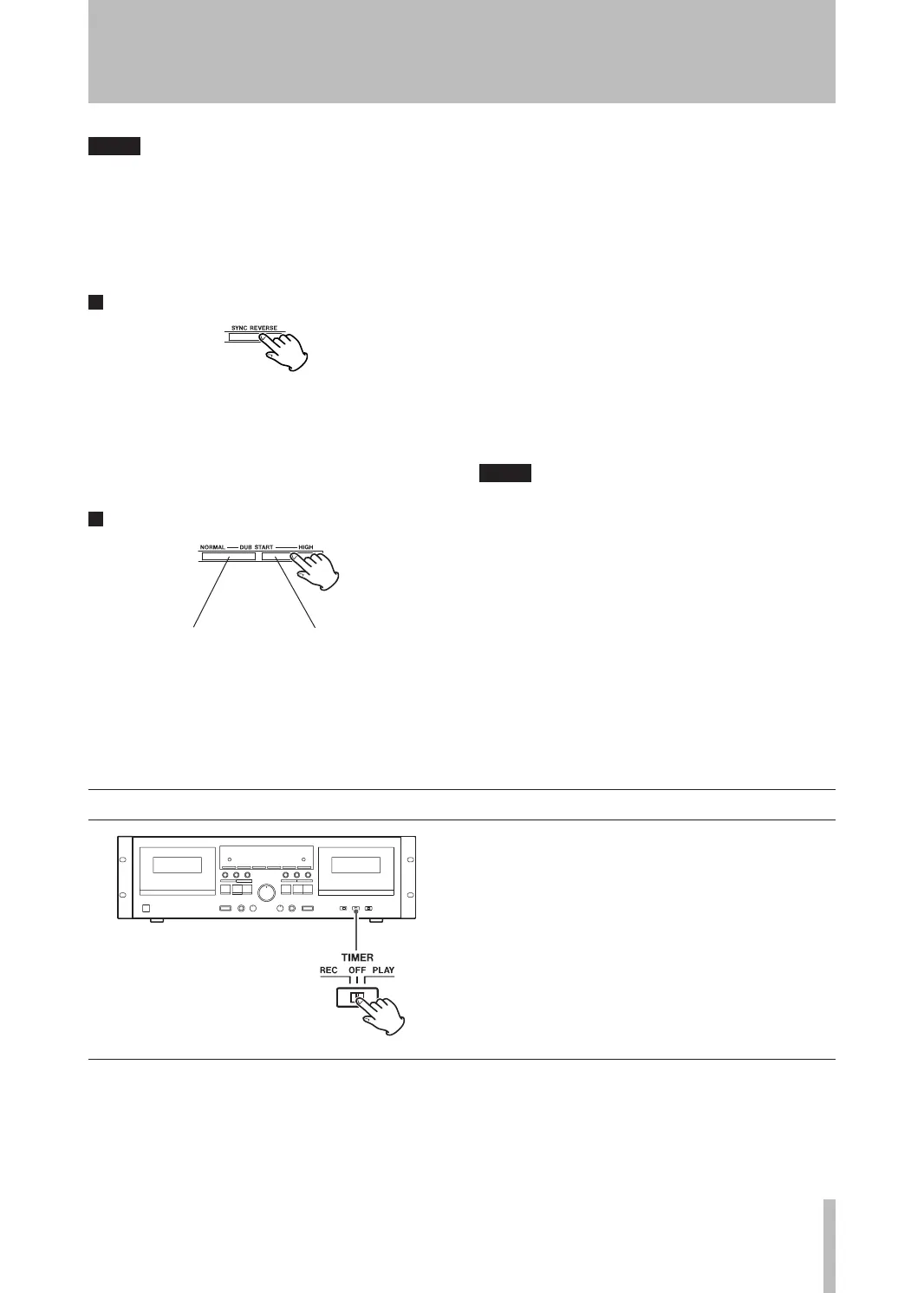
Press the SYNC REVERSE key.
The SYNC REV indicator will light on the display.
The SYNC REVERSE key does not work if the
reverse mode is set to any positions other than Ë
or if the transport direction of both decks is set to
reverse (˙).
5
Press either DUB START key to start dubbing.
For normal speed dubbing, press the NORMAL
key. For high-speed dubbing, press the HIGH key.
High-speed dubbing makes a copy at approximate-
ly two times the normal speed. We recommend
normal speed dubbing for best audio quality.
During dubbing, either the NORM DUB or HIGH DUB
indicator lights steadily on the display.
During normal speed dubbing, only the following
keys work:
TAPE 1 deck: STOP (H)
TAPE 2 deck: PAUSE, REC MUTE, STOP (H)
During high-speed dubbing, only the STOP (ª)
key works.
Pressing the STOP (ª) key on either deck stops
both tapes at once.
Neither DUB START key works immediately after
the tape is fast-forwarded or rewound to the end.
Wait for 5 seconds or more before pressing the
key.
During dubbing, the pitch control does not
•
work.
Recording level adjustment is not necessary for
•
dubbing, as the recording level is set to the level
of the pre-recorded tape. Operating the INPUT
control, before or after starting dubbing, has no
effect at all.
If a nearby television set is switched on during
•
high-speed dubbing, a high-pitched interfer-
ence noise may be recorded on the tape. To
avoid this, either perform dubbing at normal
speed, or turn off the television.
Timer playback
1. Connect this unit and stereo system to a com-
mercially available audio timer.
2. Set the power switch of all components to ON.
3. Load a prerecorded cassette tape in TAPE 1 or
2.
You can also insert tapes into both decks. In this
case, TAPE 1 starts rst.
Playback


 To Next Page