IMPORTANT SAFETY PRECAUTIONS
24 TASCAM 202MKV
4 − Recording
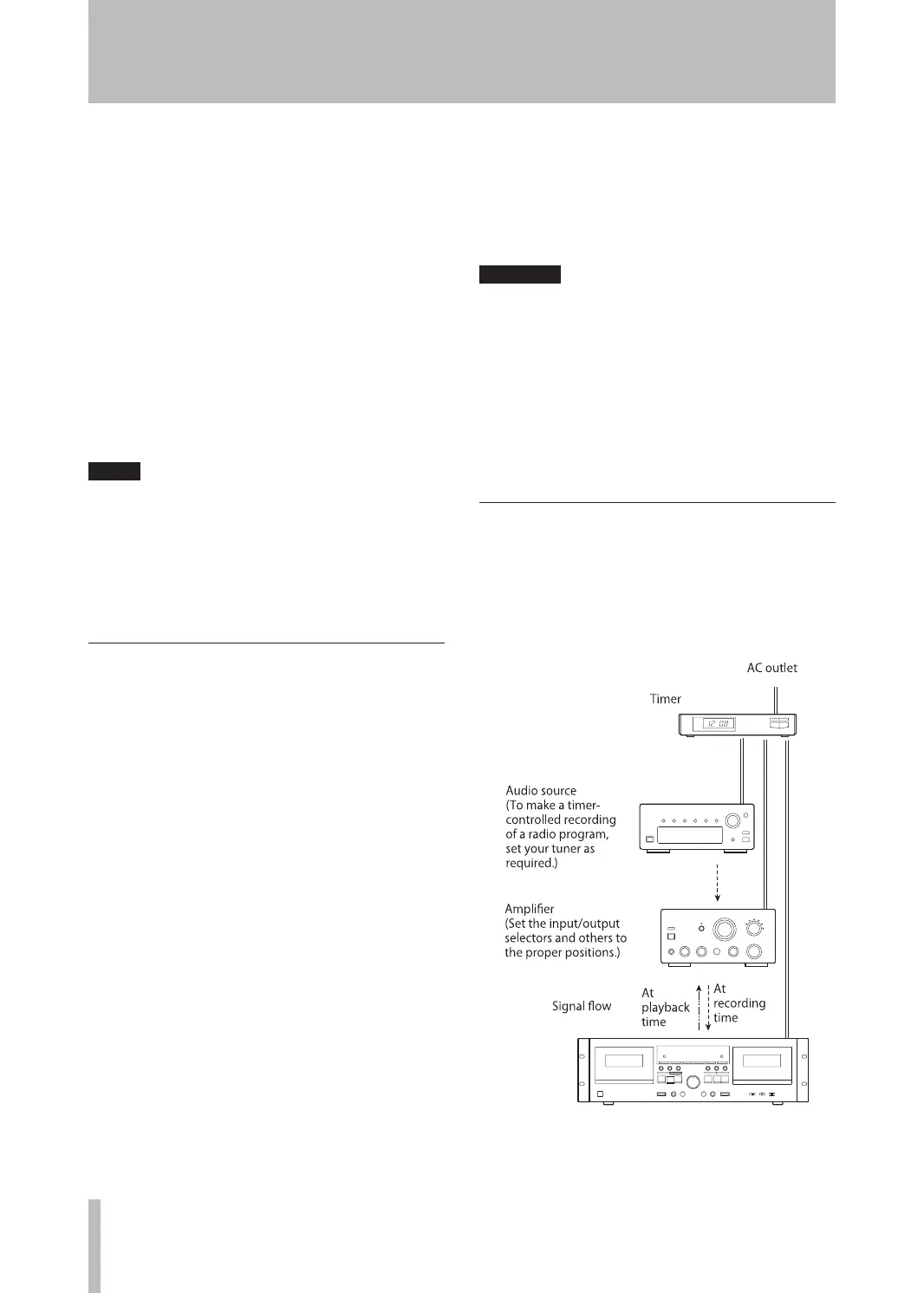
Connecting a commercially available timer to your
audio setup lets you wake up to your favorite cassette
tape, or start recording at specified times.
Refer to the illustration below, and connect your audio
components.
4. Set the REV MODE switch to the required posi-
tion.
To let both decks play continuously, set the REV
MODE switch to the ä (CONT PLAY) position.
5. Set the DOLBY NR switch.
6. Set the TIMER switch to the PL AY position.
7. Set the audio timer to the required start (power
on) and stop (power off) times. When this set-
ting is completed, the power to all components
will be switched off.
When a preset start time is reached, power will be
supplied and playback will start automatically.
Playback always starts from side “A”.
If you directly connect the deck’s AC power cord
to the AC outlet, playback automatically starts
by simply pressing on the STANDBY/ON switch
of this deck when you set the TIMER switch to
the PLAY position. When you do not use the
timer, set the TIMER switch to the OFF position.
Timer-controlled recording
(Example: Recording a broadcast program)
1. Connect this unit and stereo system to a com-
mercially available audio timer.
2. Set the power switch of all components to ON.
3. Load a recordable cassette tape(s) in TAPE 1
or 2 (or both decks for continuous recording).
4. Set the REV MODE switch to the required posi-
tion.
For continuous recording on both decks, set the
REV MODE switch to the ä (CONT PLAY)
position.
5. Set the DOLBY NR switch as required.
6. Tune in a broadcasting station to be recorded.
7. Press the RECORD (º) key of the deck to be
recorded to set the deck to the record-pause
mode.
8. Adjust the recording level.
9. Set the TIMER switch to the REC position.
10. Set the audio timer to the required start (power
on) and stop (power off) times. When this set-
Connections with a timer
ting is completed, the power to all components
will be switched off.
When the preset start time is reached, power will
be supplied and recording will start automatically.
Recording always starts from side “A”.
If you directly connect the deck’s AC power cord
to the AC outlet, recording automatically starts
by simply pressing on the STANDBY/ON switch
of this deck when you set the TIMER switch to
the REC position. When you do not use the timer
for a while, be sure to set the TIMER switch
back to the OFF position to prevent accidental
erasure of your important tape.


 To Next Page